Dynamic Block
Printed From: CAD Forum
Category: EN
Forum Name: AutoCAD
Forum Description: Discussion about AutoCAD and AutoCAD LT, viewers, DWG and DXF formats, Design Review, AutoCAD web, Drive, add-ons
URL: https://www.cadforum.cz/forum_en/forum_posts.asp?TID=12149
Printed Date: 02.Sep.2026 at 22:40
Topic: Dynamic Block
Posted By: aledford
Subject: Dynamic Block
Date Posted: 19.Dec.2016 at 11:11
|
I'm new to dynamic blocks and am struggling to figure out how to do something. I have a electrical symbol for a wall-mount fixture (see below). I need to be able to rotate the symbol at it's base with the "V" always upright (horizontal) and centered within the circle. Thank you, Andy 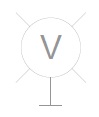 ------------- Andy |
Replies:
Posted By: John Connor
Date Posted: 19.Dec.2016 at 11:45
|
Wouldn't it be easier just to rotate the base? ------------- "Humans have a strength that cannot be measured. This is John Connor. If you are reading this, you are the resistance." <<AutoCAD 2015>> |
Posted By: aledford
Date Posted: 19.Dec.2016 at 12:34
|
I think, based on what little I know about this, that it would be easier to create the block but not easier to use it on a day-to-day basis. My thinking is that the base point of the symbol is where the base and the stem meet. The user inserts the block at the proper location on a wall and then rotates the block as necessary. Andy ------------- Andy |
Posted By: mountain D&D
Date Posted: 07.Jan.2017 at 03:58
|
IF YOU ARE USING A CURRENT VERSION OF AUTOCAD IN 2015 THEY ADDED THE TEXTALIGN COMMAND SO I WOULD TRY TO FIRST OPEN THE BLOCK EDITOR THEN TRY TYPING TEXT ALIGN AFTER MAKING SURE YOU HAVE FIRST SET UCS CORDINATES IN BOTH THE BLOCK EDITOR OR DWG THE BLOCK WAS CREATED AND ALSO IN THE CURRENT DRAWING YOU WISH TO INSERT THE BLOCK. I THINK THAT IS THE EASIEST WAY TO GET WHERE YOU WANT TO GO WITHOUT HAVING TO GO INTO TO MUCH DETAIL LET ME KNOW IF IT DOESNT WORK AND ILL TELL YOU ANOTHER MORE DRAWN OUT WAY TO ACCOMPLISH THIS TASK. ------------- H.E.F. III Ed Frederick |