Text display issue
Printed From: CAD Forum
Category: EN
Forum Name: AutoCAD
Forum Description: Discussion about AutoCAD and AutoCAD LT, viewers, DWG and DXF formats, Design Review, AutoCAD web, Drive, add-ons
URL: https://www.cadforum.cz/forum_en/forum_posts.asp?TID=12150
Printed Date: 06.Sep.2026 at 03:47
Topic: Text display issue
Posted By: mardix
Subject: Text display issue
Date Posted: 20.Dec.2016 at 03:43
|
Hi all! Hopefully someone with more CAD knowledge then me can help me with my problem I am running AutoCAD 2015 and cant seem to resolve the problem. The keynotes are set up as blocks with attributes. 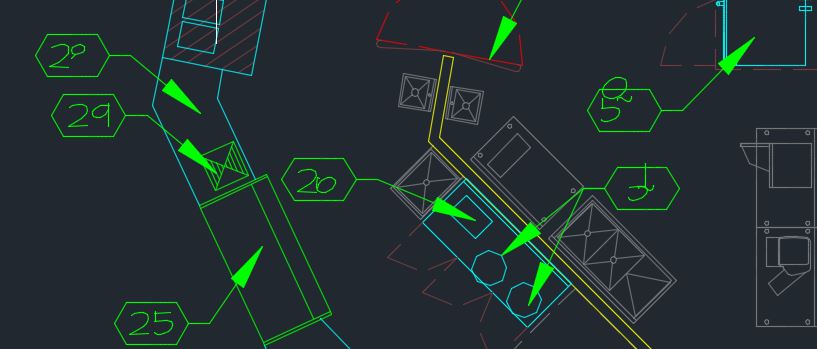 If I change the text in an affected key note it displays properly for awhile, only to distort again when the file is closed and re-opened. The affected keynotes appear to be random and change each time the file is opened. Sometimes they are slightly distorted like the attached pics, but other times they have large lines going every which way across the screen. It seems to only be affecting a couple of computers in the office, others can open the same file with no distortion. Is anyone familiar with this issue? Help! Thanks Ken
|
Replies:
Posted By: Vladimir Michl
Date Posted: 20.Dec.2016 at 08:29
|
I would take a damaged font file or a graphics card issue as suspects. ------------- Vladimir Michl (moderator) https://www.linkedin.com/in/vmichl/" rel="nofollow - LinkedIn , Autodesk Expert Elite |
Posted By: John Connor
Date Posted: 20.Dec.2016 at 11:37
|
What font is being used? Is the text annotative? If you start a new drawing and insert a keynote in it does the same problem occur? Can you attach a copy of the drawing to your next post so we can take a look at it ourselves? Images are nice but one cannot troubleshoot a problem properly using an image. ------------- "Humans have a strength that cannot be measured. This is John Connor. If you are reading this, you are the resistance." <<AutoCAD 2015>> |