Create a table base AutoCAD 2017 for MAC
Printed From: CAD Forum
Category: EN
Forum Name: AutoCAD
Forum Description: Discussion about AutoCAD and AutoCAD LT, viewers, DWG and DXF formats, Design Review, AutoCAD web, Drive, add-ons
URL: https://www.cadforum.cz/forum_en/forum_posts.asp?TID=12152
Printed Date: 03.Sep.2026 at 00:51
Topic: Create a table base AutoCAD 2017 for MAC
Posted By: Sve87
Subject: Create a table base AutoCAD 2017 for MAC
Date Posted: 21.Dec.2016 at 17:32
|
Hi guys, I'm new here, I hope I don't violate any rules, and registered with the purpose of getting some help with this sketch I've been struggling to do in a few days. So what I'm basically trying to do is get the exact angles and measurements of the base of this table. I am in a dead end. So I will appreciate some help and someone do it for me. I know it's a really simple job, but I am total beginner. So here are some pics of the table: https://www.arredamento.it/tavoli-in-legno-grezzo_NG4.jpg http://www.italianarredo.it/wp-content/uploads/2014/02/p-24546-shangai-base.jpg What I can't do is to do the the "legs" on top and bottom to be at the same plane Regards, Sve |
Replies:
Posted By: John Connor
Date Posted: 21.Dec.2016 at 17:38
|
Well basically you just need two legs...one for each direction then mirror them. As for actually constructing them so that the bottom of each leg and the top of each leg is at the same elevation you can use some temporary construction lines to keep everything in check. Keep in mind that each leg passes over one leg and under another (like weaving). Another way to do it would be to construct the four legs but make them longer than they need to be. Then use the SLICE command and one of its several options (ex. - Surface or Object) to slice off the ends of the legs so they are all at the same level. ------------- "Humans have a strength that cannot be measured. This is John Connor. If you are reading this, you are the resistance." <<AutoCAD 2015>> |
Posted By: Sve87
Date Posted: 21.Dec.2016 at 18:36
|
Thanks for the fast reply mate! I thought it would be better to start off with the centre "console" and graze the legs around it. The second option you suggest seems better to me, though I still can't achieve that effect  |
Posted By: John Connor
Date Posted: 21.Dec.2016 at 18:40
|
Well the centre console at least helps you position the legs as far as spacing goes but you still need to account for the over/under affect of the legs. Personally that may be the more difficult part of the problem to solve (trial and error). Getting the bottoms and tops of the legs at their respective planes shouldn't be all that difficult if you use the SLICE command as suggested. ------------- "Humans have a strength that cannot be measured. This is John Connor. If you are reading this, you are the resistance." <<AutoCAD 2015>> |
Posted By: Sve87
Date Posted: 21.Dec.2016 at 19:16
| I'll give a couple of tries, though if I can't do it would it be possible for you to just outline them roughly so I can start from somewhere. Will be much appreciated!!! |
Posted By: John Connor
Date Posted: 21.Dec.2016 at 19:48
|
I'm not sure what you mean by outline them? Is this for a school project? Do you know if the legs that run the length of the table are parallel to the edge of the table or at an angle. Those would be the two longest legs. If that is the case then it would probably be fairly simple to create the 3D model given the proper construction lines. ------------- "Humans have a strength that cannot be measured. This is John Connor. If you are reading this, you are the resistance." <<AutoCAD 2015>> |
Posted By: John Connor
Date Posted: 21.Dec.2016 at 20:14
Here is my version. The legs running the length of the table are parallel to the edges. The shorter legs have been rotated 30 degrees.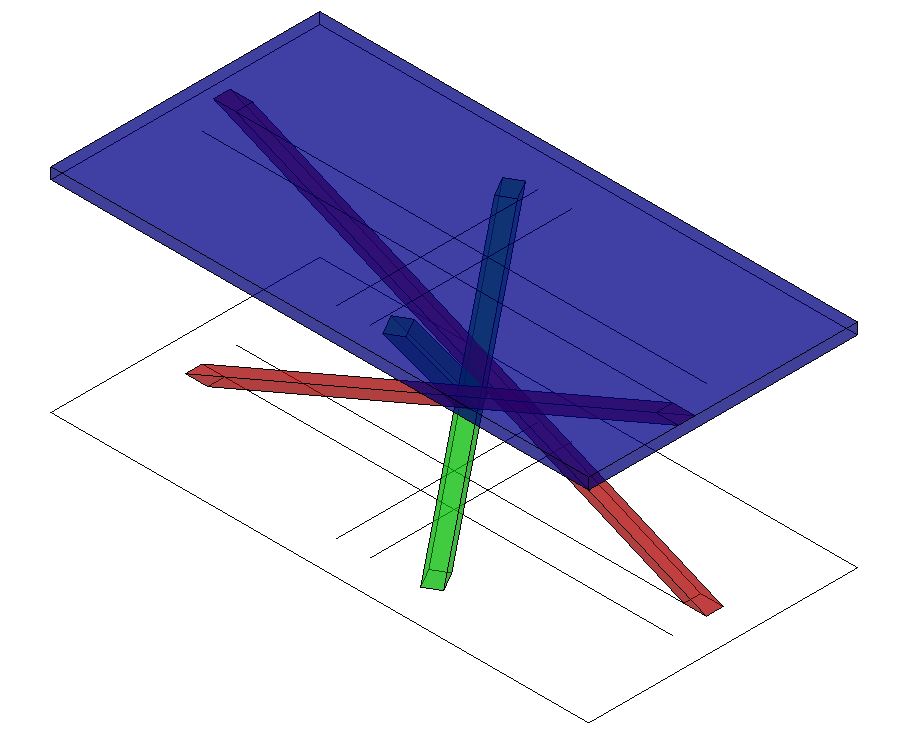 ------------- "Humans have a strength that cannot be measured. This is John Connor. If you are reading this, you are the resistance." <<AutoCAD 2015>> |
Posted By: John Connor
Date Posted: 21.Dec.2016 at 20:18
|
The legs pictured above do indeed go over/under each other. BTW...I used the X-Ray visual style. Given that you are in the U.K. and about 5 hours ahead of me it must be after 7 p.m. By the time I arrive at work tomorrow it will be around 10 a.m. your time. At some point our paths will cross again. Until then it is almost time for me to take a very long drive home. I'll check this thread tomorrow morning. Good luck. It isn't as tough as it may look. Thursday morning here. No response? Oh well. Just wanted to mention I did not use the SLICE command to create my legs. I merely extruded a rectangle along the path of a sloped line. ------------- "Humans have a strength that cannot be measured. This is John Connor. If you are reading this, you are the resistance." <<AutoCAD 2015>> |
Posted By: Sve87
Date Posted: 22.Dec.2016 at 20:41
|
Hey Connor huge thanks for the help!!! I'm still struggling with the 2D version though. So, basically, what I'm trying to find out is the exact degrees of the corners/angles that form up at the top and the bottom. I'm uploading a quick sketch with horizontal and vertical lengths and with the width of the "leg" pointing out with questions marks what I'm looking for. Up until now I couldn't manage to wrap it up, I know it's probably 5min job, but I am a total noob  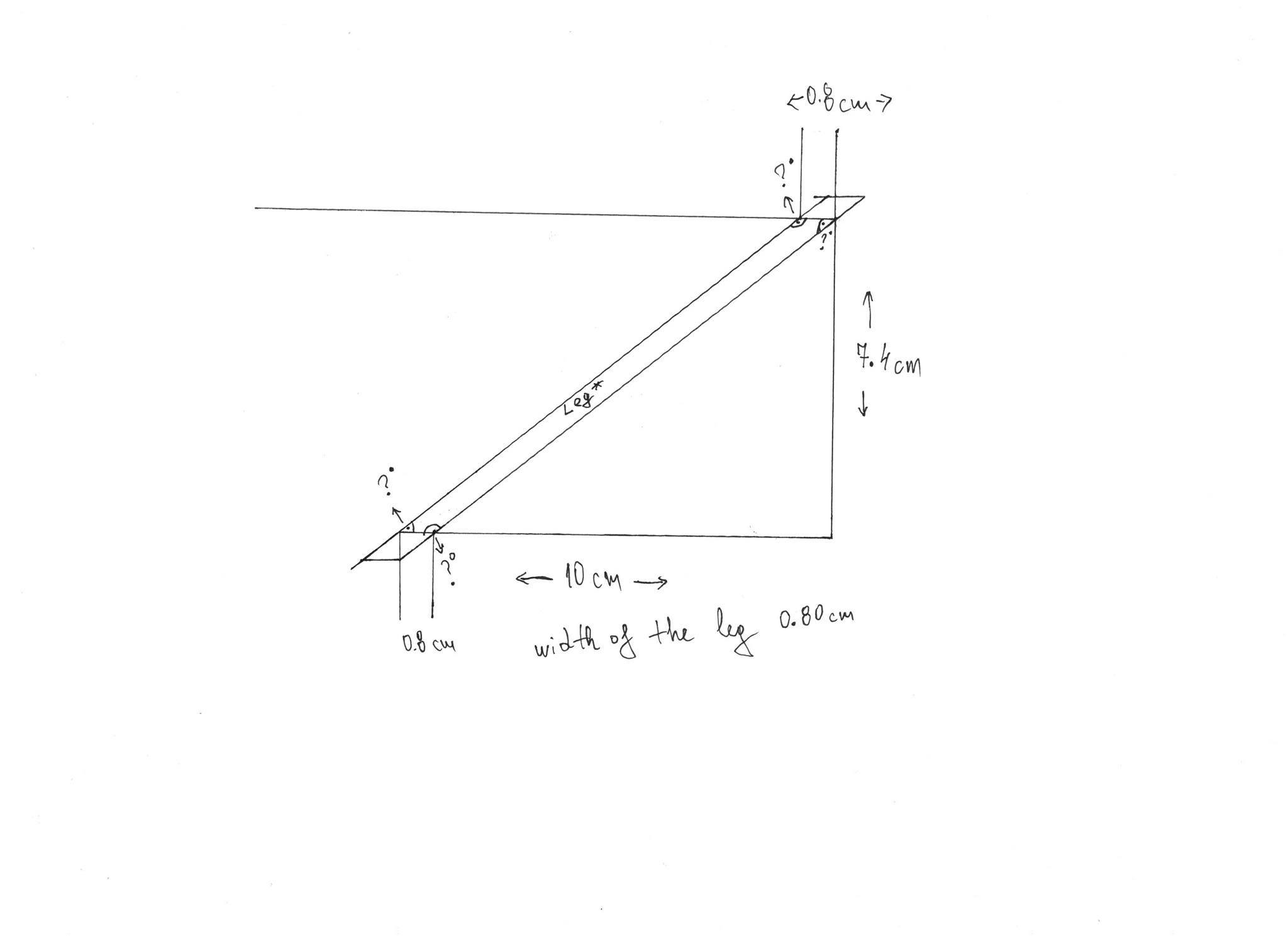 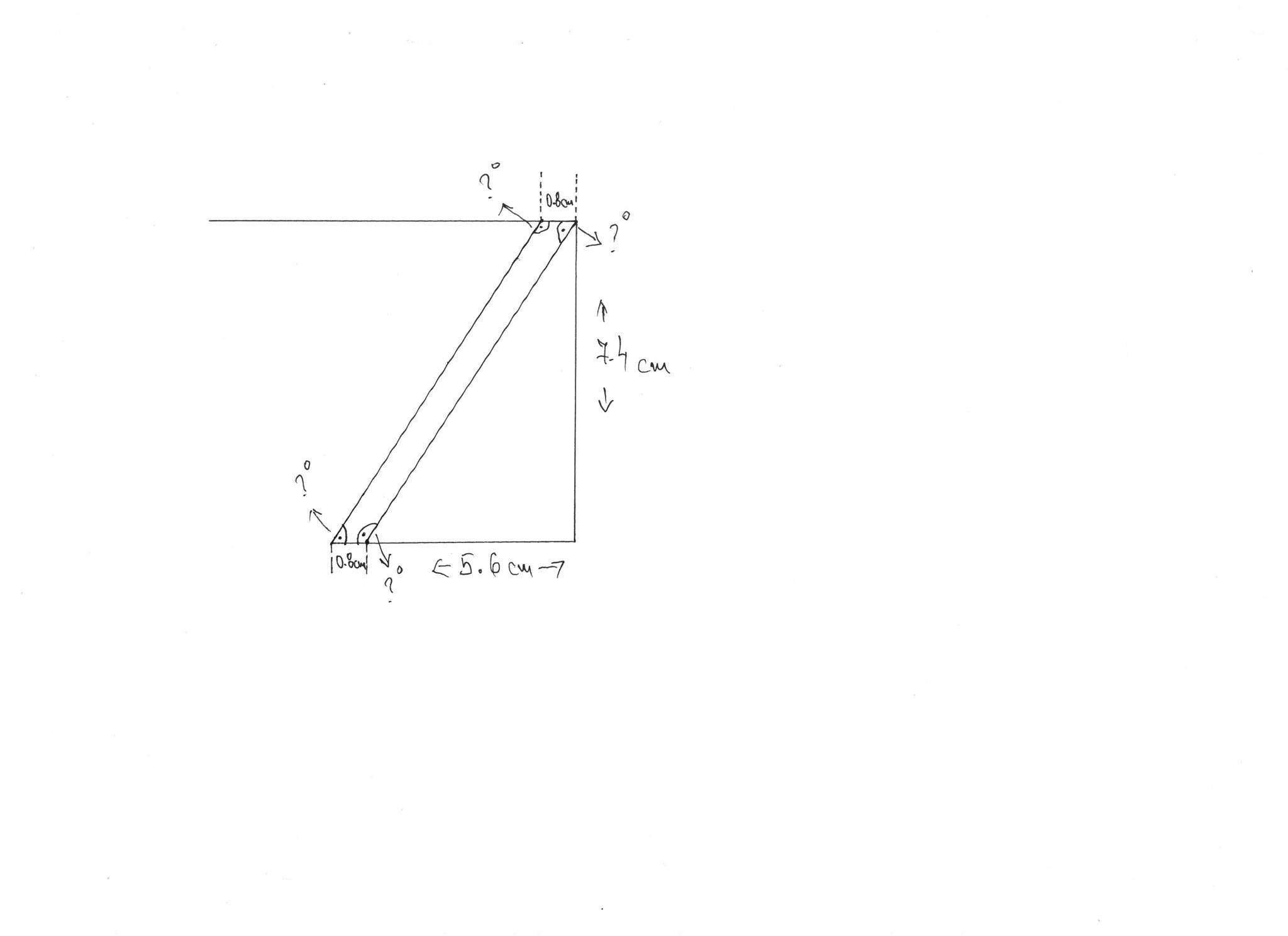 |
Posted By: John Connor
Date Posted: 23.Dec.2016 at 00:15
|
Looks like something you could easily draw in AutoCAD either in 2D or 3D. Personally, I don't see what's stopping you from doing it. Draw what you have pictured above in 2D using AutoCAD and derive the lengths and angles of any lines that you require the information for.
------------- "Humans have a strength that cannot be measured. This is John Connor. If you are reading this, you are the resistance." <<AutoCAD 2015>> |
Posted By: John Connor
Date Posted: 23.Dec.2016 at 12:50
|
OK...you have had way more time than is required to solve the your problem using AutoCAD. Even as brain addled as I am before having my first cup of coffee I think it took about 90 seconds once I had AutoCAD open to replicate the two sketches above and figure out the angles and even the lengths of the inside and outside faces of each leg. Hint: the LIST command. Once you have the 2D sketch of each leg you can move onto creating the 3D solid version, add the top of the table, then position the legs correctly. My 2D sketch looks like this...  ------------- "Humans have a strength that cannot be measured. This is John Connor. If you are reading this, you are the resistance." <<AutoCAD 2015>> |
Posted By: Sve87
Date Posted: 23.Dec.2016 at 13:57
I did, but when I try to measure the angles between the leg and for example the floor I get the message "Objects are non coplanar" that is for the leg itself, the are lines i.e. 10x7.4 and 5.6x7.4 are OK. But the leg itself is non coplanar. I've tried converting it, but no luck so far. I'm using AutoCad 2017 for Mac and there is no FLATTEN option in it. When I explode the rectangle it still remains non coplanar, though in the properties of each line the Z positioning is 0.... 
|
Posted By: John Connor
Date Posted: 23.Dec.2016 at 14:17
|
Your problem seems to be that you are attempting to do this in 3D. FIRST, draw the legs, correctly, in 2D. You can use the PressPull command to extrude them and then they can be rotated into their proper position. ------------- "Humans have a strength that cannot be measured. This is John Connor. If you are reading this, you are the resistance." <<AutoCAD 2015>> |
Posted By: John Connor
Date Posted: 23.Dec.2016 at 19:52
Table legs as 3D solids. A front and side view.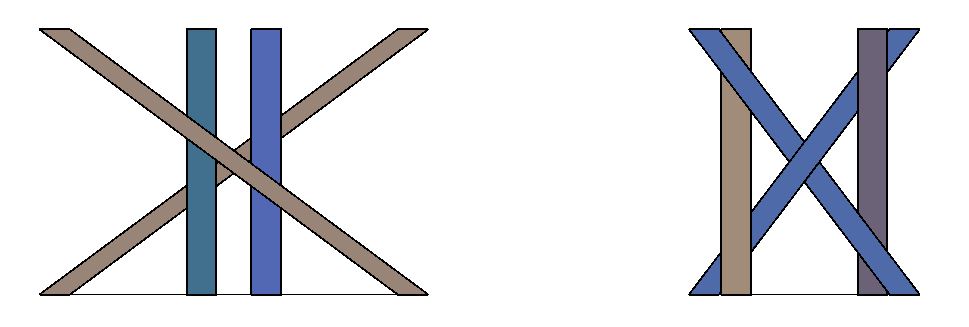 ------------- "Humans have a strength that cannot be measured. This is John Connor. If you are reading this, you are the resistance." <<AutoCAD 2015>> |
Posted By: John Connor
Date Posted: 23.Dec.2016 at 19:56
Here is what the legs look like in plan view. The square circled in red representative of the top of each leg.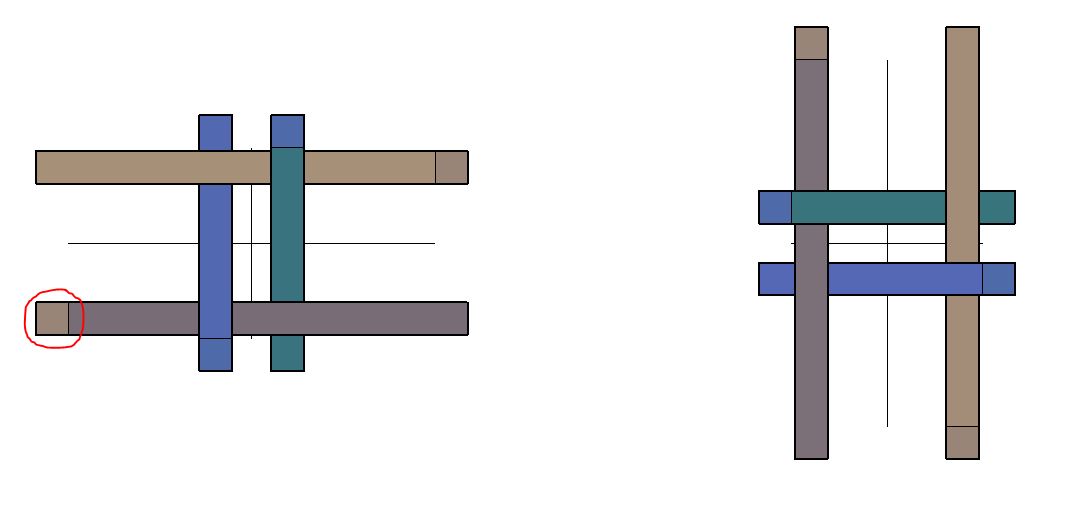 ------------- "Humans have a strength that cannot be measured. This is John Connor. If you are reading this, you are the resistance." <<AutoCAD 2015>> |
Posted By: John Connor
Date Posted: 27.Dec.2016 at 12:05
|
Well? Time's up. You should have finished by now unless you spent the holiday eating too much and playing games on your Xbox or Playstation hours on end. ------------- "Humans have a strength that cannot be measured. This is John Connor. If you are reading this, you are the resistance." <<AutoCAD 2015>> |
Posted By: Sve87
Date Posted: 03.Feb.2017 at 21:34
|
Hey there, It has been a long time since I checked here. I hate excuses and apologies, but I had some health issues. However, we did finish this project if I may call it that way. Eventually, I managed to do the AutoCad drawing, the app did the angle degrees calculation for me, we trusted my lame skills and decided to cut. This is what we came up with 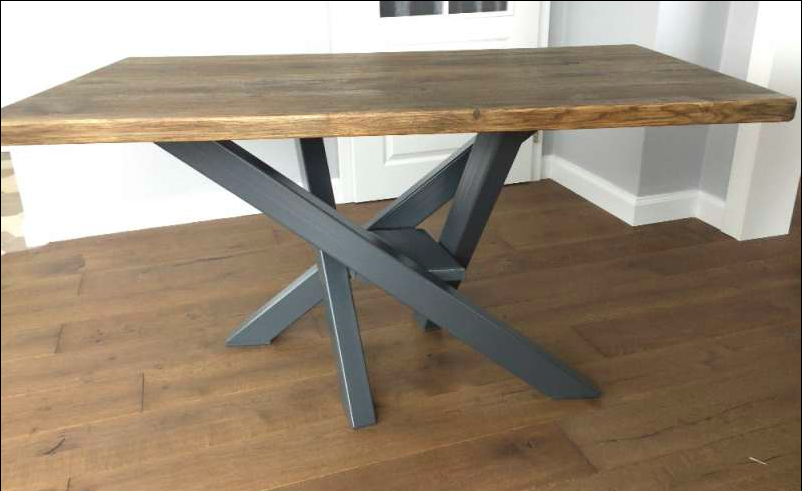 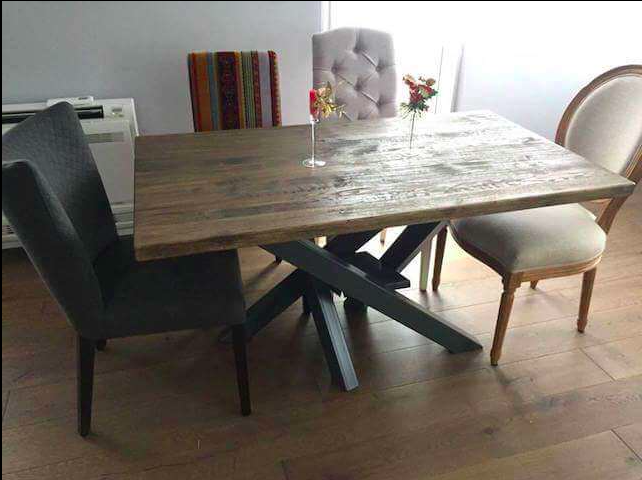 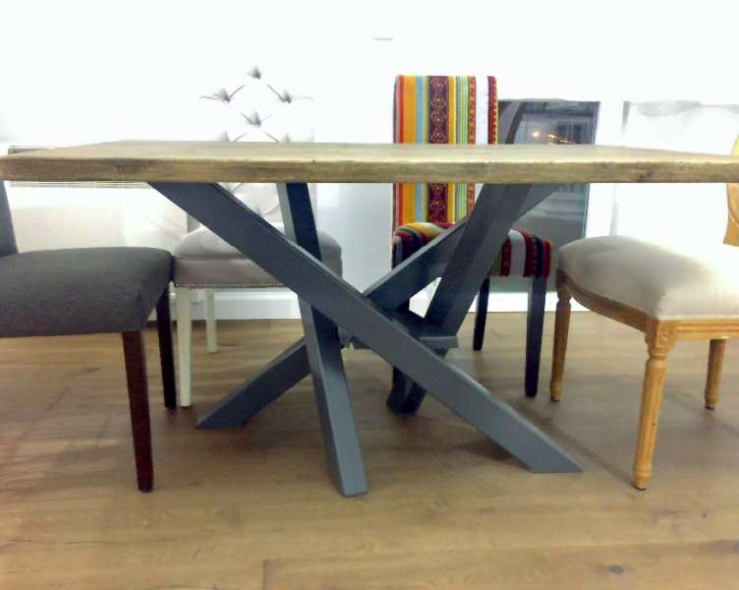 Huge thanks to John Connor for the concern, all the help and guidance! I really appreciate it! So this is officially my first AutoCad work of Art
 |
Posted By: John Connor
Date Posted: 03.Feb.2017 at 22:47
|
Looks very nice. Thank you for sharing some images with us. ------------- "Humans have a strength that cannot be measured. This is John Connor. If you are reading this, you are the resistance." <<AutoCAD 2015>> |