DYNAMIC INPUT NOT WORKING WITH CERTAIN COMMANDS
Printed From: CAD Forum
Category: EN
Forum Name: AutoCAD
Forum Description: Discussion about AutoCAD and AutoCAD LT, viewers, DWG and DXF formats, Design Review, AutoCAD web, Drive, add-ons
URL: https://www.cadforum.cz/forum_en/forum_posts.asp?TID=12213
Printed Date: 05.Sep.2026 at 04:16
Topic: DYNAMIC INPUT NOT WORKING WITH CERTAIN COMMANDS
Posted By: deputee_doodie
Subject: DYNAMIC INPUT NOT WORKING WITH CERTAIN COMMANDS
Date Posted: 14.Feb.2017 at 16:54
|
hi all, Some setting flipped and i've tried every possible setting and forum i can find and still have had no luck. typically, dynamic input would operate like the following (picture), it would show the blue box with the distance from origin of command (line, move, stretch, etc), regardless of what command i used) and my cursor would show what i'm snapping to (endpoint, midpoint, etc) 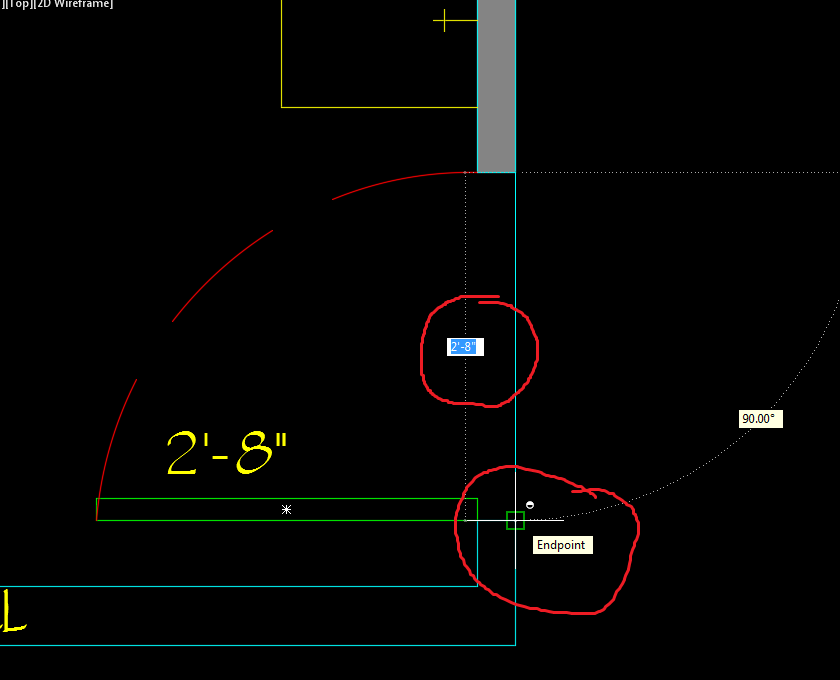 But now, while dynamic input is on (and once again, i've tried every toggling setting i can find) it looks like the following, without showing the distance from origin of command or what my cursor is snapping to. this might not seem like a big issue but it DRASTICALLY slows down my drafting. No file, profile, workspace setting, etc, affects this problem.  thanks for the help
|
Replies:
Posted By: John Connor
Date Posted: 14.Feb.2017 at 18:15
|
Did you try right-clicking the Dynamic Input button on the Status Bar (located near the bottom of your screen) and clicking on Settings? From the AutoCAD Help file: Dynamic input has three components: cursor (pointer) input, dimension input, and dynamic prompts. Right-click the dynamic input button and click Settings to control what is displayed by each component when dynamic input is turned on. ------------- "Humans have a strength that cannot be measured. This is John Connor. If you are reading this, you are the resistance." <<AutoCAD 2015>> |
Posted By: deputee_doodie
Date Posted: 15.Feb.2017 at 21:48
| YES I'VE TOGGLED ALL THOSE SETTINGS BUT NONE OF THEM ARE MAKING A DIFFERENCE |