Create buffert/space when lines crossing
Printed From: CAD Forum
Category: EN
Forum Name: AutoCAD
Forum Description: Discussion about AutoCAD and AutoCAD LT, viewers, DWG and DXF formats, Design Review, AutoCAD web, Drive, add-ons
URL: https://www.cadforum.cz/forum_en/forum_posts.asp?TID=12249
Printed Date: 05.Sep.2026 at 04:43
Topic: Create buffert/space when lines crossing
Posted By: HVAC_Constructor
Subject: Create buffert/space when lines crossing
Date Posted: 07.Mar.2017 at 14:20
|
What is the easiest way to create space (se the picture) when lines are crossing? At present I copy the line and duplicates it on each side. Then Trim to create spacing. But is there any easier way? Is there any Trim-set than can be used to create space-bufferts?  uploads/711621/Dok2.pdf" rel="nofollow - uploads/711621/Dok2.pdf
|
Replies:
Posted By: Kent Cooper
Date Posted: 07.Mar.2017 at 15:36
| There are a lot of routines out there to do this kind of thing. For instance, just on the Cadalyst CAD Tips site, there's http://cadtips.cadalyst.com/linear-objects/break-multiple-lines" rel="nofollow - this one and http://cadtips.cadalyst.com/2d-editing/break-lines-below" rel="nofollow - this other one and http://cadtips.cadalyst.com/2d-operations/break-a-crossing-line" rel="nofollow - this third one . Some Searching on the AutoCAD Customization Forum, and The Swamp, and other such places, will find more. |
Posted By: Robert_D
Date Posted: 07.Mar.2017 at 15:36
|
Look here: http://forums.augi.com/showthread.php?145889-Break-Wire-With-Gap-LISP and here: https://autocadtips1.com/2011/09/24/autolisp-break-at-intersections-with-a-gap/ |
Posted By: HVAC_Constructor
Date Posted: 07.Mar.2017 at 16:25
|
Thanks to both Kent and Robert! Robert: About the scond link: I read the links, but am unsurtain if I have to new version of AutoCAD(?) My version is AutoCAD 2015 If i for instance type "BI" in the commandline the command "Bindtype" is activated. https://knowledge.autodesk.com/support/autocad-lt/learn-explore/caas/CloudHelp/cloudhelp/2016/ENU/AutoCAD-LT/files/GUID-1B410F79-266A-4D64-BEA6-87191A0B0D30-htm.html Kent Do I have to download any file to use the commands? When i Write "Multigap.lsp" in the commandline it says "unknow command". MULTIGAP.LSP and GSIZE.DCL break any number of selected lines at their intersection with other selected lines. Gsize defines the gap value.
|
Posted By: John Connor
Date Posted: 07.Mar.2017 at 16:35
|
Download both MULTIGAP.LSP and GSIZE.DCL to your hard drive. Use the APPLOAD command to load MULTIGAP.lsp. To run the lisp type MULTIGAP at the command line then press the Enter key. Now look at your command line prompts. *********** Re: BI Try typing BreakInt at the command type and see if the lisp routine works. ------------- "Humans have a strength that cannot be measured. This is John Connor. If you are reading this, you are the resistance." <<AutoCAD 2015>> |
Posted By: HVAC_Constructor
Date Posted: 08.Mar.2017 at 09:28
|
Thanks for your answer John C! Where do I download MULTIGAP.LSP and GISIZE.DCL ? Tried to google "download MULTIGAP.LSP GISIZE.DCL" but i did not find any download homepage.
|
Posted By: John Connor
Date Posted: 08.Mar.2017 at 11:43
|
The link (the second of three he listed) was contained in Kent Cooper's post above. Here it is again... http://cadtips.cadalyst.com/2d-editing/break-lines-below ------------- "Humans have a strength that cannot be measured. This is John Connor. If you are reading this, you are the resistance." <<AutoCAD 2015>> |
Posted By: HVAC_Constructor
Date Posted: 08.Mar.2017 at 15:35
|
Thanks for your answer John! So I just klick on the red "Download this tip" button and save down the LSP and DCL files on my computer(?) Then I type "Uppload" in the commandline (in the AutoCAD program) to load the Multigap.lsp.  Then I can se my alternatives to break lines.
|
Posted By: John Connor
Date Posted: 08.Mar.2017 at 16:39
|
Most likely the download will be in the form of a zip file so first you will have to unzip the files. Next place the files in the folder where you keep all your custom lisp routines. Use the APPLOAD command to load the lisp file (Multigap.lsp). You'll have to click on the Browse button and migrate to the folder previously mentioned to locate the lisp routine. Once loaded type MULTIGAP at the command line to run it. How long have you been using AutoCAD? ------------- "Humans have a strength that cannot be measured. This is John Connor. If you are reading this, you are the resistance." <<AutoCAD 2015>> |
Posted By: HVAC_Constructor
Date Posted: 09.Mar.2017 at 12:57
JOHN: Started (as it notice) a couple of month ago  But work mostly in MagiCAD, so knowledge about AutoCAD is not what it should be. I Have downloaded the two tip-files. But could only Appload the "Multigap.lsp" file. The Gsize.dcl was not able to appload. When i Type "Multigap" in the command line, AutoCAD ask me to select the upper line (Gapsize = 2 seems to be default). I notice that the line i select is divided in the cross section. But how do i choose gapsize? |
Posted By: John Connor
Date Posted: 09.Mar.2017 at 13:53
|
You cannot Appload a .DCL file. DCL files contain settings for dialog boxes; they are not lisp routines. OK...here's some advice. Brush up on what lisp files are and how they are created then note that unless they are compiled, in which case the file extension will be something other than .lsp, they can be opened, viewed, copied, edited using an ASCII text editor such as Notepad which comes with just about every version of Windows that I know of. If you open the Multigap.lsp file and scroll through it you would see that there are two commands in the one file. The first is MULTIGAP and the second is GSIZE. If you type GSIZE at the command line, after first loading the Multigap.lsp routine, you'll be able to reset the gap size from its default of 2. This is what clues you in to a command.... (defun c:MULTIGAP....... or (defun c:GSIZE........... I have not tested nor have I used the routine so I can't answer any questions specifically how it works. *********************************** 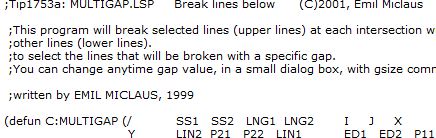 ------------- "Humans have a strength that cannot be measured. This is John Connor. If you are reading this, you are the resistance." <<AutoCAD 2015>> |
Posted By: HVAC_Constructor
Date Posted: 09.Mar.2017 at 15:50
|
Thanks for your answer and patience John! It seems like I can´t get hold on the functions of Gsize. I have apploaded Multigap and split the line, but when i type "Gsize" in the command line the answer is: Error: quit /exit abort command: When I read in the Gsize.dcl tip file this is what is said: gp_gap : dialog { label = "Size for gap-line"; : text { label = "Enter a value."; } : edit_box { label = "Size="; fixed_width = true; alignment = centered; edit_width = 4; key = "gap"; } spacer_1; ok_cancel; } |
Posted By: John Connor
Date Posted: 09.Mar.2017 at 16:12
|
I said to open and read the .lsp file. There is no benefit to opening the .dcl that I can think of. I think the error could be in the lisp file and the way it is attempting to call the .dcl file. Forum member Kent Cooper could probably tell you for sure. What gap size did you want to use and will it always be the same? Have you tried any of the other lisp routines for creating gaps in lines that cross? ------------- "Humans have a strength that cannot be measured. This is John Connor. If you are reading this, you are the resistance." <<AutoCAD 2015>> |
Posted By: Robert_D
Date Posted: 09.Mar.2017 at 21:44
|
HVAC: I suspect you are "over thinking" your issue. If both the .lsp & .dcl files are in the same directory / in your file support path, all should be well. Running the lisp routine probably invokes a dialog via the .dcl file (as pointed out above). I often use BreakInt.lsp (which performs the same function (without a .dcl file)). It works perfectly as advertised. |
Posted By: HVAC_Constructor
Date Posted: 10.Mar.2017 at 08:10
|
When I Used this tip: http://cadtips.cadalyst.com/2d-operations/break-a-crossing-line ...and it worked fine! Downloaded the tip, apploaded file and wrote "thru" and followed the instructions. John: I often use 200 as spacing between lines. Do I always have to appload the tip-file when i Use the command? (for instance my "thru" command), or can a upploded file stay in memory? |
Posted By: John Connor
Date Posted: 10.Mar.2017 at 11:46
|
You can load lisp routines automatically via the.... -Startup Suite -Acaddoc.lsp -AutoLoad function All three methods are explained here... http://lee-mac.com/autoloading.html ------------- "Humans have a strength that cannot be measured. This is John Connor. If you are reading this, you are the resistance." <<AutoCAD 2015>> |
Posted By: HVAC_Constructor
Date Posted: 15.Mar.2017 at 12:40
|
Perfect! Thanks John!
|