Linetype Issues
Printed From: CAD Forum
Category: EN
Forum Name: AutoCAD
Forum Description: Discussion about AutoCAD and AutoCAD LT, viewers, DWG and DXF formats, Design Review, AutoCAD web, Drive, add-ons
URL: https://www.cadforum.cz/forum_en/forum_posts.asp?TID=12258
Printed Date: 05.Sep.2026 at 02:24
Topic: Linetype Issues
Posted By: mik29
Subject: Linetype Issues
Date Posted: 15.Mar.2017 at 17:06
|
Hello. I am working in C3D 2016. I noticed my linetypes were not correct. Our State DOT has standards for linetypes. After I did imported the standards and open the drawing I had some strange lines. I have my LTSCALE =1. MSLTSCALE=1, VSLTSCALE=1 and it has not changed. The biggest problem that only my computer have this issue. I attached pictures of what they look on my computer and on others. http://www.cadforum.cz/forum_en/uploads/713418/PM.pdf" rel="nofollow - uploads/713418/PM.pdf http://www.cadforum.cz/forum_en/uploads/713418/PM-1.pdf" rel="nofollow - uploads/713418/PM-1.pdf Thank you
|
Replies:
Posted By: aanonimnim
Date Posted: 05.Apr.2017 at 01:07
|
Hi, Is it a line or polyline? Check the thickness of the layer as well. Sometimes the same layers have different standard settings. I know - sound obvious but I catch myself many times on that ;) Kamil http://cadmasters.guru" rel="nofollow - www.CADMasters.guru |
Posted By: John Connor
Date Posted: 05.Apr.2017 at 11:34
|
aa: Please explain something to me. If I give you a drawing where I have set the lineWEIGHT by layer and you open that drawing on your computer why/how would it appear differently unless you changed it or you had lineweight display enabled/disabled? Additionally, if it is a pline the system variable PLINEWID is saved with the drawing and not in the Windows Registry. How then does it automagically change when opened by another cad tech on a different computer? ------------- "Humans have a strength that cannot be measured. This is John Connor. If you are reading this, you are the resistance." <<AutoCAD 2015>> |
Posted By: John Connor
Date Posted: 05.Apr.2017 at 12:07
|
mik29: What is VSLTSCALE? When I type that in at the command line I get this: Command: VSLTSCALE Unknown command "VSLTSCALE". Press F1 for help. Could you have been referring to PSLTSCALE? BTW...is Lineweight Display enabled? ------------- "Humans have a strength that cannot be measured. This is John Connor. If you are reading this, you are the resistance." <<AutoCAD 2015>> |
Posted By: mik29
Date Posted: 05.Apr.2017 at 15:26
| this is what we're wondering too. Thanks. |
Posted By: mik29
Date Posted: 05.Apr.2017 at 15:30
|
sorry I mistype. It is PSLTSCALE .Yes Linewight display is enabled. Thank you.
|
Posted By: mik29
Date Posted: 05.Apr.2017 at 15:34
|
Hello. It's PLINE.
|
Posted By: John Connor
Date Posted: 05.Apr.2017 at 15:43
|
So what happens if you toggle Lineweight off? ------------- "Humans have a strength that cannot be measured. This is John Connor. If you are reading this, you are the resistance." <<AutoCAD 2015>> |
Posted By: mik29
Date Posted: 05.Apr.2017 at 15:52
| Absolutely no changes. |
Posted By: John Connor
Date Posted: 05.Apr.2017 at 16:30
|
Do you utilize custom lisp routines that automatically load? ------------- "Humans have a strength that cannot be measured. This is John Connor. If you are reading this, you are the resistance." <<AutoCAD 2015>> |
Posted By: mik29
Date Posted: 05.Apr.2017 at 16:37
|
not anymore. Again all linetypes come from our state DOT and were created for microstation and we did import them and put in our template.
|
Posted By: John Connor
Date Posted: 05.Apr.2017 at 17:01
|
Maybe that's your problem. The fact they are Microstation linetypes. You say you import them. Exactly how are they "imported"? ------------- "Humans have a strength that cannot be measured. This is John Connor. If you are reading this, you are the resistance." <<AutoCAD 2015>> |
Posted By: mik29
Date Posted: 05.Apr.2017 at 17:31
|
How I know all blocks, linetypes, etc were downloaded from DOT site (.dgnlib) and after imported in template drawing. |
Posted By: John Connor
Date Posted: 05.Apr.2017 at 18:05
|
Is it possible to obtain a copy of one of these problematic drawings so I can open it in AutoCAD myself? ------------- "Humans have a strength that cannot be measured. This is John Connor. If you are reading this, you are the resistance." <<AutoCAD 2015>> |
Posted By: mik29
Date Posted: 05.Apr.2017 at 19:07
|
here is the copy of my drawing uploads/713418/ACAD-test_PM-Model.dwg" rel="nofollow - uploads/713418/ACAD-test_PM-Model.dwg
|
Posted By: John Connor
Date Posted: 05.Apr.2017 at 19:33
How does this look?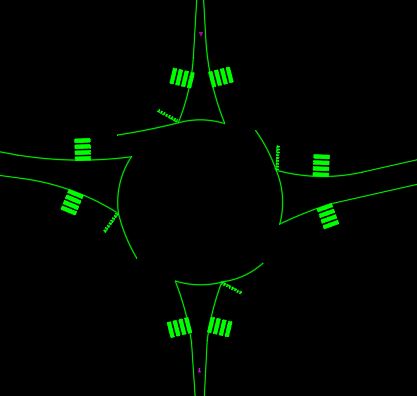 ------------- "Humans have a strength that cannot be measured. This is John Connor. If you are reading this, you are the resistance." <<AutoCAD 2015>> |
Posted By: mik29
Date Posted: 05.Apr.2017 at 19:41
| It looks good as I can see. So you have a solution? |
Posted By: John Connor
Date Posted: 05.Apr.2017 at 19:48
|
Well that would depend on you. I can get all the very wide lines to be nice and thin like you see in the previously posted image. However, I cannot get the lines thin (i.e. continuous) AND of the type you may need such as stop line, skips, or striping. ------------- "Humans have a strength that cannot be measured. This is John Connor. If you are reading this, you are the resistance." <<AutoCAD 2015>> |
Posted By: mik29
Date Posted: 05.Apr.2017 at 19:57
| I was changing linetype scale to make them nice and thin, but it's a temporary solution. |
Posted By: John Connor
Date Posted: 05.Apr.2017 at 20:04
|
You didn't exactly address my main concern. Let's try again. I can get ALL the wide lines to be thin/continuous. But let's just say that the linetype called "skips" really should appear as a dashed linetype in the drawing. I can't make that happen. Understand? If so, does it make any difference to you? ------------- "Humans have a strength that cannot be measured. This is John Connor. If you are reading this, you are the resistance." <<AutoCAD 2015>> |
Posted By: mik29
Date Posted: 05.Apr.2017 at 20:08
| ok, I see what u're saying. And yes all lynetypes should appear as they are in the drawing but thinner. Thank you. |
Posted By: John Connor
Date Posted: 05.Apr.2017 at 20:14
|
I took another look at your drawing this morning and ran the -DWGUNITS command on it. AutoCAD reported back that the drawing uses INCHES as its units. This is a roadway not some object you can hold in your hand so I figured, what the heck I'll just scale all objects up by a factor of 12 (12 inches per foot). What do you think the drawing looked like then? It would be handy if you could supply some sort of reference dimension. What is the distance, in feet, supposed to be here: 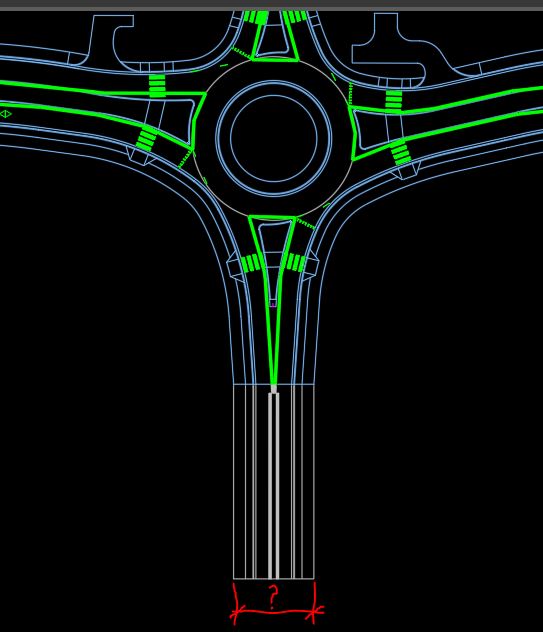 ------------- "Humans have a strength that cannot be measured. This is John Connor. If you are reading this, you are the resistance." <<AutoCAD 2015>> |
Posted By: mik29
Date Posted: 06.Apr.2017 at 13:27
|
I was experimenting with linetype scale 0.083 and they did look as I want it. It's a scale factor of 12. I can not scale all drawing up or down and can not make all linetypes continuous. Thank you.
|
Posted By: mik29
Date Posted: 06.Apr.2017 at 13:35
| your attachment is just opens. Distance is 54' |
Posted By: John Connor
Date Posted: 06.Apr.2017 at 13:58
|
Well if I change the units from Decimal to Engineering, scale the drawing by a factor of 12, then measure that distance AutoCAD reports back 54'-0". Leaving the drawing as is (the way you uploaded it) that distance is reported back as being 54.0000 inches. Have you ever driven on a road that is 54 inches in width? ------------- "Humans have a strength that cannot be measured. This is John Connor. If you are reading this, you are the resistance." <<AutoCAD 2015>> |
Posted By: mik29
Date Posted: 06.Apr.2017 at 14:17
| I have distance 54' in the drawing what I apploaded. Sorry |
Posted By: John Connor
Date Posted: 06.Apr.2017 at 14:29
|
Not in model space. If you run the -DWGUNITS command it reports back the units as being in Inches not in Feet. Hey, if what you've done works for you then what should I care right? Glad you got a solution to your problem. Have fun. ------------- "Humans have a strength that cannot be measured. This is John Connor. If you are reading this, you are the resistance." <<AutoCAD 2015>> |
Posted By: mik29
Date Posted: 06.Apr.2017 at 14:38
| just looking for a solution why lines appears so thick. Thanks for your time. |
Posted By: John Connor
Date Posted: 06.Apr.2017 at 14:51
|
The reason your lines look so thick is something, either the line markings or the roadway itself, is at the wrong scale. The solution is to rescale one or the other or both. BTW...was the drawing drawn "to scale" as one might do manually on a drafting board or full size? ------------- "Humans have a strength that cannot be measured. This is John Connor. If you are reading this, you are the resistance." <<AutoCAD 2015>> |