viewports
Printed From: CAD Forum
Category: EN
Forum Name: AutoCAD
Forum Description: Discussion about AutoCAD and AutoCAD LT, viewers, DWG and DXF formats, Design Review, AutoCAD web, Drive, add-ons
URL: https://www.cadforum.cz/forum_en/forum_posts.asp?TID=12290
Printed Date: 05.Sep.2026 at 00:44
Topic: viewports
Posted By: vader555555
Subject: viewports
Date Posted: 13.Apr.2017 at 09:08
| How do I hide objects in a viewport but not in another ?? |
Replies:
Posted By: philippe JOSEPH
Date Posted: 13.Apr.2017 at 10:47
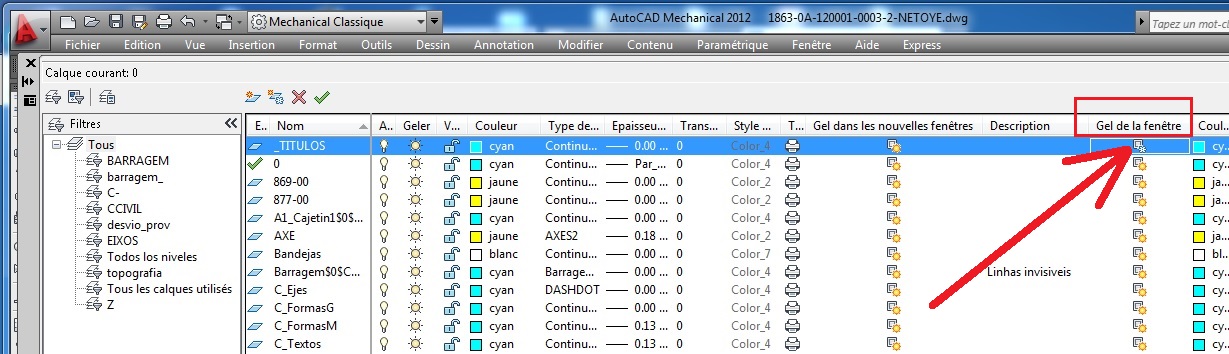 Hello vader555555, for doing this you will have to go to the layout space, open the view port, open the layers control palette ( command LAYER ) and declare frozen certain layers. Hello vader555555, for doing this you will have to go to the layout space, open the view port, open the layers control palette ( command LAYER ) and declare frozen certain layers.If you do this like this, then the objects that you will put on that layer ( can be lines, arc, etc or even blocks constituted of anything ) will be invisible in that view port. See the printscreen here in French. Please tell us if this helped or not.
|