Selecting all items in multiple layers
Printed From: CAD Forum
Category: EN
Forum Name: AutoCAD
Forum Description: Discussion about AutoCAD and AutoCAD LT, viewers, DWG and DXF formats, Design Review, AutoCAD web, Drive, add-ons
URL: https://www.cadforum.cz/forum_en/forum_posts.asp?TID=12321
Printed Date: 04.Sep.2026 at 04:43
Topic: Selecting all items in multiple layers
Posted By: z1990m
Subject: Selecting all items in multiple layers
Date Posted: 03.May.2017 at 14:48
|
Hi I hope someone can help please?? I am trying to find a way I can automate moving all the items in one layer to a corresponding layer, as the new layer has specific linetypes and properties I would like the items to gain. For example my utility survey once exported to a .DXF file has its own layers for each utility. I open the DXF in a drawing template that has the correct layers in it, but then have to go through and 'quickselect' each layer individually and manually change the whole drawing. I have dabbled with the possibility of using a script file for this process but cant work out how to do complete my command using only the command bar. I'm guessing this would probably be the best way of doing what I need, but am open if someone could show me an easier way of doing this. Many Thanks Zak  ------------- Many Thanks Zak |
Replies:
Posted By: John Connor
Date Posted: 03.May.2017 at 15:19
|
Why can't you use the Layer Merge command? The new layer you refer to would be considered the "target" layer. ------------- "Humans have a strength that cannot be measured. This is John Connor. If you are reading this, you are the resistance." <<AutoCAD 2015>> |
Posted By: z1990m
Date Posted: 03.May.2017 at 15:36
|
Hi john That's a command i've never used before or knew about and seems to work well for what i want and is faster than my current method of quickselect. Thanks a bunch!! Is there a way I could use that for a bulk layer change e.g. 'BT' merged to 'INT_UG_BT' and 'LV' to 'INT_UG_LV' and 'SWS' to 'INT_UG_SWS' so on so forth, all at the same time? As it's still fairly time consuming going through every layer one by one.  Thanks Zak ------------- Many Thanks Zak |
Posted By: John Connor
Date Posted: 03.May.2017 at 15:48
|
The first method outlined in this article I believe answers your question. https://knowledge.autodesk.com/support/autocad/learn-explore/caas/CloudHelp/cloudhelp/2016/ENU/AutoCAD-Core/files/GUID-D7F24669-483F-4589-96AC-557F08784E7E-htm.html ------------- "Humans have a strength that cannot be measured. This is John Connor. If you are reading this, you are the resistance." <<AutoCAD 2015>> |
Posted By: z1990m
Date Posted: 03.May.2017 at 15:55
|
John Yes the layer merge command works well and i thank you for that, i was just wondering if there was a way i could select all the layers i need merging and merge them into they're correct layers all at the same time, rather than doing it individually? thanks zak ------------- Many Thanks Zak |
Posted By: John Connor
Date Posted: 03.May.2017 at 16:10
I answered your question is my last post. Maybe this will help....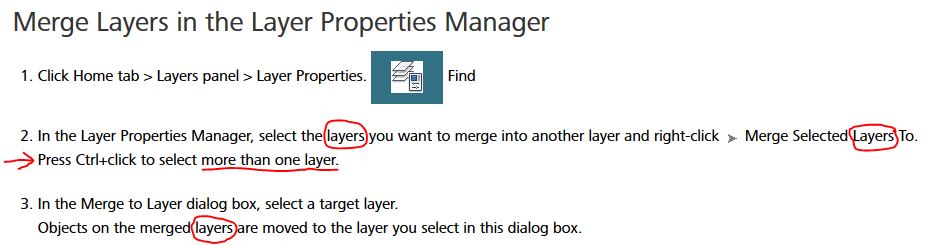 ------------- "Humans have a strength that cannot be measured. This is John Connor. If you are reading this, you are the resistance." <<AutoCAD 2015>> |
Posted By: Kent Cooper
Date Posted: 03.May.2017 at 20:19
Look into another one you may not yet be familiar with -- LAYTRANS.
|
 z1990m wrote:
Posted By: z1990m
Date Posted: 03.May.2017 at 20:27
|
I've managed to write a basic script file using the layer merge command, and it seems to work really well. Thanks for your help 🊠------------- Many Thanks Zak |