Chamferedge failed..
Printed From: CAD Forum
Category: EN
Forum Name: AutoCAD
Forum Description: Discussion about AutoCAD and AutoCAD LT, viewers, DWG and DXF formats, Design Review, AutoCAD web, Drive, add-ons
URL: https://www.cadforum.cz/forum_en/forum_posts.asp?TID=12324
Printed Date: 05.Sep.2026 at 08:14
Topic: Chamferedge failed..
Posted By: nakayama
Subject: Chamferedge failed..
Date Posted: 04.May.2017 at 03:29
|
Hello All
I need your help for this isuee.
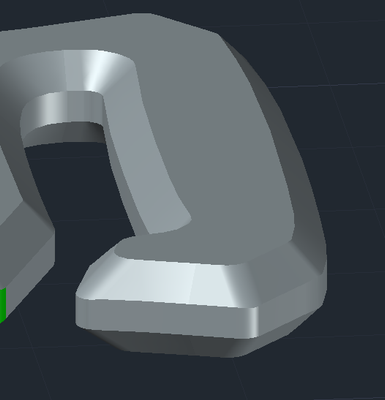
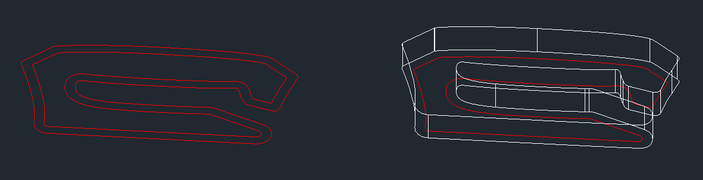
Here is what I want to make as 3D. There is chamfer 1.66mm x 1.66mm. I tried this.. but Autocad told me "Error ,Blend failed.. " but I do not know why at all...
Here is starting point. First, I draw this line with Adobe-Illustrator. and output DWG file. and Open it....
I tried with 3 way.
1) With Chamferedge --> failed. 2) With Blend only.. ---> failed... 3) with Sweep --> failed. I hope Someone tell me why Autocad can not draw this simple shape.. Is this limitation ???
Could you help me ?? here is cad file http://www.cadforum.cz/forum_en/uploads/724730/shape1x.zip" rel="nofollow - uploads/724730/shape1x.zip If AutoCAD is not possible to draw it, How should I do ? Should I buy other CAD software to draw this only ? David. |
Replies:
Posted By: John Connor
Date Posted: 04.May.2017 at 11:25
|
I have had time to open/view your drawing. You could try using AutoDesk A360. ------------- "Humans have a strength that cannot be measured. This is John Connor. If you are reading this, you are the resistance." <<AutoCAD 2015>> |
Posted By: John Connor
Date Posted: 04.May.2017 at 12:47
Well if you're more concerned about the end result (may not fully satisfy your requirements however) rather than the process I was able to achieve the following. It was somewhat involved. Maybe someone else here with better skills can arrive at a solution with less work. And, yes, it is a 3D solid. I checked.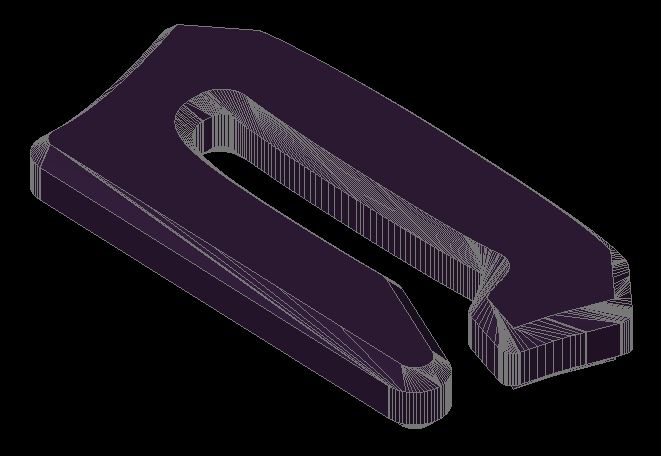
------------- "Humans have a strength that cannot be measured. This is John Connor. If you are reading this, you are the resistance." <<AutoCAD 2015>> |
Posted By: nakayama
Date Posted: 04.May.2017 at 14:11
|
Thank you , John. It is good : ) I want to learn your step with AutoCAD. I tried many time "Chamfer" -> Loop -> Select some edge -> 1.6 -> 1.6 -> Enter CAD refused to make chamfer with same error. Failed to perform blend. Failure while chamfering. How to avoid this error ? Please have me to learn your skill.... David.
|
Posted By: John Connor
Date Posted: 04.May.2017 at 14:23
|
I did not use chamfer. I basically used a series of profiles that I lofted separately then unioned them (there were three) together. But first I had to use the SPLINEDIT command and turn the outer spline into a polyline. ------------- "Humans have a strength that cannot be measured. This is John Connor. If you are reading this, you are the resistance." <<AutoCAD 2015>> |
Posted By: nakayama
Date Posted: 04.May.2017 at 17:02
|
Thank you , John I also make it with LOFT + some guides. but It is not beautiful than I expect. There is lot of NOT good surfaces.. This maybe limitation of AutoCAD 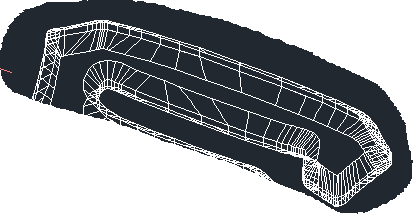 Anyway, Thank you ! I will try other software too. Is there any recommendation ? |
Posted By: John Connor
Date Posted: 04.May.2017 at 17:22
|
I'd try either A360 or Inventor. ------------- "Humans have a strength that cannot be measured. This is John Connor. If you are reading this, you are the resistance." <<AutoCAD 2015>> |
Posted By: superschophycus
Date Posted: 28.Jul.2018 at 17:05
|
Sorry about late reply, I hope it will help... That's not a limitation of autocad what you said, I think your model suffers from bad junctions, or curves in the model. "Cannot blend" error is usually connected with inaccuracies in your 2d shape, for example 2 curves are not perfectly blended with another curve/line(tangent) between them. You should do a little "repair" of your curve exported from illustator - fillet the straight lines with radiuses so it gives a perfect blend or flow between the curves. Even if you managed to get polyline from your closed shape or a region, that does not mean the CHAMFEREDGE command will work if curves are "badly" joined. Sorry I cannot open your attached file because I use ACAD2015.
|
Posted By: John Connor
Date Posted: 31.Jul.2018 at 20:51
|
If naka hasn't fixed the problem by now (some 14 months later) then he had better change careers. ------------- "Humans have a strength that cannot be measured. This is John Connor. If you are reading this, you are the resistance." <<AutoCAD 2015>> |