Complex Linetypes drawing direction problems
Printed From: CAD Forum
Category: EN
Forum Name: AutoCAD
Forum Description: Discussion about AutoCAD and AutoCAD LT, viewers, DWG and DXF formats, Design Review, AutoCAD web, Drive, add-ons
URL: https://www.cadforum.cz/forum_en/forum_posts.asp?TID=12406
Printed Date: 06.Sep.2026 at 05:09
Topic: Complex Linetypes drawing direction problems
Posted By: z1990m
Subject: Complex Linetypes drawing direction problems
Date Posted: 27.Jul.2017 at 12:28
|
Hey This will probably be mega easy for you guys but it's got me scratching my head  I have a linetype that has both a shape file and text incorporated in it, drawing lines from left to right works fine. However the problem is when the line is drawn right to left it seems to position the text over the top of my shape file. This line shows flow direction of a pipe so the PEDIT (Reverse) doesn't work as it will shows the flow running the wrong direction. Below is my .lin and an example of the error in CAD. *UG-SWS-AR,UNDERGROUND STORM DRAIN ASSUMED FROM RECORDS A,30,-28,30,-28,30,-28,30,-1.197827,[FLOW,\\INTHQSVR03\RedirectedFolders\jobs2017\systemfiles2017\utilitymaster.linfiles\FLOW ARROW,y=-11.419447,s=.997684],-37.664418,["(AR)",LINESTYLE,y=-8.891762,s=19.238087,u=0],-51.876634 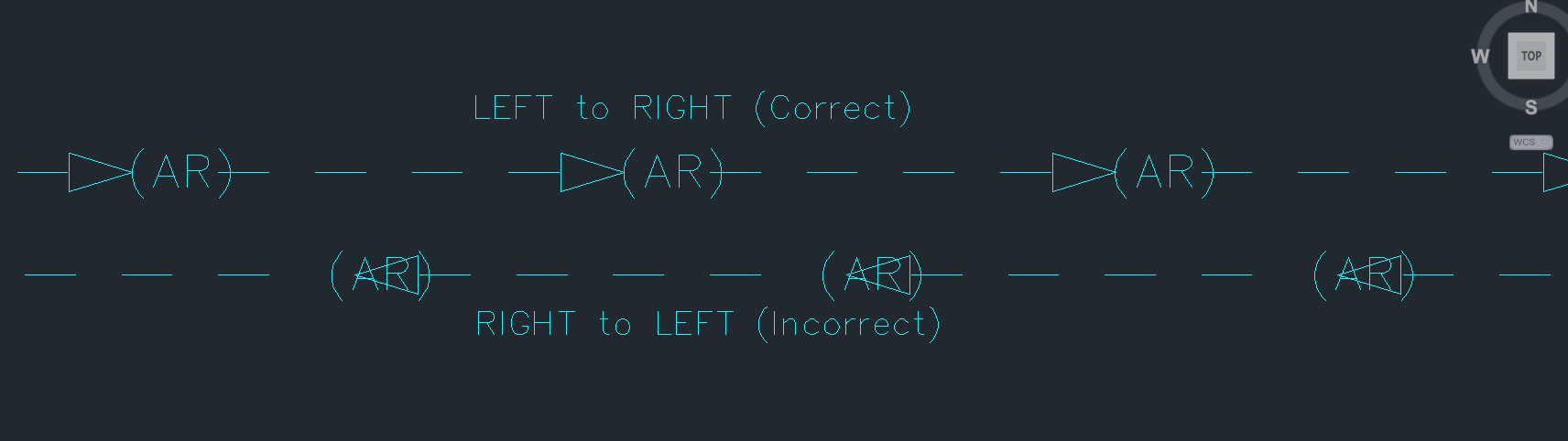 If anyone could help that would be muchly appreciated. ------------- Many Thanks Zak |
Replies:
Posted By: Vladimir Michl
Date Posted: 27.Jul.2017 at 14:08
|
This is (geometrically) not possible to achieve - you will need a different linetype to reverse the order of the arrow+text while keeping the text readable. ------------- Vladimir Michl (moderator) https://www.linkedin.com/in/vmichl/" rel="nofollow - LinkedIn , Autodesk Expert Elite |
Posted By: z1990m
Date Posted: 27.Jul.2017 at 14:22
|
Bugger!! I was hoping there was a problem with the code in the .lin i.e. easy fix for someone that knows what their doing  Thanks for getting intouch, i'll create a second linetype, should do the job  ------------- Many Thanks Zak |
Posted By: Kent Cooper
Date Posted: 27.Jul.2017 at 18:20
No, it's not impossible! Give it a larger pen-up (negative-value) gap between the symbol and the text element, to push the nominal "location" of the text farther along by about half the text width, and then include a negative-X component (like the negative-Y one) in the text specification, to "back off" the start of the text so the nominal location is in the middle of it. You'll have to experiment with the exact numerical values to fine-tune it, as the result is affected by the size and font and content of the text. Here's an example of a quickie I threw together using a symbol I already had, that illustrates reverse direction with text nicely positioned in the gap between the symbol and the subsequent line [pen-down] element. The "base" linetype definition is shown in the right side, which is a Line drawn from left to right, with the symbol pointing up. The left side is a Line drawn from right to left, and the text is uprighted but still positioned in the same relationship to the symbol and the line element. 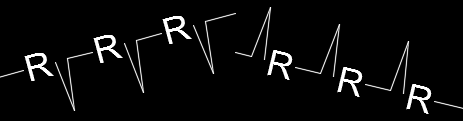 EDIT: To be more specific, take half the gap after the text and add it to the gap before the text, and back the text off by the same amount. Rounding off your values for those gaps to 38 and 52, try something like this, the half-value being 26: ....,s=.997684],-64,["(AR)",LINESTYLE,x=-26,y=-8.891762,s=19.238087,u=0],-26 Fine-tune the values for best positioning [though it hardly seems necessary to take it down to millionths of a drawing unit!].
|
 Vladimir Michl wrote:
Posted By: Kent Cooper
Date Posted: 31.Jul.2017 at 21:04
| [Vladimir, do you have a way of notifying z1990m that they can do what they're after? I wouldn't want to see them go to the extra trouble of defining different linetypes if they've just given up on this and haven't checked back to see my suggestion.] |
Posted By: z1990m
Date Posted: 31.Jul.2017 at 22:09
|
Hi Kent cooper Sorry I've been mega busy at work so haven't had chance to put what you've suggested into action đź• I will have a proper look at my line type soon trying what you have suggested and I'll be sure to post my results on here. Thanks ever so much for taking the time to reply. I'll keep you posted on my progress 🊠Thanks again and sorry on the slow reply đź•đź‘Ť ------------- Many Thanks Zak |
Posted By: Kent Cooper
Date Posted: 01.Aug.2017 at 03:41
|
Here's another reason to always do it that way, even with your arrowhead Shapes, if you ever use linetypes with Text or Shapes on curves of any kind: *BAD,------ TextString ------ TextString ------ TextString ------ A,2,-.1,["TextString",STANDARD,S=.3,U=0.0,Y=-.15],-2 *GOOD,------ TextString ------ TextString ------ TextString ------ A,2,-1.1,["TextString",STANDARD,S=.3,U=0.0,X=-1.0,Y=-.15],-1  |