Adding "<" or ">" to linetype definition
Printed From: CAD Forum
Category: EN
Forum Name: AutoCAD
Forum Description: Discussion about AutoCAD and AutoCAD LT, viewers, DWG and DXF formats, Design Review, AutoCAD web, Drive, add-ons
URL: https://www.cadforum.cz/forum_en/forum_posts.asp?TID=12410
Printed Date: 05.Jul.2026 at 23:44
Topic: Adding "<" or ">" to linetype definition
Posted By: khcharteredengineers
Subject: Adding "<" or ">" to linetype definition
Date Posted: 31.Jul.2017 at 17:12
|
HI Guys, Trying to add greater than/less than arrows to my linetype. Have used the following definition: *FIBRE-V<1,Fibre-V<1 ----FIBRE-V<1----FIBRE-V<1----FIBRE-V<1----FIBRE-V<1----FIBRE-V<1----FIBRE-V<1-- A,.5,-.2,["FIBRE-V<1",ARIAL,S=.1,U=0.0,X=-0.1,Y=-.05],-.5 *FIBRE-V>1,Fibre-V>1 ----FIBRE-V>1----FIBRE-V>1----FIBRE-V>1----FIBRE-V>1----FIBRE-V>1----FIBRE-V>1-- A,.5,-.2,["FIBRE-V>1",ARIAL,S=.1,U=0.0,X=-0.1,Y=-.05],-.5 I have included an arrow before when defining a pumped water main linetype; however this doesnt seem to work. Can arrows only be used in certain circumstances?? Any help greatly appreciated
|
Replies:
Posted By: John Connor
Date Posted: 31.Jul.2017 at 18:07
Is this what you are looking for? Pay no mind to the spacing as it's a work-in-progress. ------------- "Humans have a strength that cannot be measured. This is John Connor. If you are reading this, you are the resistance." <<AutoCAD 2015>> |
Posted By: khcharteredengineers
Date Posted: 31.Jul.2017 at 18:27
| That's it John. The definition included in my initial post doesnt seem to work. Maybe it's a limitation with acadlt??? |
Posted By: John Connor
Date Posted: 31.Jul.2017 at 18:27
I made an adjustment to the spacing and added a second version.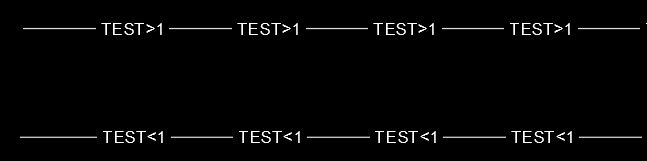
------------- "Humans have a strength that cannot be measured. This is John Connor. If you are reading this, you are the resistance." <<AutoCAD 2015>> |
Posted By: John Connor
Date Posted: 31.Jul.2017 at 18:28
I doubt it. ------------- "Humans have a strength that cannot be measured. This is John Connor. If you are reading this, you are the resistance." <<AutoCAD 2015>> |
 khcharteredengineers wrote:
Posted By: Kent Cooper
Date Posted: 31.Jul.2017 at 20:59
You may have used them as arrows before in a linetype definition (and so have I), but have you used one in a linetype name? I haven't dug into it, but I know not all characters can be used in all types of names [of linetypes, hatch patterns, Blocks, Text Styles, etc.] -- try naming them without that somehow, and see whether they work.
|
Posted By: Kent Cooper
Date Posted: 31.Jul.2017 at 21:30
FOUND IT in http://help.autodesk.com/view/ACD/2018/ENU/?guid=GUID-8A8F6924-9B1C-41E6-A0E9-3A95DD96CD42" rel="nofollow - Help : Linetype names can contain letters, digits, and the special characters dollar sign ($), hyphen (-), and underscore (_). No allowance for < or >.
|
Posted By: khcharteredengineers
Date Posted: 01.Aug.2017 at 07:34
| Thanks guys for your help. All sorted now - it was the arrows in the linetype name that it didnt like |