Fast layer change to current layer?
Printed From: CAD Forum
Category: EN
Forum Name: AutoCAD
Forum Description: Discussion about AutoCAD and AutoCAD LT, viewers, DWG and DXF formats, Design Review, AutoCAD web, Drive, add-ons
URL: https://www.cadforum.cz/forum_en/forum_posts.asp?TID=12414
Printed Date: 05.Sep.2026 at 10:36
Topic: Fast layer change to current layer?
Posted By: slupi
Subject: Fast layer change to current layer?
Date Posted: 02.Aug.2017 at 13:24
|
Hello, I want to change the layer of different fresh inserted blocks to the current layer. Is there a fast way to do this? (command?) I don´t want to klick on the dropdown and look for the right layer all the time...  BR. Thomas
|
Replies:
Posted By: John Connor
Date Posted: 02.Aug.2017 at 14:36
|
Are these blocks that are used often? If so, would they normally be inserted on the same layer each time and in each drawing? Another option is to use the Make Layer current command by clicking on the appropriate icon on your Ribbon. ------------- "Humans have a strength that cannot be measured. This is John Connor. If you are reading this, you are the resistance." <<AutoCAD 2015>> |
Posted By: slupi
Date Posted: 02.Aug.2017 at 15:00
|
Yes they are used very often, but always on different layers. About 60 different Blocks for exampel: i have to place 100 tables on layer_+0000 20 tables on layer_+3500 6 tables and 5 chairs on layer_+6500 and i want just to activate the layer_+6500 as current one and place 6 tables and 5 chairs out of the library into the layout select them and change their layer to the current one. without klicking an the dropdown an searching for the right layer.
|
Posted By: John Connor
Date Posted: 02.Aug.2017 at 15:02
|
I suggested a second option. There is no clicking on a dropdown and searching for the right layer. ------------- "Humans have a strength that cannot be measured. This is John Connor. If you are reading this, you are the resistance." <<AutoCAD 2015>> |
Posted By: slupi
Date Posted: 02.Aug.2017 at 15:20
| How does it work? |
Posted By: John Connor
Date Posted: 02.Aug.2017 at 15:34
You click on the icon, the command is invoked, then you pick an object on the layer you want to make current. Not difficult at all.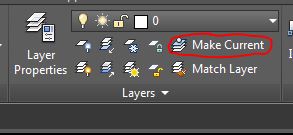 ------------- "Humans have a strength that cannot be measured. This is John Connor. If you are reading this, you are the resistance." <<AutoCAD 2015>> |
Posted By: slupi
Date Posted: 02.Aug.2017 at 15:50
|
haven´t used this toolbox before! Thanks a lot.
|
Posted By: John Connor
Date Posted: 02.Aug.2017 at 16:16
|
It's not a toolbox or a toolbar. It's merely a command found on the Ribbon > Layers panel. ------------- "Humans have a strength that cannot be measured. This is John Connor. If you are reading this, you are the resistance." <<AutoCAD 2015>> |
Posted By: Kent Cooper
Date Posted: 04.Aug.2017 at 22:37
This is what I use to do that: ;; ToCurrentLayer.lsp [command name: TCL] ;; Moves selected objects to current layer. (defun C:TCL ()
(command "_.select" pause "_.chprop" "_previous" "" "_layer" (getvar 'clayer) "" ); end command ); end defun |
 slupi wrote:
Posted By: Nate143
Date Posted: 10.Aug.2017 at 07:40
|
If you're using the blocks why not just edit them to always com in on the layer that you want them to come in on? or am I understanding the question incorrectly?
|
Posted By: slupi
Date Posted: 10.Aug.2017 at 08:52
|
No the blocks always belong to different layer. _laycur was exactly what i needed
|