Need some help drawing odd shape in DraftSight
Printed From: CAD Forum
Category: EN
Forum Name: CAD - general
Forum Description: General discussion about CAD, formats, standards, management, licensing, networking, harware, other CAD applications
URL: https://www.cadforum.cz/forum_en/forum_posts.asp?TID=12416
Printed Date: 28.Sep.2026 at 18:24
Topic: Need some help drawing odd shape in DraftSight
Posted By: kylermorgan1987
Subject: Need some help drawing odd shape in DraftSight
Date Posted: 02.Aug.2017 at 17:21
I'm pretty new to CAD and I'm wondering if anyone has any tips on how they would go about drawing this odd shape in Draftsight? Thanks.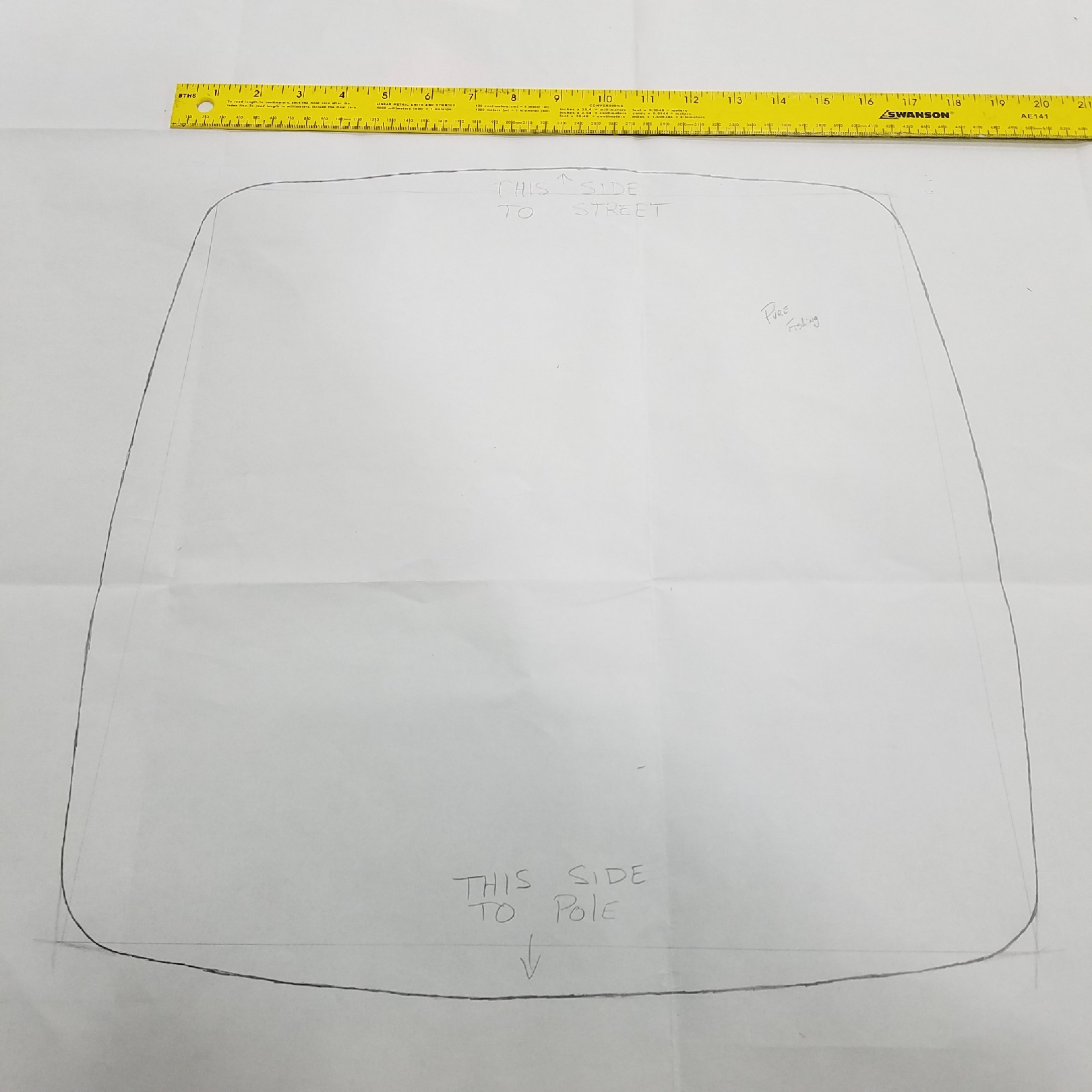
|
Replies:
Posted By: John Connor
Date Posted: 02.Aug.2017 at 17:47
|
Everything is an arc (i.e. - no straight lines)? Do you have any curve information (i.e. - radii)? What are the overall dimensions (LxW)? Can you bring an image into Draftsight and trace over it (then scale to suit)? Yes, you can using the IMAGEATTACH command. ------------- "Humans have a strength that cannot be measured. This is John Connor. If you are reading this, you are the resistance." <<AutoCAD 2015>> |
Posted By: kylermorgan1987
Date Posted: 02.Aug.2017 at 19:00
|
No straight lines. Don't know if Draftsight allows you to pull an image in a trace it. Dimensions at its widest points are 17.5" x 17.5" and I don't have curve information. |
Posted By: John Connor
Date Posted: 02.Aug.2017 at 19:42
|
Perhaps you missed it but I did confirm the command that will allow a user to bring an image into a drawing. It's called IMAGEATTACH. Since you have no curve information then a combination of polylines (curve fitted) and perhaps the circle command (TTR option; take an educated guess re: radius)) would get you close enough. Retake the photo and make sure your camera is as parallel to the sketch as you can get it. ------------- "Humans have a strength that cannot be measured. This is John Connor. If you are reading this, you are the resistance." <<AutoCAD 2015>> |
Posted By: kylermorgan1987
Date Posted: 02.Aug.2017 at 19:46
|
Awesome, I will give that a shot. Thanks! |
Posted By: Roger9789
Date Posted: 12.Aug.2017 at 03:51
|
Can anyone help me, am in need of 2D autocad valves and vessel block symbols. Anything really to do with p&id |
Posted By: John Connor
Date Posted: 12.Aug.2017 at 16:27
|
Roger: It is considered bad form to hijack a thread started by someone else on a totally different subject. Free CAD blocks of the type you are looking for can be found here at the CADForum and elsewhere on the Internet. All it takes is a little effort on your part. Seek and ye shall find. ------------- "Humans have a strength that cannot be measured. This is John Connor. If you are reading this, you are the resistance." <<AutoCAD 2015>> |