Rename a block after editing
Printed From: CAD Forum
Category: EN
Forum Name: AutoCAD
Forum Description: Discussion about AutoCAD and AutoCAD LT, viewers, DWG and DXF formats, Design Review, AutoCAD web, Drive, add-ons
URL: https://www.cadforum.cz/forum_en/forum_posts.asp?TID=12442
Printed Date: 31.Oct.2026 at 12:36
Topic: Rename a block after editing
Posted By: Nate143
Subject: Rename a block after editing
Date Posted: 16.Aug.2017 at 10:06
|
Hi all We are working with blocks and there is a constant update that we have to do on the blocks, however when exiting the block editor it requests a new name when saving. is there a way to turn this off that it keeps the original name? There used to be a way to set the system variables to not rename a block after a block edit but i can't find the setting  Thanks all  ------------- Regards Nate... |
Replies:
Posted By: John Connor
Date Posted: 16.Aug.2017 at 12:12
|
What is this "constant" update that has to be made to the block? Why don't you just replace the block with one that has a different name to begin with? Is the block attributed? ------------- "Humans have a strength that cannot be measured. This is John Connor. If you are reading this, you are the resistance." <<AutoCAD 2015>> |
Posted By: John Connor
Date Posted: 16.Aug.2017 at 12:30
When I am finished editing a block using BEDIT and I wish to close it I see only this...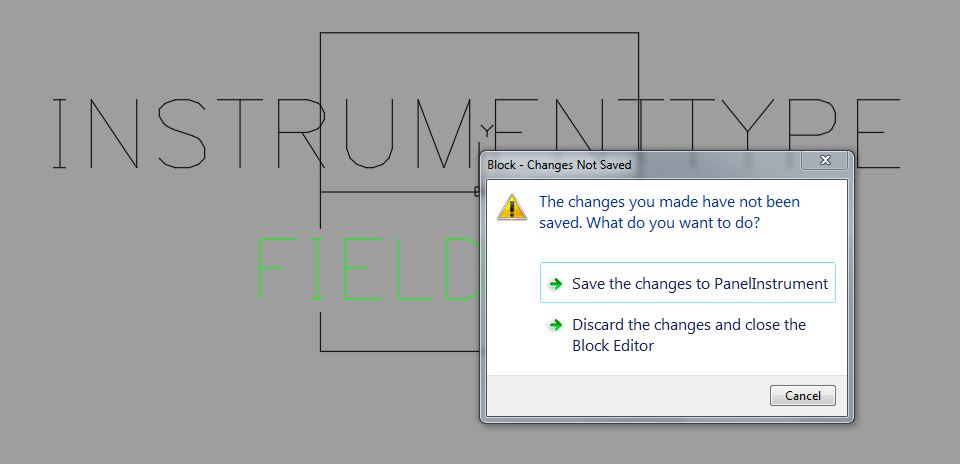 ------------- "Humans have a strength that cannot be measured. This is John Connor. If you are reading this, you are the resistance." <<AutoCAD 2015>> |
Posted By: Nate143
Date Posted: 16.Aug.2017 at 12:37
|
Changing the sizes of objects etc. it has nothing to do with a name change however every time I close the block it asks me if I want to rename the block. it doesn't affect anything regarding the block itself (unless you decide to change the name obviously) just an irritation causing a lot of time to be lost. Thanks I'll try and send a screen shot when I'm on the server again ------------- Regards Nate... |