Join AutoCAD line
Printed From: CAD Forum
Category: EN
Forum Name: AutoCAD
Forum Description: Discussion about AutoCAD and AutoCAD LT, viewers, DWG and DXF formats, Design Review, AutoCAD web, Drive, add-ons
URL: https://www.cadforum.cz/forum_en/forum_posts.asp?TID=12476
Printed Date: 27.Oct.2026 at 13:35
Topic: Join AutoCAD line
Posted By: mudassar_javed
Subject: Join AutoCAD line
Date Posted: 29.Sep.2017 at 06:15
I want to join end point of these two line with out changing the length of these two lines. please help which command is used...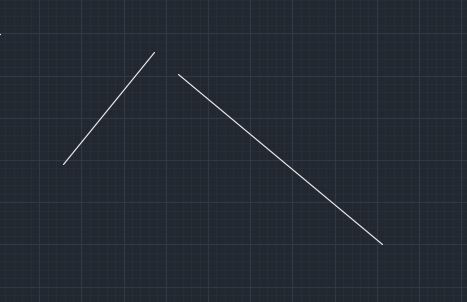 ------------- Mudassar |
Replies:
Posted By: philippe JOSEPH
Date Posted: 29.Sep.2017 at 08:10
|
Hello Mudassar, if I understand you want to "move" the two lines without changing their length to the " projected intersection" of them.
Then if yes use the command MOVE from one end of one line to the PROJECTED INTERSECTION of the 2 lines. You have the option PROJECTED INTERSECTION ( if correct because my AutoCAD is in French ) with Ctrl+right clic. |
Posted By: Kent Cooper
Date Posted: 29.Sep.2017 at 17:09
In English versions that's called the APPARENT INTERSECTION.
|
 philippe JOSEPH wrote:
Posted By: mudassar_javed
Date Posted: 01.Oct.2017 at 05:19
Thanks for you reply. Let me clarify the question. Please see picture below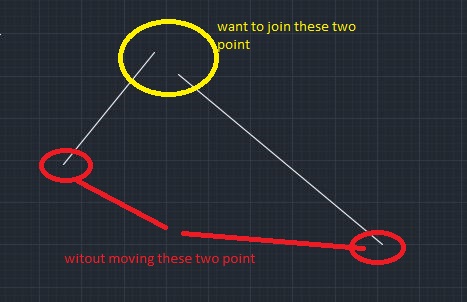
------------- Mudassar |
Posted By: John Connor
Date Posted: 01.Oct.2017 at 13:10
|
Rotate the line on the left to meet up with the line on the right. Use the endpoint circled in red of the left line as the base point for the rotation. I assume you are smart enough to figure out the angle of rotation. ------------- "Humans have a strength that cannot be measured. This is John Connor. If you are reading this, you are the resistance." <<AutoCAD 2015>> |
Posted By: philippe JOSEPH
Date Posted: 01.Oct.2017 at 13:14
|
Hello mudassar_javed, you will have to draw centered circles at the extremities of the lines in the red circles. Then you get the intersection to keep the 2 lines lengthes unchanged.
|
Posted By: mudassar_javed
Date Posted: 03.Oct.2017 at 08:39
|
Thanks Philippe JOSEPH I am unable to do. Can u please demonstrate it. ------------- Mudassar |
Posted By: John Connor
Date Posted: 03.Oct.2017 at 11:34
|
You could have written the next great Pakistani novel by now. I think this is what you were told to do. The intersection of the two circles (circled in red) is where the two lines should meet. By clicking on the green line and checking Properties you'll find the angle of the line. Invoke the Rotate command and select the line. Next, select the basepoint. When prompted to specify the rotation angle note that there are two other available options - Copy and Reference. Choose the Reference option. When asked to specify the Reference angle type in the angle you got from the Properties palette. When asked to specify the new angle pick the intersection of the two circles. Done. All of this takes less than 20 seconds and that includes having a cup of tea. If you skip the cup of tea it can be done in half that time. You are making this way more difficult than it needs to be. 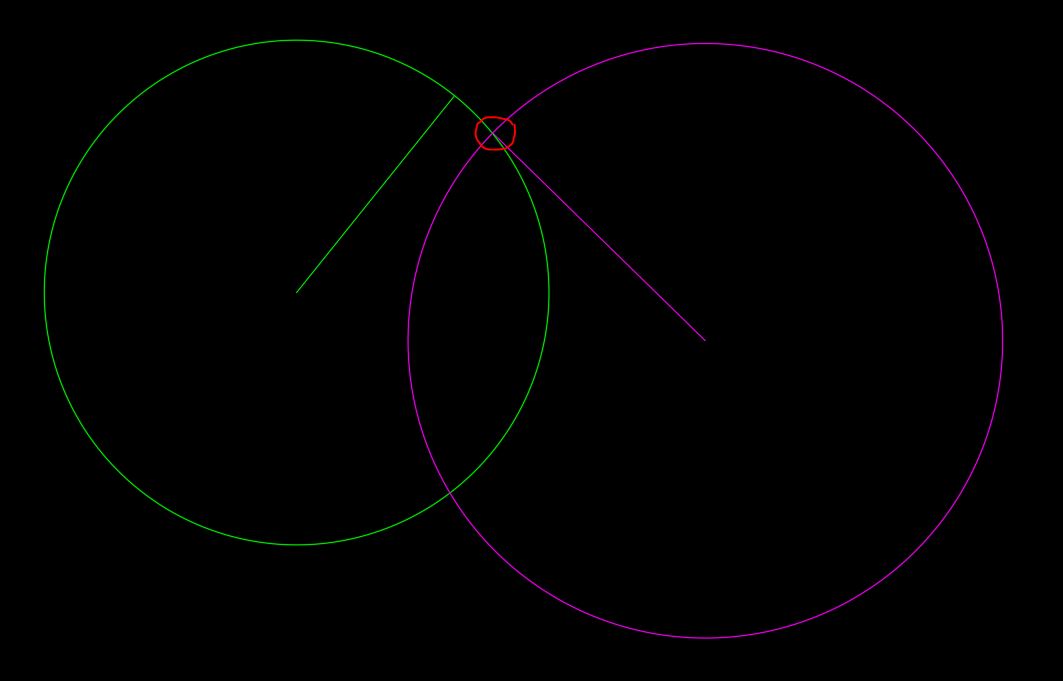 ------------- "Humans have a strength that cannot be measured. This is John Connor. If you are reading this, you are the resistance." <<AutoCAD 2015>> |
Posted By: philippe JOSEPH
Date Posted: 03.Oct.2017 at 14:16
| Yes John and mudassar_javed, or you can have the option of just clicking the lines and use the end grips "at hand" to connect them at the intersection of the 2 circles ( working with the grips ). |
Posted By: John Connor
Date Posted: 03.Oct.2017 at 15:54
|
Maybe you should have mentioned that to the OP right from the start? ------------- "Humans have a strength that cannot be measured. This is John Connor. If you are reading this, you are the resistance." <<AutoCAD 2015>> |
Posted By: mudassar_javed
Date Posted: 04.Oct.2017 at 08:55
 Thanks John. Thanks John.You are the great teacher
------------- Mudassar |
Posted By: John Connor
Date Posted: 04.Oct.2017 at 11:15
|
It wasn't all my doing; it was a collaborative effort.
------------- "Humans have a strength that cannot be measured. This is John Connor. If you are reading this, you are the resistance." <<AutoCAD 2015>> |