Hot to connect these two solid
Printed From: CAD Forum
Category: EN
Forum Name: AutoCAD
Forum Description: Discussion about AutoCAD and AutoCAD LT, viewers, DWG and DXF formats, Design Review, AutoCAD web, Drive, add-ons
URL: https://www.cadforum.cz/forum_en/forum_posts.asp?TID=12479
Printed Date: 05.Sep.2026 at 23:14
Topic: Hot to connect these two solid
Posted By: rdjavi
Subject: Hot to connect these two solid
Date Posted: 01.Oct.2017 at 20:21
I have not idea how to connect two solid from the picture below so I would be grateful if somebody help me. dwg file attached.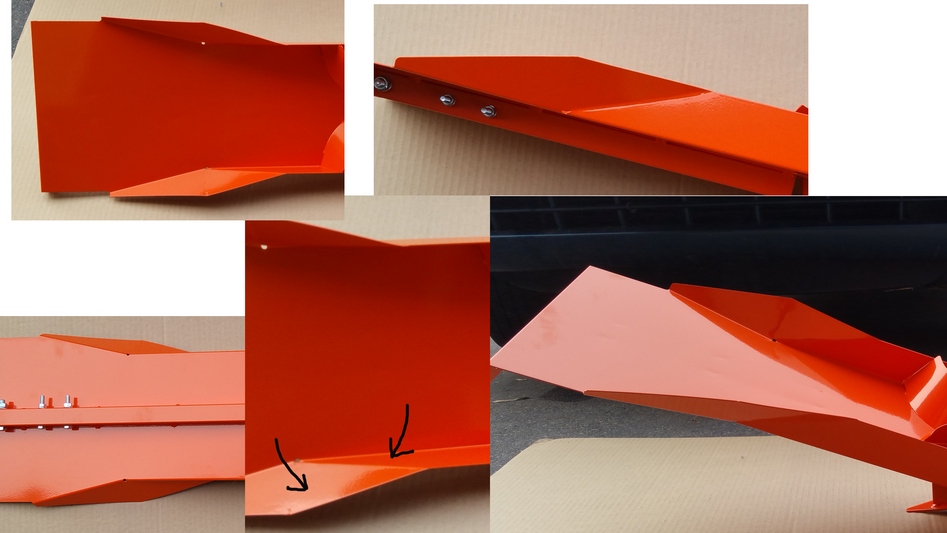 uploads/441310/how.dwg" rel="nofollow - uploads/441310/how.dwg uploads/441310/how.dwg" rel="nofollow - uploads/441310/how.dwg
|
Replies:
Posted By: John Connor
Date Posted: 01.Oct.2017 at 23:13
|
Are you saying the UNION command does not work? ------------- "Humans have a strength that cannot be measured. This is John Connor. If you are reading this, you are the resistance." <<AutoCAD 2015>> |
Posted By: rdjavi
Date Posted: 01.Oct.2017 at 23:55
|
I don't have a second solid, just a one, that is the problem, I don't know how to draw second solid. Sorry, I set the wrong question. He has a angle on X and Z axis. If you open the dwg file, you see that there are not second solid. |
Posted By: John Connor
Date Posted: 02.Oct.2017 at 00:49
|
Actually your drawing has two solids, a line, and two lightweight polylines. For the flared end you might try using the Loft command. Are you working off of a sketch? Do you have any dimensions to work with? Do you know the angle of the flared portion of the object? ------------- "Humans have a strength that cannot be measured. This is John Connor. If you are reading this, you are the resistance." <<AutoCAD 2015>> |
Posted By: rdjavi
Date Posted: 02.Oct.2017 at 01:08
|
Ok, thanks! |
Posted By: John Connor
Date Posted: 02.Oct.2017 at 12:15
This is what I was able to create using a combination of commands including 3Dpoly, Loft, Region and Extrude. I set the angle of my flared section at 10 degrees.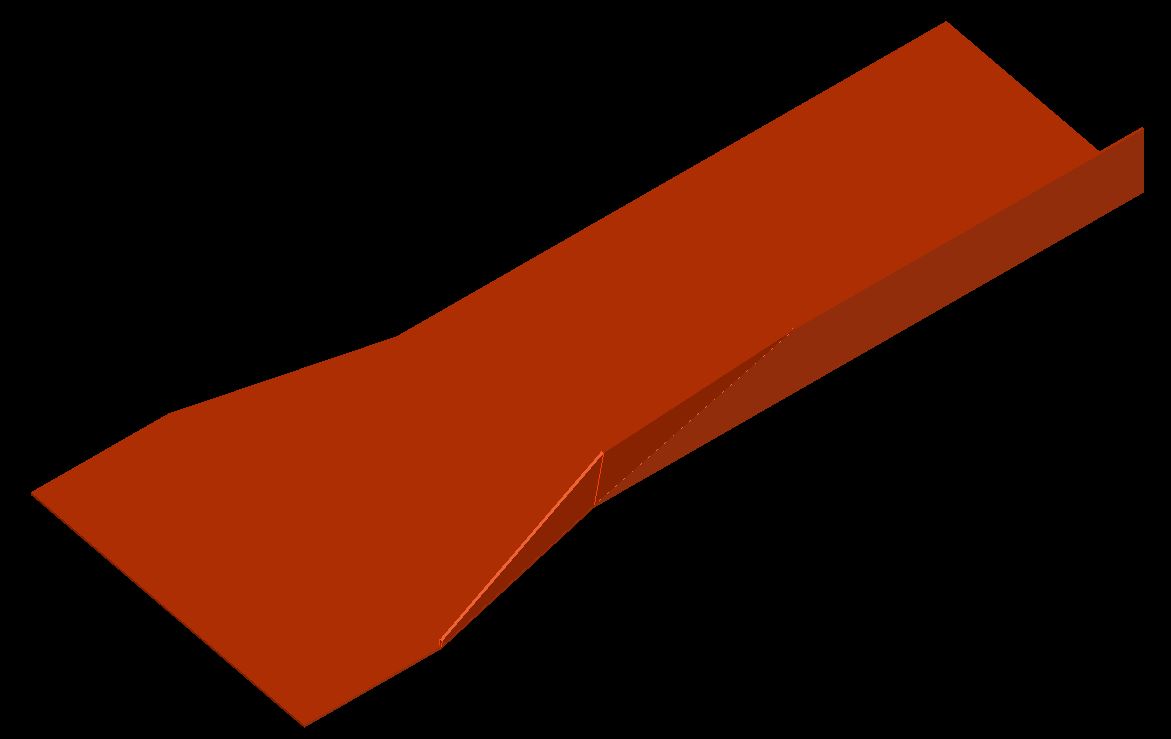 ------------- "Humans have a strength that cannot be measured. This is John Connor. If you are reading this, you are the resistance." <<AutoCAD 2015>> |
Posted By: John Connor
Date Posted: 02.Oct.2017 at 12:17
Here is another view.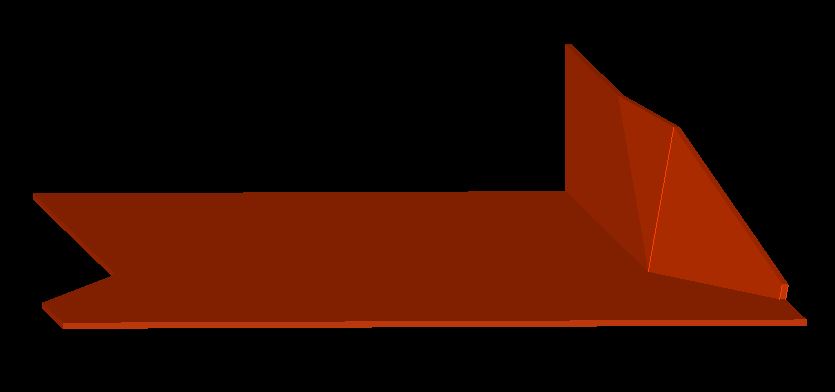 ------------- "Humans have a strength that cannot be measured. This is John Connor. If you are reading this, you are the resistance." <<AutoCAD 2015>> |
Posted By: John Connor
Date Posted: 04.Oct.2017 at 12:18
|
Well? Were you successful in creating the flared end or did you give up? ------------- "Humans have a strength that cannot be measured. This is John Connor. If you are reading this, you are the resistance." <<AutoCAD 2015>> |
Posted By: rdjavi
Date Posted: 06.Oct.2017 at 14:54
|
Hi John. I apologize for the delay with the reply, I had a lot of work. And I found a solution similar to yours, look at the picture. Is there any option to convert the surface to solid? In Mesh panel that is option Convert to solid but it does not to apply on my surface. I'm not quite clear about your procedure, after the loft command is not going to apply to the Region command with me. It's a REGION command or another one? 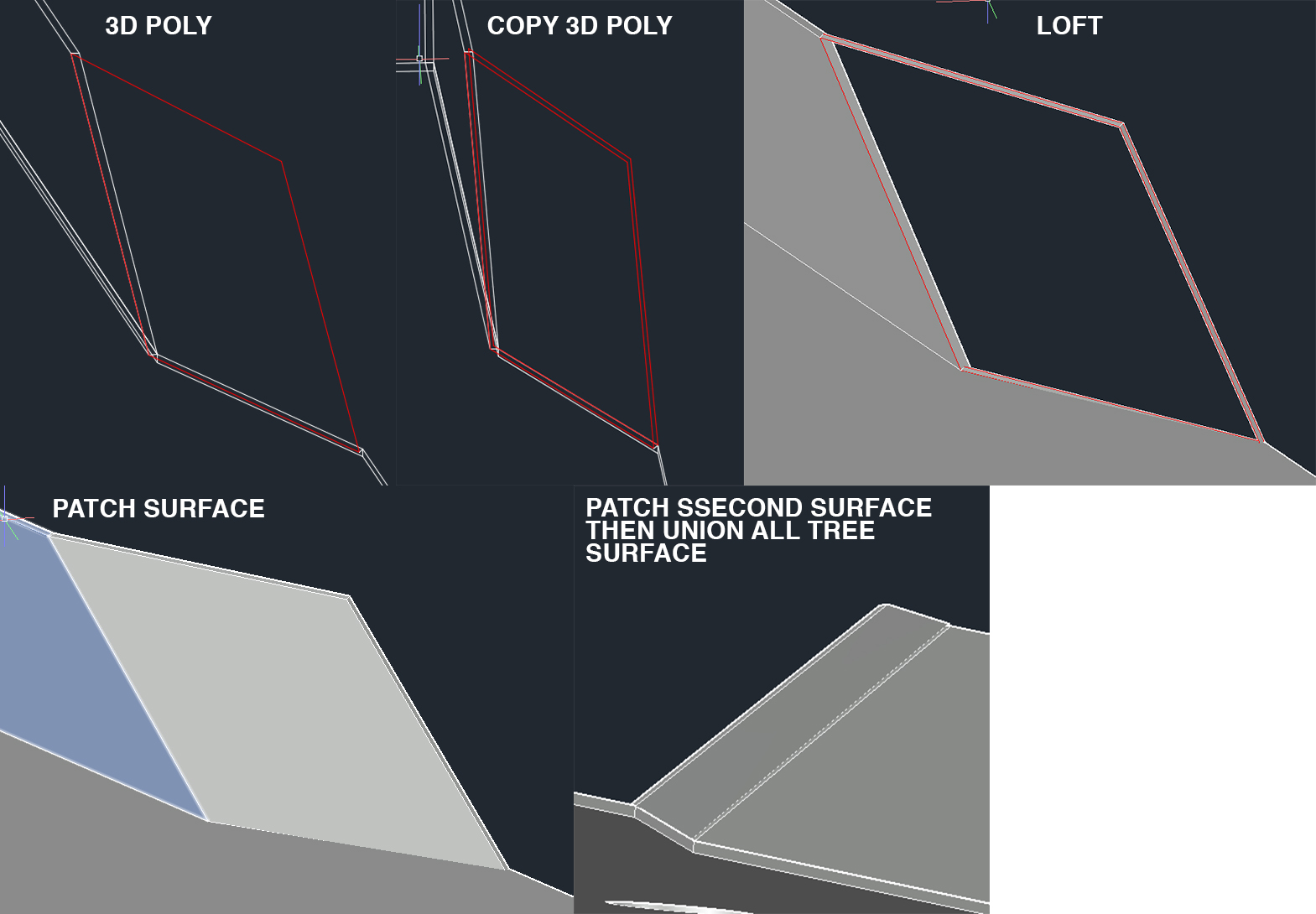 |
Posted By: John Connor
Date Posted: 06.Oct.2017 at 15:29
|
I'm sure there is more than one solution to the problem. My solution may be not be the best or the quickest but it worked. There are two or three different ways to convert a surface to a solid but it depends on what you have to work with. Unfortunately I worked with your drawing on a different CAD system so I do not have the .dwg file to refer back to. I would have to start over from scratch and right now I am a little busy.
------------- "Humans have a strength that cannot be measured. This is John Connor. If you are reading this, you are the resistance." <<AutoCAD 2015>> |
Posted By: rdjavi
Date Posted: 06.Oct.2017 at 15:33
|
I just need to convert the surface in solid to have a one solid object instead of multiple surfaces. I export the 3D model in IGS file and work with him in another software. |
Posted By: John Connor
Date Posted: 06.Oct.2017 at 17:11
|
So pick a method and try it. If it doesn't work try another method. 1. Convert to solid. 2. Thicken then convert to solid. 3. SurfSculpt (must be watertight). ------------- "Humans have a strength that cannot be measured. This is John Connor. If you are reading this, you are the resistance." <<AutoCAD 2015>> |
Posted By: Kent Cooper
Date Posted: 06.Oct.2017 at 20:11
| Images and drawing files https://forums.autodesk.com/t5/autocad-forum/hot-to-connect-these-two-solid/td-p/7423589" rel="nofollow - here . [Including the "Hot" in place of "How" in the Subject line -- it's good to be eager about these things.] |