Switching to another drawing in a running VBA sess
Printed From: CAD Forum
Category: EN
Forum Name: AutoCAD
Forum Description: Discussion about AutoCAD and AutoCAD LT, viewers, DWG and DXF formats, Design Review, AutoCAD web, Drive, add-ons
URL: https://www.cadforum.cz/forum_en/forum_posts.asp?TID=12492
Printed Date: 05.Sep.2026 at 00:48
Topic: Switching to another drawing in a running VBA sess
Posted By: arjen_broens
Subject: Switching to another drawing in a running VBA sess
Date Posted: 07.Oct.2017 at 16:26
|
My VBA application requires info from one drawing to be used in another one in the same VBA running session. I need to ALIGN one drawing based upon 3 3D points from another draiwng automatically. At the moment I'm running my application to collate the info from drawing 1, store it, close my application to open the other drawing and run my application again to retrieve the info to ALIGN it. Any idea how I can switch to another loaded drawing in the same VBA running session? Thanks! ------------- I Tego Arcana Dei |
Replies:
Posted By: arjen_broens
Date Posted: 08.Oct.2017 at 12:27
|
I've narrowed the problem down. I can switch drawings now whilst my application is running. I've created a combobox to switch drawings whilst my application is running and even ACTIVATE and REGEN the selected drawing: ThisDrawing.Application.Documents.Item(ComboBox1.ListIndex).Activate ThisDrawing.Application.Documents.Item(ComboBox1.ListIndex).Regen acAllViewports The GETPOINT line is only successful in the drawing that was active before I started my application: PrikPnt = ThisDrawing.Utility.GetPoint(Basepnt, PrikPointTexT) The error I get in all other drawings I select and activate: 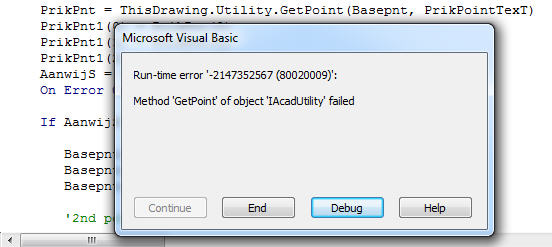 Anyone any idea what's need to be set before I can use it? Thanks ------------- I Tego Arcana Dei |