autocad
Printed From: CAD Forum
Category: EN
Forum Name: AutoCAD
Forum Description: Discussion about AutoCAD and AutoCAD LT, viewers, DWG and DXF formats, Design Review, AutoCAD web, Drive, add-ons
URL: https://www.cadforum.cz/forum_en/forum_posts.asp?TID=12499
Printed Date: 28.Oct.2026 at 20:32
Topic: autocad
Posted By: pytha
Subject: autocad
Date Posted: 18.Oct.2017 at 10:22
|
How do you add domstyle control to your cui. in autocad 2016 Bart ------------- bart |
Replies:
Posted By: John Connor
Date Posted: 18.Oct.2017 at 11:22
|
DIMstyle control? Isn't the DIMstyle command already part of the cui? ------------- "Humans have a strength that cannot be measured. This is John Connor. If you are reading this, you are the resistance." <<AutoCAD 2015>> |
Posted By: pytha
Date Posted: 18.Oct.2017 at 11:29
|
De sizes 1-10-1-1 etc. ------------- bart |
Posted By: John Connor
Date Posted: 18.Oct.2017 at 12:00
|
De sizes? I have no idea what you are referring to. Try again. Dimstyle can be accessed via the Ribbon by clicking on the Annotate tab and looking at the Dimensions panel. ------------- "Humans have a strength that cannot be measured. This is John Connor. If you are reading this, you are the resistance." <<AutoCAD 2015>> |
Posted By: raheemshaik
Date Posted: 26.Oct.2017 at 11:04
|
I NEEDS PRESSURE GAUGE WITH DBB VALVE DWG & BLOCK ------------- RS |
Posted By: Kent Cooper
Date Posted: 26.Oct.2017 at 16:09
| I'm lost here.... From the meaningless Subject line to the "clarification" that doesn't clarify anything to the last post that seems to have nothing whatever to do with the original question, this is a textbook example of poor technical-forum usage. I recommend people read and heed http://www.catb.org/esr/faqs/smart-questions.html" rel="nofollow - this . |
Posted By: RunningSad
Date Posted: 17.Nov.2017 at 18:08
|
Help me. Send Bitcoin 1FojHzKyNUegxDxK7nZLLJW584426BSHwy
|
Posted By: John Connor
Date Posted: 18.Nov.2017 at 12:03
Another idiot heard from. ------------- "Humans have a strength that cannot be measured. This is John Connor. If you are reading this, you are the resistance." <<AutoCAD 2015>> |
 RunningSad wrote:
Posted By: AntonioGutierrez
Date Posted: 12.Dec.2017 at 23:53
|
I need a reliable source to download 2016 keygen crack. I usually work with 2017 but need 2016 for a few weeks can anyone help me thanks ------------- Antonio Gutierrez |
Posted By: John Connor
Date Posted: 13.Dec.2017 at 00:05
|
Antonio: You have obviously come to the wrong place. Nobody here with any ethics would provide you with a keygen crack. You do know that students can get AutoDesk products for free and anyone who is not a student can buy AutoCAD clones for about 1/10th the price charged by AutoDesk for full AutoCAD and AutoCAD LT don't you? There are even free 2D AutoCAD clones like nanoCAD and Draftsight. ------------- "Humans have a strength that cannot be measured. This is John Connor. If you are reading this, you are the resistance." <<AutoCAD 2015>> |
Posted By: marox
Date Posted: 20.Dec.2017 at 11:49
|
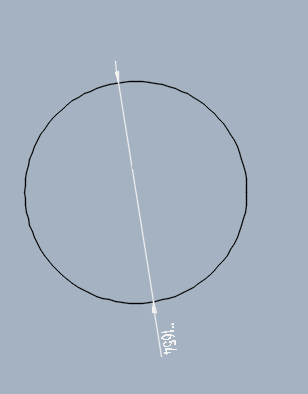
hello, help me please font name Technic. Why doesn't show diameter
 thank you
 |
Posted By: John Connor
Date Posted: 20.Dec.2017 at 11:53
|
Did you specify the correct text style in your DimStyle dialog box?
------------- "Humans have a strength that cannot be measured. This is John Connor. If you are reading this, you are the resistance." <<AutoCAD 2015>> |
Posted By: marox
Date Posted: 20.Dec.2017 at 12:00
| only font 'Technic' does not show diameter |
Posted By: John Connor
Date Posted: 20.Dec.2017 at 12:16
Yes, it does. I tested it. See........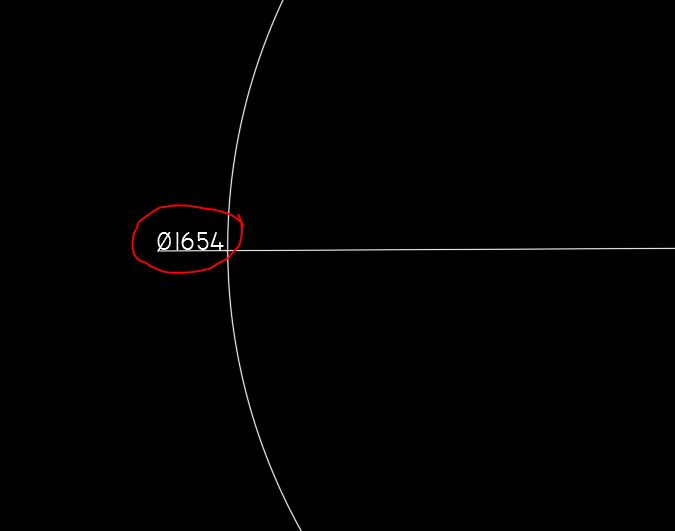
------------- "Humans have a strength that cannot be measured. This is John Connor. If you are reading this, you are the resistance." <<AutoCAD 2015>> |
Posted By: John Connor
Date Posted: 20.Dec.2017 at 12:18
|
I think the problem is you specified a Prefix using the < " > symbol which then replaced the diameter symbol. Why would you do that? ------------- "Humans have a strength that cannot be measured. This is John Connor. If you are reading this, you are the resistance." <<AutoCAD 2015>> |
Posted By: marox
Date Posted: 20.Dec.2017 at 12:22
|
no i did this is indicated by autocad |
Posted By: John Connor
Date Posted: 20.Dec.2017 at 12:29
|
If that is the case then please explain how was I able to specify the Technic font for use with my dimensions thus resulting in the appearance of the diameter symbol. And how is it your diameter is preceded with the < " > symbol. I'll wait while you think of a good answer. ------------- "Humans have a strength that cannot be measured. This is John Connor. If you are reading this, you are the resistance." <<AutoCAD 2015>> |
Posted By: marox
Date Posted: 20.Dec.2017 at 12:34
| in other shows good, my computer has a problem |
Posted By: John Connor
Date Posted: 20.Dec.2017 at 12:36
|
Yes, the problem is the operator. I too can override the diameter symbol. See...... 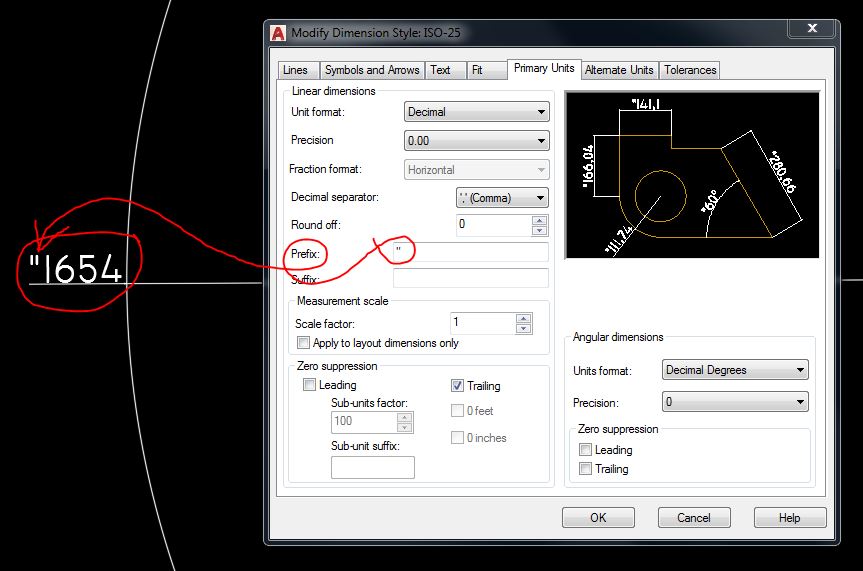 ------------- "Humans have a strength that cannot be measured. This is John Connor. If you are reading this, you are the resistance." <<AutoCAD 2015>> |
Posted By: marox
Date Posted: 20.Dec.2017 at 12:52
| no it is not. there is empty |
Posted By: John Connor
Date Posted: 20.Dec.2017 at 12:55
|
Then you overrode it manually because when you look at the image you posted the < " > symbol is clearly in front of your dimension. Or is that a fake image? Start a new drawing and specify the Technics font. Remember to check your Dimension Style too as you want the same text style/font to be specified. Then draw a circle of the same diameter (1654) and dimension the diameter. What happens? Does the diameter symbol now display properly? Yes or no? ------------- "Humans have a strength that cannot be measured. This is John Connor. If you are reading this, you are the resistance." <<AutoCAD 2015>> |
Posted By: marox
Date Posted: 20.Dec.2017 at 12:57
|
Thank you I'll post the video later
|
Posted By: John Connor
Date Posted: 20.Dec.2017 at 13:16
|
I did not ask for a video. I asked you to run a simple test by creating a new drawing to see if the problem is repeated. It would take less than a minute to do.
------------- "Humans have a strength that cannot be measured. This is John Connor. If you are reading this, you are the resistance." <<AutoCAD 2015>> |
Posted By: marox
Date Posted: 20.Dec.2017 at 13:19
| so the same problem |
Posted By: John Connor
Date Posted: 20.Dec.2017 at 13:27
|
Then you are doing something wrong. The diameter symbol can be reproduced using the Technic font. Try entering it manually using %%c. ------------- "Humans have a strength that cannot be measured. This is John Connor. If you are reading this, you are the resistance." <<AutoCAD 2015>> |
Posted By: marox
Date Posted: 20.Dec.2017 at 13:40
| I'm doing well, but the program is doing wrong. %% c does not help |
Posted By: John Connor
Date Posted: 20.Dec.2017 at 13:48
|
There are no spaces between those three characters. It is %%c not %% c. Got it? ------------- "Humans have a strength that cannot be measured. This is John Connor. If you are reading this, you are the resistance." <<AutoCAD 2015>> |
Posted By: John Connor
Date Posted: 20.Dec.2017 at 13:51
|
Open the attached drawing. Do the diameter symbols display both in the dimension and in the plain text entities? The drawing was saved in 2010 file format so you should be able to open it. http://www.cadforum.cz/forum_en/uploads/165260/Technic_test.dwg" rel="nofollow - uploads/165260/Technic_test.dwg ------------- "Humans have a strength that cannot be measured. This is John Connor. If you are reading this, you are the resistance." <<AutoCAD 2015>> |
Posted By: marox
Date Posted: 20.Dec.2017 at 13:58
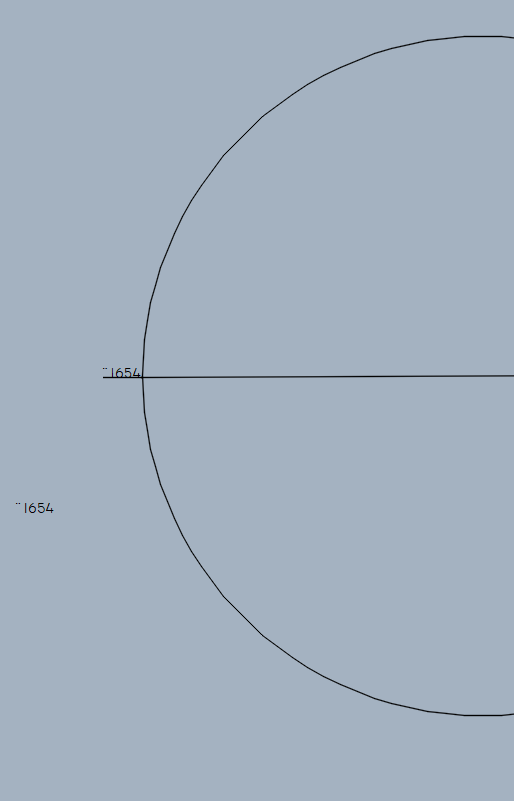
|
Posted By: John Connor
Date Posted: 20.Dec.2017 at 14:03
|
Are you sure you are specifying the correct font? Did you substitute the font for the Style called Standard or create a new dimension style? Let's see a screenshot of your Style dialog box and your DimStyle > Text tab dialog box. The only other thing I can think of is that your copy of Technic is either corrupt or the wrong version. Technic is not an AutoCAD .shx font. It is a Windows Truetype font. Here are the details:  ------------- "Humans have a strength that cannot be measured. This is John Connor. If you are reading this, you are the resistance." <<AutoCAD 2015>> |
Posted By: John Connor
Date Posted: 20.Dec.2017 at 14:40
|
If you suspect a corrupted font or that it is the wrong version then the best I can offer is to provide you with a copy of the font I have on my computer. You will have to follow the Microsoft procedures for removing and installing a font as outlined here... https://support.microsoft.com/en-us/help/314960/how-to-install-or-remove-a-font-in-windows ------------- "Humans have a strength that cannot be measured. This is John Connor. If you are reading this, you are the resistance." <<AutoCAD 2015>> |
Posted By: shwetakakran
Date Posted: 17.Feb.2018 at 10:38
| Dimstyle can be accessed via the Ribbon after this you have to clicking on the Annotate tab and looking at the Dimensions panel. |