help autocad changed my folders to autocad scripts
Printed From: CAD Forum
Category: EN
Forum Name: AutoCAD
Forum Description: Discussion about AutoCAD and AutoCAD LT, viewers, DWG and DXF formats, Design Review, AutoCAD web, Drive, add-ons
URL: https://www.cadforum.cz/forum_en/forum_posts.asp?TID=12532
Printed Date: 05.Sep.2026 at 12:42
Topic: help autocad changed my folders to autocad scripts
Posted By: annaa555
Subject: help autocad changed my folders to autocad scripts
Date Posted: 18.Nov.2017 at 16:16
| i installed autocad 2016 and it changed folders to autocad scripts i uninstalled autocad and everything that it had but problem is still the same help me please :( here is a link see the photos it is not virus link or anything help me please :( https://imgur.com/a/AYq1m |
Replies:
Posted By: John Connor
Date Posted: 19.Nov.2017 at 12:02
|
You could have just as easily changed the path to the folder via Options > Files and Folders. ------------- "Humans have a strength that cannot be measured. This is John Connor. If you are reading this, you are the resistance." <<AutoCAD 2015>> |
Posted By: Kent Cooper
Date Posted: 21.Nov.2017 at 18:22
I suspect what you want is the OPTIONS command > Files tab > Support File Search Path list. Open that and you can Add as many folder locations as you want, for AutoCAD to look in for such things: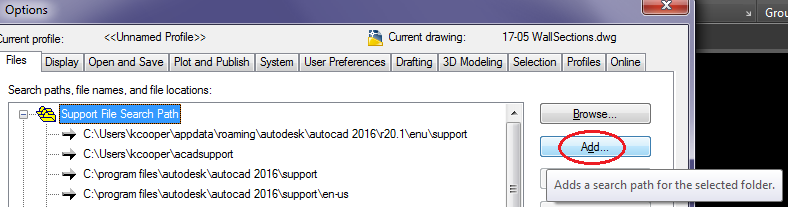 |