How to scale in one axis only.
Printed From: CAD Forum
Category: EN
Forum Name: AutoCAD
Forum Description: Discussion about AutoCAD and AutoCAD LT, viewers, DWG and DXF formats, Design Review, AutoCAD web, Drive, add-ons
URL: https://www.cadforum.cz/forum_en/forum_posts.asp?TID=12543
Printed Date: 05.Sep.2026 at 03:01
Topic: How to scale in one axis only.
Posted By: Vanan6
Subject: How to scale in one axis only.
Date Posted: 30.Nov.2017 at 23:48
I've been having trouble scaling a gate. when I scale along the x axis to fit the length of the gate, the height of the gate in the z axis is too much. Is it possible to independently scale the z axis independently to fix the height of my gate? 
|
Replies:
Posted By: John Connor
Date Posted: 30.Nov.2017 at 23:53
|
Is this a 2D or 3D drawing? Creating a block then inserting it allows the user to apply different scale factors to the X, Y and Z axis. ------------- "Humans have a strength that cannot be measured. This is John Connor. If you are reading this, you are the resistance." <<AutoCAD 2015>> |
Posted By: Vanan6
Date Posted: 01.Dec.2017 at 00:05
| Its a 3D drawing. I turned it into a block and checked properties but when I try to change the values of the z axis all i get is the calculator but the scale of my drawing doesn't change. what am i doing wrong? |
Posted By: John Connor
Date Posted: 01.Dec.2017 at 00:14
|
What you did wrong was fail to follow my instructions. I tested the procedure before posting and it does work. Try again. Create a block. Insert block. In the dialogue box uncheck the Uniform Scale option then enter the X, Y and Z scale.
------------- "Humans have a strength that cannot be measured. This is John Connor. If you are reading this, you are the resistance." <<AutoCAD 2015>> |
Posted By: John Connor
Date Posted: 01.Dec.2017 at 00:22
Example: White color cube is a block 1 unit x 1 unit by 1 unit high. Magenta colored version of cube was INSERTED with a non-uniform scale of 1 unit x 1 unit by 3 units in height. BTW...the cube is a 3D solid model.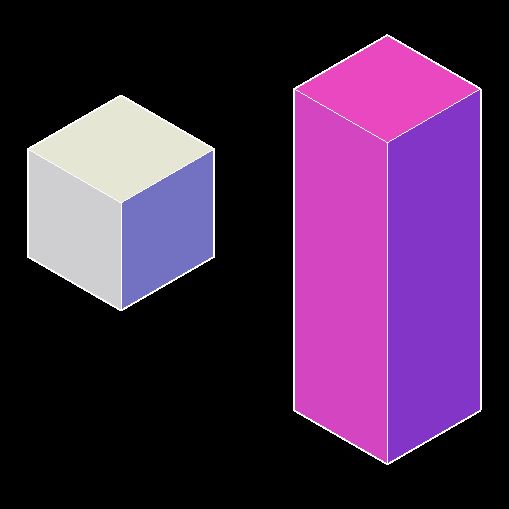 ------------- "Humans have a strength that cannot be measured. This is John Connor. If you are reading this, you are the resistance." <<AutoCAD 2015>> |
Posted By: Kent Cooper
Date Posted: 01.Dec.2017 at 16:38
To add a little: First, uncheck the Scale uniformly option in the dialog box during creation of the Block definition, or else you won't get the choice to uncheck the Uniform Scale option when Inserting, so you can give it unequal X, Y & Z scale factors. If you have a Block already defined with Scale uniformly chosen, you can "un-choose" that feature in BEDITing the Block definition.
|
 John Connor wrote: