Hatch Creation Help
Printed From: CAD Forum
Category: EN
Forum Name: AutoCAD
Forum Description: Discussion about AutoCAD and AutoCAD LT, viewers, DWG and DXF formats, Design Review, AutoCAD web, Drive, add-ons
URL: https://www.cadforum.cz/forum_en/forum_posts.asp?TID=12568
Printed Date: 05.Sep.2026 at 04:16
Topic: Hatch Creation Help
Posted By: martingtc
Subject: Hatch Creation Help
Date Posted: 21.Dec.2017 at 16:52
|
Can someone please help me? I've drawn a 1m x 1m square and need the hatch inside as a .pat but I just can't work it out :( can someone help? Super thanks. uploads/657554/dm.dwg" rel="nofollow - uploads/657554/dm.dwg
|
Replies:
Posted By: Breeze104
Date Posted: 21.Dec.2017 at 17:13
Can you upload a screen shot of what "you" are getting? Because when I opened the dwg it was total hatched.
------------- Breeze |
Posted By: martingtc
Date Posted: 21.Dec.2017 at 17:59
| Sorry, that's how I want the hatch to look - a diamond pattern with thick bars. I've drawn the end product but need a hatch for it please |
Posted By: John Connor
Date Posted: 21.Dec.2017 at 18:07
|
So you want someone here to create a custom hatch pattern. What are you willing to pay? ------------- "Humans have a strength that cannot be measured. This is John Connor. If you are reading this, you are the resistance." <<AutoCAD 2015>> |
Posted By: Kent Cooper
Date Posted: 21.Dec.2017 at 20:37
|
I happen to have one quite similar to that: *LATT60,LATTICE-WORK AT 60 DEGREES, 1" SLATS, 3" GAPS 60,0,0,0,4 60,1.1547,0,0,4 120,0,0,2.3094,4,3.4641,-1.1547 120,1.1547,0,2.3094,4,-1.1547,3.4641 Are you capable of figuring out how to alter that for your size and proportions? Also, you will need to decide whether the 70x120 diamond dimensions are the critical thing, or an actual 60-degree angle is wanted [yours is only about 1/4 of a degree off of 60]. If the former, the angle designators above will have to be changed as well as the offsets and pen-down/pen-up numbers. If the latter, the angles above are good.
|
Posted By: martingtc
Date Posted: 22.Dec.2017 at 09:15
|
Pefect!! that's awesome. I have another which is the same, but 100 across and 170 top to bottom. Which valus would I change on the txt file? Thank you Edit: actually, it's a bit off - the bars are 20 when they need to be 32 :(
|
Posted By: Kent Cooper
Date Posted: 22.Dec.2017 at 15:41
You can make your own, at whatever sizes and/or proportions and/or angles you want. Read about it in Help http://help.autodesk.com/view/ACD/2018/ENU/?guid=GUID-A6F2E6FF-1717-44B6-A476-0CA817ADD77E" rel="nofollow - [>>here<< for 2018, but no different for earlier versions], draw up your specifics in a limited area, and use the image for what values to put where in the pattern definitions.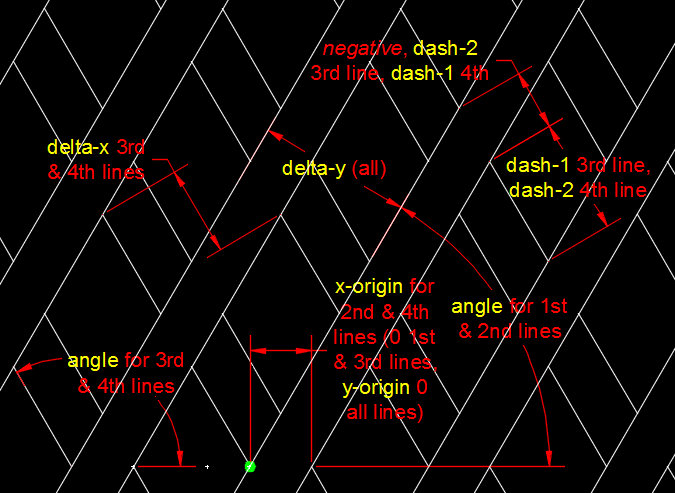 |