How Do You Draw These Arcs?
Printed From: CAD Forum
Category: EN
Forum Name: AutoCAD
Forum Description: Discussion about AutoCAD and AutoCAD LT, viewers, DWG and DXF formats, Design Review, AutoCAD web, Drive, add-ons
URL: https://www.cadforum.cz/forum_en/forum_posts.asp?TID=12624
Printed Date: 05.Sep.2026 at 04:16
Topic: How Do You Draw These Arcs?
Posted By: dery
Subject: How Do You Draw These Arcs?
Date Posted: 10.Feb.2018 at 20:32
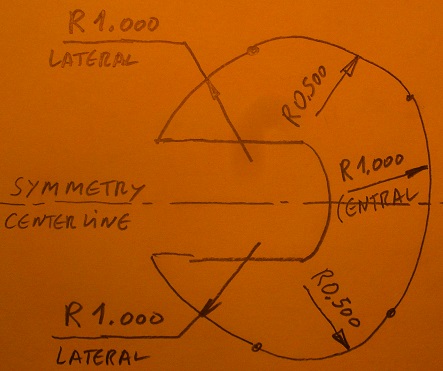
Can someone please tell me how to draw these arcs (see below pic) in AutoCAD? This is what I done so far (see below pic), can somebody tell me what is the next step?  |
Replies:
Posted By: philippe JOSEPH
Date Posted: 11.Feb.2018 at 13:50
|
Hello dery ( sorry John ) it's possible to draw the all thing using : OFFSET by 0.6875 , ccircle r 0.500 tangent to line/tangent to circle, OFFSET by 1.000, CIECLE r 1.000 , CIRCLE r 1.000. This is not so complicate and you will have to use the fixed dimensions to draw circles of known radius giving the good inerstections and dimensions.
|
Posted By: dery
Date Posted: 11.Feb.2018 at 13:57
I am sorry but I do not understand. Can you explain the step-by-step in detail by using an image?
|
 philippe JOSEPH wrote:
Posted By: philippe JOSEPH
Date Posted: 11.Feb.2018 at 15:06

|
Posted By: dery
Date Posted: 11.Feb.2018 at 15:38
I am sorry but I still don't understand. Please don't answer once for all like you did in your post #4. Now, can you tell me what is the next step of my drawing in post #1?
|
Posted By: John Connor
Date Posted: 11.Feb.2018 at 15:57
|
The steps are listed in the explanation and numbered 0 through 4. Why is it necessary for us to hold your hand and take you through them one by one? They seem straight forward enough. Is it that you are unfamiliar with one of the commands? If so that would point to a basic lack of understanding of AutoCAD. Is that the case here? ------------- "Humans have a strength that cannot be measured. This is John Connor. If you are reading this, you are the resistance." <<AutoCAD 2015>> |
Posted By: dery
Date Posted: 11.Feb.2018 at 16:20
How do you draw the green circle (the r.500)?
|
Posted By: John Connor
Date Posted: 11.Feb.2018 at 16:31
|
You're kidding us right? Do you see the words "tangent tangent"? What command and what option would allow you to specify a radius and two different tangent points for a single circle? Think hard. The answer is practically staring you in the face.
------------- "Humans have a strength that cannot be measured. This is John Connor. If you are reading this, you are the resistance." <<AutoCAD 2015>> |
Posted By: dery
Date Posted: 11.Feb.2018 at 16:35
What do you mean with "tangent tangent"? Is it a Ttr command?
|
Posted By: John Connor
Date Posted: 11.Feb.2018 at 16:43
|
Folks, we have a winner! Someone give this man a cupie doll.
------------- "Humans have a strength that cannot be measured. This is John Connor. If you are reading this, you are the resistance." <<AutoCAD 2015>> |
Posted By: dery
Date Posted: 11.Feb.2018 at 16:59
|
How do I create the green circle (r.500)? I try the Ttr command but the error says "circle does not exist".
|
Posted By: John Connor
Date Posted: 11.Feb.2018 at 17:33
|
In order to use Circle > TTR you must have TWO entities that already exist in the drawing that your new circle will be drawn TANGENT to. It's a very simple concept even a student with only basic AutoCAD knowledge should be able to grasp. I don't understand why you are struggling with this. Is it a language barrier? Have you not had any AutoCAD training at all or gone through any of the number of basic AutoCAD tutorials that are available on the Internet? Would you like me to suggest two or three websites? Maybe you need to purchase a book preferably one that has exercises on a CD for practicing the various commands and exploring all options available where applicable. ------------- "Humans have a strength that cannot be measured. This is John Connor. If you are reading this, you are the resistance." <<AutoCAD 2015>> |
Posted By: dery
Date Posted: 11.Feb.2018 at 18:25
| How do I get 0.6875? |
Posted By: dery
Date Posted: 11.Feb.2018 at 18:36
How do I draw the green circle (r.500) in AutoCAD where tangent to r1.000 and its centroid is at the center line? |
Posted By: John Connor
Date Posted: 11.Feb.2018 at 18:41
|
Do you not yet have TWO entities you can draw a circle using the TTR option yet? What are you doing? ------------- "Humans have a strength that cannot be measured. This is John Connor. If you are reading this, you are the resistance." <<AutoCAD 2015>> |
Posted By: dery
Date Posted: 11.Feb.2018 at 19:23
|
This is the result of my work (see attached dwg file below). Is this correct or not? uploads/763835/Arc2.dwg" rel="nofollow - uploads/763835/Arc2.dwg |
Posted By: philippe JOSEPH
Date Posted: 11.Feb.2018 at 21:17
|
dery, your result will be correct if you can lay all the dimensions of the first drawing. The same dimensions at the same places + tangents of the 3 radius R 1.000 , R 0.500 , R 1.000.
I will take a look at the AutoCAD file tomorrow.
|
Posted By: Kent Cooper
Date Posted: 12.Feb.2018 at 00:33
CIRCLE command, 2Point option, Object-Snap to the CENter of the bigger Circle, then to anywhere you like on its circumference.
|
Posted By: philippe JOSEPH
Date Posted: 12.Feb.2018 at 13:10
|
Hello dery I have taken a look at your drawing and it looks like there is no tangent relations between the lateral radius R.500 and the lateral radius R1.000. I have done the drawing also and I'm confused with the dimension 0.618 that I find impossible to achieve. Take a look at my step "5". For me I can lay all the tangent relations between the various radius R1.000 central , R0.500 lateral and R1.000 lateral at the expense of modifying 0.618 to approx. 0.717 and with the end of the lateral radius R0.500 tangent to the dimension 1.375 instead of like what is drawn on the first drawing. See the steps "5" and "8". I will continue to take a look later. uploads/175428/Arc2-PJH.dwg" rel="nofollow - uploads/175428/Arc2-PJH.dwg
|
Posted By: philippe JOSEPH
Date Posted: 12.Feb.2018 at 13:35
| uploads/175428/Arc2-PJH+.dwg" rel="nofollow - uploads/175428/Arc2-PJH+.dwg SOLVED WITH PARAMETRIC CONSTRAINTS. |
Posted By: John Connor
Date Posted: 12.Feb.2018 at 17:58
|
FYI - The drawing was solved at another website, by more than one person, using the exact information provided by the OP and without the use of constraints. ------------- "Humans have a strength that cannot be measured. This is John Connor. If you are reading this, you are the resistance." <<AutoCAD 2015>> |
Posted By: philippe JOSEPH
Date Posted: 12.Feb.2018 at 21:58
| Yes John You can use geometry only + the command ALIGN to place the little lateral R1.00 arc. |
Posted By: dery
Date Posted: 12.Feb.2018 at 22:01
What is lateral?
|
Posted By: John Connor
Date Posted: 13.Feb.2018 at 11:18
The ALIGN command is not necessary to complete the task. ------------- "Humans have a strength that cannot be measured. This is John Connor. If you are reading this, you are the resistance." <<AutoCAD 2015>> |
Posted By: philippe JOSEPH
Date Posted: 13.Feb.2018 at 14:32
|
Hello dery and John, I'm so sorry for the delay and I did erase the "align" phase but that 10° rotated drawing nearly worried me more than the rest and I still have some "real" work here ( at work).
uploads/175428/Arc2-PJH++.dwg" rel="nofollow - uploads/175428/Arc2-PJH++.dwg
|
Posted By: John Connor
Date Posted: 13.Feb.2018 at 14:37
|
The 10 deg rotation means nothing you could easily have rotated the drawing an additional 80 degrees (to a full 90) and it would not have any bearing on the solution. Why do people seem to all but ignore the words "symmetry centerline"? You could solve for half the drawing then mirror the solution for the other half. ------------- "Humans have a strength that cannot be measured. This is John Connor. If you are reading this, you are the resistance." <<AutoCAD 2015>> |
Posted By: philippe JOSEPH
Date Posted: 13.Feb.2018 at 15:00
| Yes John of course I did use the symmetry for the drawing and I could also have rotated the entire drawing at the last minute... |
Posted By: dery
Date Posted: 13.Feb.2018 at 16:03
I can't download the .dwg file. The link says 404 not found error . Please upload it again. Also, what is lateral?
|
Posted By: philippe JOSEPH
Date Posted: 13.Feb.2018 at 20:30
|
OK dery I can't download the file too, I'll put it in the CAD/BIM Blocks tomorrow. There are 2 radius R1.000, 1 on the centerline and 1 on each side of the centerline. THE problem of the drawing is to achieve those 2 lateral radius R1.000 and still have the tangent between all the radius.
 |
Posted By: philippe JOSEPH
Date Posted: 14.Feb.2018 at 07:44
|
Hello dery, please find here in the site at CAD/BIM Blocks the file : Arc2-PJH-03.dwg Do re-draw the entire thing using complete circles + circles intersections, lines, etc... Please see and read all the here under Related CAD tips: Tip 2060: How to draw an arc with.......Please take a look on the internet at : AutoCAD Tutorial lessons. |
Posted By: dery
Date Posted: 16.May.2018 at 16:17
|
Hi philippe JOSEPH, can you please tell me what is meant by "lateral"? I am still not be able to create these arcs. Please help me.
|