line type
Printed From: CAD Forum
Category: EN
Forum Name: AutoCAD
Forum Description: Discussion about AutoCAD and AutoCAD LT, viewers, DWG and DXF formats, Design Review, AutoCAD web, Drive, add-ons
URL: https://www.cadforum.cz/forum_en/forum_posts.asp?TID=12664
Printed Date: 28.Oct.2026 at 19:35
Topic: line type
Posted By: waynelem
Subject: line type
Date Posted: 19.Mar.2018 at 22:23
|
I need to make a custom line type using a 36" o.d. and a 15" i.d. donut. or a filled circle. I have been trying to first make a shape with the donut and this does not seem to work. Also tried to use two circles and a fill, still does not work. Any ideas? Thanks Wayne ------------- wayne |
Replies:
Posted By: John Connor
Date Posted: 19.Mar.2018 at 22:42
|
How about two circles and an exploded (dense) hatch pattern? ------------- "Humans have a strength that cannot be measured. This is John Connor. If you are reading this, you are the resistance." <<AutoCAD 2015>> |
Posted By: waynelem
Date Posted: 19.Mar.2018 at 23:29
|
Tried that. Did not work. Next? ------------- wayne |
Posted By: waynelem
Date Posted: 20.Mar.2018 at 02:37
|
Can't believe this is that hard to make happen. It will work if the area is not filled. ------------- wayne |
Posted By: John Connor
Date Posted: 20.Mar.2018 at 10:27
Almost there but not quite. Yeah, the hatch pattern isn't dense as this was just a test. The problem to solve is getting rid of the spurious little line segments circled in red. I called mine DonutHoleLT.lin. The magenta color donut at the top is the shape file.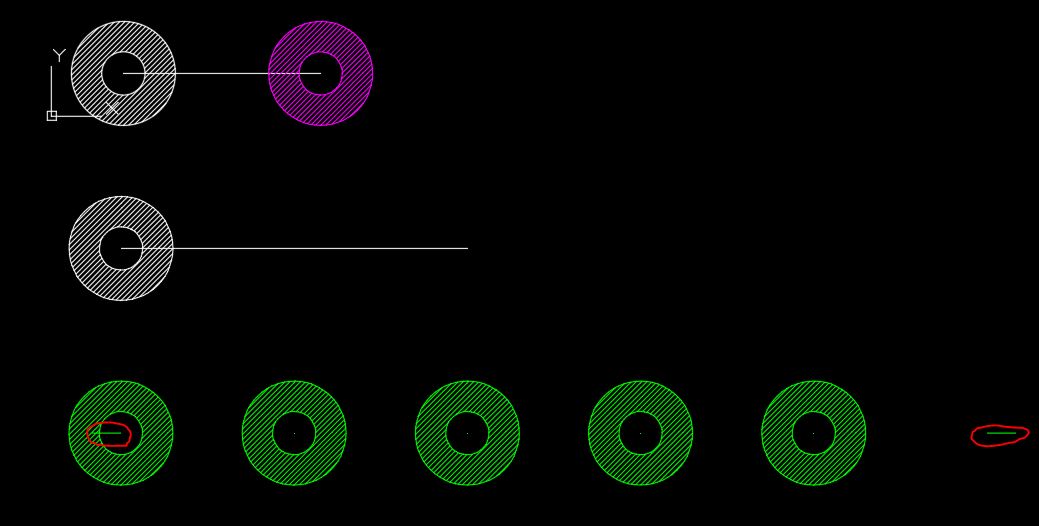 ------------- "Humans have a strength that cannot be measured. This is John Connor. If you are reading this, you are the resistance." <<AutoCAD 2015>> |
Posted By: Kent Cooper
Date Posted: 20.Mar.2018 at 17:07
I'm afraid that's not a problem that can be solved, it being the nature of anything open-ended drawn with any non-continuous linetype to "fill out the ends," beyond full cycles of the linetype definition, with continuous extensions [in closed objects, it can make adjustments]. You can minimize them by adjusting the length of an object [when that's not made impractical or impossible by other considerations], but you can't get rid of them entirely.
|
 John Connor wrote:
Posted By: Kent Cooper
Date Posted: 20.Mar.2018 at 19:22
| How critical is the relationship between the 36" vs. 15" dimensions? Could you use an embedded-Text linetype instead of an embedded-Shape one? For example, the 0xA3 character in the Wingdings font looks pretty much just like that (when I make one 36 units wide outside, its inside diameter is about 14-1/2 units), and it's truly solid-filled, so you don't need to fake that part. |
Posted By: John Connor
Date Posted: 21.Mar.2018 at 08:33
Good suggestion Kent. ------------- "Humans have a strength that cannot be measured. This is John Connor. If you are reading this, you are the resistance." <<AutoCAD 2015>> |
Posted By: waynelem
Date Posted: 21.Mar.2018 at 15:39
|
I only has to be close, give or take a couple of inches. ------------- wayne |
Posted By: John Connor
Date Posted: 21.Mar.2018 at 15:46
|
Then follow Kent's suggestion. ------------- "Humans have a strength that cannot be measured. This is John Connor. If you are reading this, you are the resistance." <<AutoCAD 2015>> |
Posted By: waynelem
Date Posted: 22.Mar.2018 at 05:44
|
Except I can not find Wingdings oxa3 font. I found one that is solid bit I need a hole in the middle. May be I am stupid to night. Wayne ------------- wayne |
Posted By: John Connor
Date Posted: 22.Mar.2018 at 10:35
Kent said "the 0xA3 character in the Wingdings font." It's definitely there as I was able to find it quite easily. It can be found in the 7th row from the top and the 11th symbol in from the left. ------------- "Humans have a strength that cannot be measured. This is John Connor. If you are reading this, you are the resistance." <<AutoCAD 2015>> |
Posted By: Kent Cooper
Date Posted: 23.Mar.2018 at 18:59
For some reason I couldn't get it to work using typical Unicode "\U+0xA3" format as a text element in a linetype definition, as I had hoped, but that turns out to be the British Pound sign in most fonts. I see that waynelem didn't say whether the rings alone are what's wanted as John's image shows. The following worked pretty well for me, to make one with line segments between the rings but not across them, but that can be changed. It requires that you have a Text Style defined in the drawing that is called WINGDINGS and uses the WINGDINGS font. At a linetype scale of 1, the rings are 1 unit in outside diameter, and the spacing is 4 units C-C. [For your 36" ring size, use it at a linetype scale of 36; the C-C spacing will be 144.] It's pretty precise, but you can fine-tune those decimals if you want it even more so. For a different spacing, divide the desired C-C spacing [when the rings are 1 unit in diameter] in half, subtract 0.5, and use the result in place of the 1.5 entries at the ends. *WHATEVER,whatchamacallit ----o-----o-----o----
A,1.5,-.5,["ÂŁ",WINGDINGS,x=-.616,y=-.4987,s=1.083],-.5,1.5 |