HELP, does any one have a method or lisp can make
Printed From: CAD Forum
Category: EN
Forum Name: AutoCAD
Forum Description: Discussion about AutoCAD and AutoCAD LT, viewers, DWG and DXF formats, Design Review, AutoCAD web, Drive, add-ons
URL: https://www.cadforum.cz/forum_en/forum_posts.asp?TID=12676
Printed Date: 06.Sep.2026 at 05:09
Topic: HELP, does any one have a method or lisp can make
Posted By: mikewong0719
Subject: HELP, does any one have a method or lisp can make
Date Posted: 26.Mar.2018 at 03:25
HELP, does any one have a method or lisp can make multiple leader arrange and match same angle ,because my job need to make a lot of multiple leader arrange ,anyone can suggest solve the problem ?? 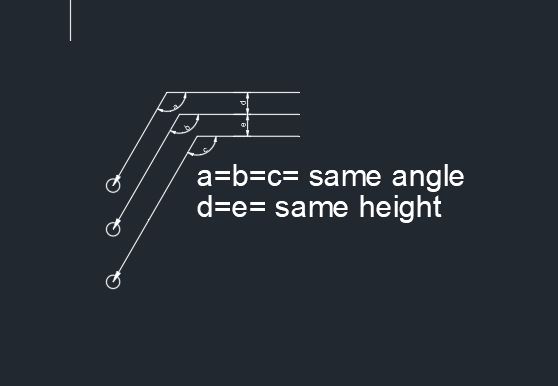 Multiple leader need same angle same height,does anyone have a method? THX
|
Replies:
Posted By: John Connor
Date Posted: 26.Mar.2018 at 11:53
|
Obtaining the same "spacing" (i.e. - height) between multileaders can be accomplished via the ALIGN option. As for the angle I am not sure there is an option for that. ------------- "Humans have a strength that cannot be measured. This is John Connor. If you are reading this, you are the resistance." <<AutoCAD 2015>> |
Posted By: mikewong0719
Date Posted: 27.Mar.2018 at 03:33
|
but i try multileader algin, how can i change from leader to mleader, i found a lisp can change to mleader , but once time only can change 1 leader to multileader , how can i change all leader to mleader faster because my job need to align over 300 leader and align , this too waste my time
|
Posted By: philippe JOSEPH
Date Posted: 27.Mar.2018 at 07:36
|
uploads/175428/MULTIPLE_LEADER_ARRANGEMENT_01_A.dwg" rel="nofollow - uploads/175428/MULTIPLE_LEADER_ARRANGEMENT_01_A.dwg Hello Mikewong0719 and the others, please find here an example of leader arrangement and it's different from your example. Please show us a drawing of yours.
|
Posted By: mikewong0719
Date Posted: 27.Mar.2018 at 08:16
my drawing is like to this drawing , many cbw need to show, how can i align angle and heignt all leader easily
|
Posted By: philippe JOSEPH
Date Posted: 27.Mar.2018 at 12:43
| OK mikewong, now I understand why it is so important for you. |
Posted By: easymike29
Date Posted: 27.Mar.2018 at 15:21
|
You might try here.... http://www.cadtutor.net/forum/search.php?searchid=6481445 Gene |
Posted By: mikewong0719
Date Posted: 27.Mar.2018 at 17:12
| your Links is error ,can not load |
Posted By: John Connor
Date Posted: 27.Mar.2018 at 18:20
He did already. And he got the same responses. ------------- "Humans have a strength that cannot be measured. This is John Connor. If you are reading this, you are the resistance." <<AutoCAD 2015>> |
 easymike29 wrote:
Posted By: mikewong0719
Date Posted: 28.Mar.2018 at 04:04
|
when i use foo.lisp, it will be like to this.jpeg how can i know it is follow which leader is buttom??
|
Posted By: mikewong0719
Date Posted: 28.Mar.2018 at 07:40
my drawing leader now can align, but leader have a block or text need to algin ,any method can make block align leader
|
Posted By: inomold
Date Posted: 28.Mar.2018 at 14:28
|
Hi mike, For Autocad you can follow this totorials on youtube : http://www.youtube.com/watch?v=-JbXqesOUyM" rel="nofollow - https://www.youtube.com/watch?v=-JbXqesOUyM Happy to help ------------- Regards carl ma carl.ma@inomold.com http://www.inomold.com |