AutoCAD how is batch printing from the Model?
Printed From: CAD Forum
Category: EN
Forum Name: AutoCAD
Forum Description: Discussion about AutoCAD and AutoCAD LT, viewers, DWG and DXF formats, Design Review, AutoCAD web, Drive, add-ons
URL: https://www.cadforum.cz/forum_en/forum_posts.asp?TID=12775
Printed Date: 06.Sep.2026 at 17:40
Topic: AutoCAD how is batch printing from the Model?
Posted By: shadashiindia
Subject: AutoCAD how is batch printing from the Model?
Date Posted: 13.Jul.2018 at 08:54
|
How is batch printing from the Model? I have many files only in the Model. I need to print a lot. How to do it quickly ? I saw the program, who used it ? Revers - Automatic batch printing a multiple format (rectangles, frames) of model space and layouts. in http://https://www.kdmsoft.net/revers.html" rel="nofollow - http://https://www.kdmsoft.net/revers.html |
Replies:
Posted By: aqeel222
Date Posted: 18.Jul.2018 at 13:55
|
you have to follow the following steps , open 1st file of ur folder 1. use print command 2. select plotter 3. select paper size 4. select plot area (Extents) 5. plot offset (center the plot) 6. pen assignment 7. plot scale 8. drawing orientation 9. Page Setup name (click Add) then name it as u like 10. cancel command. 11. save drawing 12. go publish command 13. add all drawings which u wish to plot 14. select all drawings 15. go to page setup select the setting which u save 16. publish to (PDF) 17.go to publish option and select location where u like to save if u like to save pdf 18 Publish done. 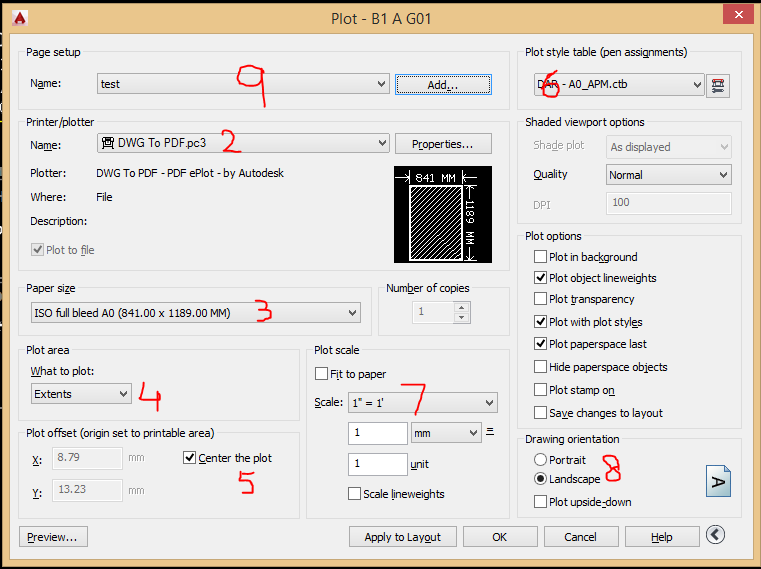 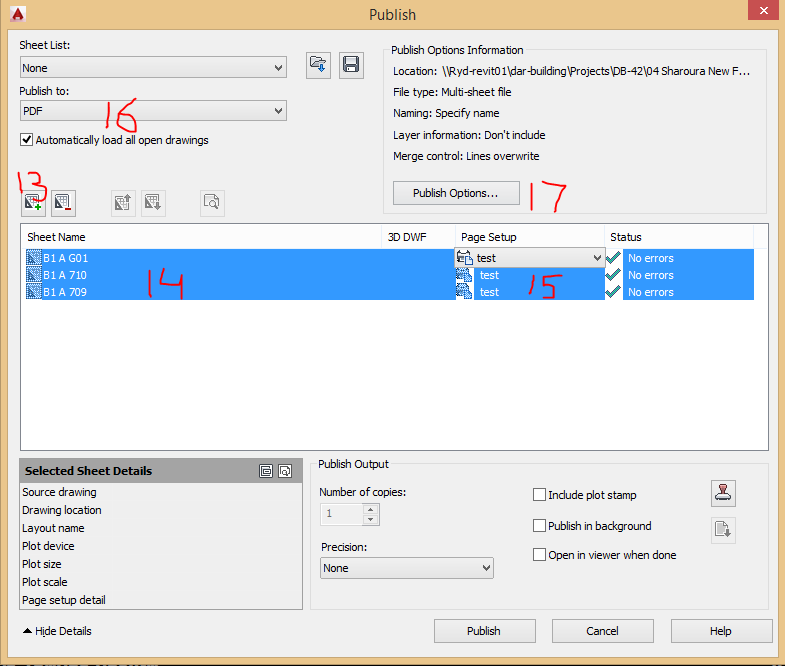 |