Transforming 2D drawing of Substation into 3D mode
Printed From: CAD Forum
Category: EN
Forum Name: AutoCAD
Forum Description: Discussion about AutoCAD and AutoCAD LT, viewers, DWG and DXF formats, Design Review, AutoCAD web, Drive, add-ons
URL: https://www.cadforum.cz/forum_en/forum_posts.asp?TID=12787
Printed Date: 05.Sep.2026 at 02:23
Topic: Transforming 2D drawing of Substation into 3D mode
Posted By: dylanc
Subject: Transforming 2D drawing of Substation into 3D mode
Date Posted: 26.Jul.2018 at 21:06
|
I need to transform a 2D drawing of a substation from the plan view and elevation view into a 3D model. I was wondering if there was any other way than buying the inventor software and Substation extension software to create this model. I know I can extrude a few sub-parts but am having difficulty transforming 2D blocks from AutoCAD into 3D. |
Replies:
Posted By: jmontesmx
Date Posted: 27.Jul.2018 at 02:22
| What type of substation, aerial or floor. I ask because I made some drawings that can helpe you. |
Posted By: John Connor
Date Posted: 27.Jul.2018 at 14:34
|
You can't extrude a block without exploding it first. There is no "automagical" way to create a 3D model from 2D linework in AutoCAD. ------------- "Humans have a strength that cannot be measured. This is John Connor. If you are reading this, you are the resistance." <<AutoCAD 2015>> |
Posted By: philippe JOSEPH
Date Posted: 27.Jul.2018 at 21:03
|
Hello, Dylanc, Jmontesmemx and John. Dylanc, do you want to work only with Inventor with 2D coming from AutoCAD or working with AutoCAD in transforming 2D into 3D ? If it's the second choise it's OK and I can help.
|
Posted By: dylanc
Date Posted: 30.Jul.2018 at 14:22
| I am primarily trying to use AutoCAD to transform the drawings from 2D into 3D |
Posted By: dylanc
Date Posted: 30.Jul.2018 at 14:26
| Aerial |
Posted By: philippe JOSEPH
Date Posted: 30.Jul.2018 at 15:05
|
Hello Dylanc, if you want to use AutoCAD 2D to generate 3D solids it's OK. If it's a first time with 3D you will have to know all about UCS settings and viewpoints. To generate 3D solids you have to create closed assembly of lines, arcs, ellispses and others modified to REGION and : EXTRUDE with a certain height or along a path, REVOLVE along an axis by 360£ or less, SWEEP between 2 different shapes. Eventually see my file : 3D SOLIDS 01.dwg here in the site in the CAD/BIM Blocks library. Ask for more or post a file here or in the CAD/BIM Blocks library. PS what do you mean with : aerial ? With aerials I think Jeret PETERSON.
|
Posted By: John Connor
Date Posted: 31.Jul.2018 at 12:04
|
Solids can be created using the Loft, PressPull and Extrude commands and do not necessarily require the user to create a region first. When using the Loft or Extrude commands one must use a closed polyline profile. ------------- "Humans have a strength that cannot be measured. This is John Connor. If you are reading this, you are the resistance." <<AutoCAD 2015>> |
Posted By: dylanc
Date Posted: 31.Jul.2018 at 16:17
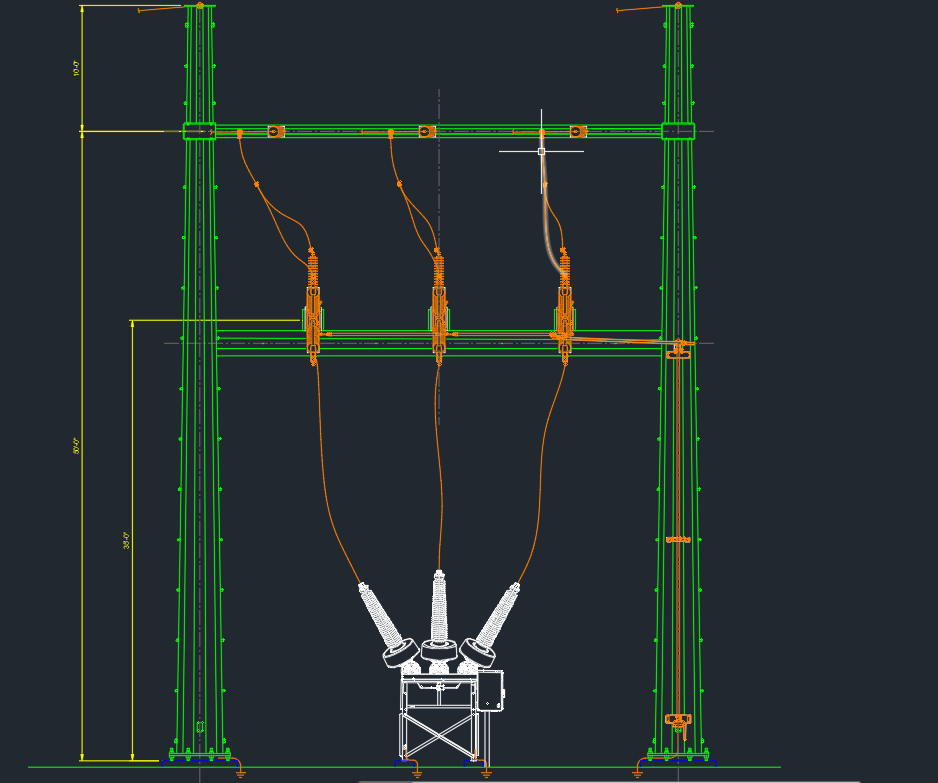
I am looking to transform this for example into 3D. I am unsure on where to begin to do so
|
Posted By: John Connor
Date Posted: 31.Jul.2018 at 19:43
|
Start with the steel structure (i.e. - baseplates, columns, beams). Next up would be any equipment (i.e. - conductors, insulators, isolators, oil circuit breakers, bus bars, lightning arresters, etc.). Do you have all the necessary dimensions available? Wires can be created by sweeping a circle along the path a spline.
------------- "Humans have a strength that cannot be measured. This is John Connor. If you are reading this, you are the resistance." <<AutoCAD 2015>> |
Posted By: philippe JOSEPH
Date Posted: 31.Jul.2018 at 20:53
| Hello Dylanc and John. you need the side view to begin the work. |
Posted By: John Connor
Date Posted: 01.Aug.2018 at 01:22
|
And a top view too? ------------- "Humans have a strength that cannot be measured. This is John Connor. If you are reading this, you are the resistance." <<AutoCAD 2015>> |