Extruding with a thickness
Printed From: CAD Forum
Category: EN
Forum Name: Inventor
Forum Description: Discussion about Autodesk Inventor
URL: https://www.cadforum.cz/forum_en/forum_posts.asp?TID=12878
Printed Date: 05.Sep.2026 at 19:38
Topic: Extruding with a thickness
Posted By: Teecross
Subject: Extruding with a thickness
Date Posted: 04.Sep.2018 at 09:42
|
Hello guys, I designed the front part of my gear pump. Now I want to extrude it with a certain thickness to make it a square.. but how do i extrude with a thickness? I dont want it to be a solid because im gonna insert the gear later.. I hope I could bring across what I was meaning. I don't know how to insert my data so maybe you can look on it to see what i mean to be more clear :/ Cheers, Teecross
|
Replies:
Posted By: John Connor
Date Posted: 04.Sep.2018 at 12:55
|
The only way we can take a look at it is for you to upload a copy of your drawing. Drawing can be uploaded to the CAD Blocks section of this website or uploaded to a file sharing website like DropBox and a link provided here at the CADforum.
------------- "Humans have a strength that cannot be measured. This is John Connor. If you are reading this, you are the resistance." <<AutoCAD 2015>> |
Posted By: Teecross
Date Posted: 04.Sep.2018 at 16:36
|
Oh alright. Sorry, im new to this forum so I did not know :) I uploaded my part here https://www.dropbox.com/s/6iue2umct9eqqzv/GearPump2.ipt?dl=0 I want to extrude it with a certain thickness of 10mm each side. Also I kinda want the exact same part on the other end of the extruded part. But it's not so much about the drawing I made but more in general.. how can I extrude with a cavity?
|
Posted By: John Connor
Date Posted: 04.Sep.2018 at 18:07
|
I missed the fact that you are using Inventor. Anyway, I was able to import your drawing into AutoCAD. I'm not exactly sure what it is you want. It looks like your part is already extruded. So what portion of the drawing needs to be 10mm? Is it the rectangular portion or the raised portion that has the arc at the top and bottom? Right now the rectangular portion is 5mm thick. The raised portion is 0.6mm thick for an overall height of 5.6mm. And what do you mean by "I want to make it a square"?
------------- "Humans have a strength that cannot be measured. This is John Connor. If you are reading this, you are the resistance." <<AutoCAD 2015>> |
Posted By: Teecross
Date Posted: 05.Sep.2018 at 07:04
|
Alright, I uploaded a new drawing, which is just a rectangular. My prior example wasn't great.. https://www.dropbox.com/s/w0nb4ic2wrh7bmd/CADForum.ipt?dl=0 So I want to extrude this rectangular with a certain thickness, i.e. 5mm from each side to the inward. So the remaining volumen is a cavity. I hope I expressed what I need to know ^^
|
Posted By: John Connor
Date Posted: 05.Sep.2018 at 12:31
|
I can't tell you how to do this using Inventor. In AutoCAD there are a couple of ways to create a cavity in a solid object. One way would be by subtraction. The other way would be by using the PressPull command. And depending on the object itself one could conceivably sweep or extrude a profile to obtain the desired result.
I tried to import the newest .ipt file but it failed for some unknown reason. It might be an invalid file (corrupted?). ------------- "Humans have a strength that cannot be measured. This is John Connor. If you are reading this, you are the resistance." <<AutoCAD 2015>> |
Posted By: John Connor
Date Posted: 05.Sep.2018 at 13:00
Is this the affect you are trying to achieve? In my example the rectangle is 200x400 and has a thickness of 20. The "cavity" is 10mm deep.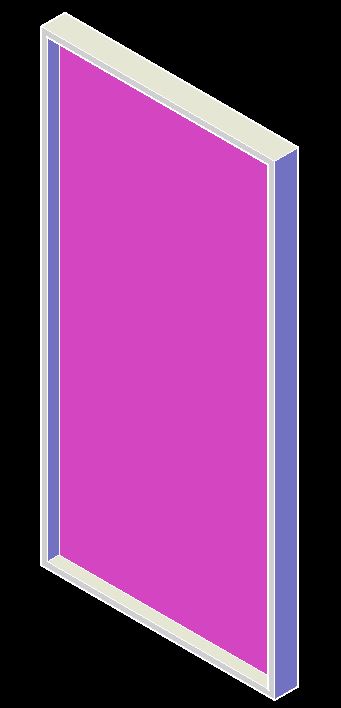 ------------- "Humans have a strength that cannot be measured. This is John Connor. If you are reading this, you are the resistance." <<AutoCAD 2015>> |
Posted By: Teecross
Date Posted: 05.Sep.2018 at 13:16
|
Yeah this is the effect but your rectangle is open on one side, i want it to be completely closed from each side. So you have a Recangle with an inner cavity. EDIT: I tried setting a new Work Plane behind the actual workplane and then extruding a rectangle and it works !!!! Just have to pick "Offset from Plane" and set a new plane in the thickness you need from the actual plane <3 Thanks for your help lovely dude! :) |
Posted By: John Connor
Date Posted: 05.Sep.2018 at 18:05
|
So what you really wanted was a hollowed out box. ------------- "Humans have a strength that cannot be measured. This is John Connor. If you are reading this, you are the resistance." <<AutoCAD 2015>> |
Posted By: Teecross
Date Posted: 06.Sep.2018 at 09:02
| Well yeah that's what cavity is isn't it? A box without volumina on the inside with thickness on the sides |
Posted By: John Connor
Date Posted: 06.Sep.2018 at 12:56
|
That's but one definition. ------------- "Humans have a strength that cannot be measured. This is John Connor. If you are reading this, you are the resistance." <<AutoCAD 2015>> |
Posted By: Teecross
Date Posted: 07.Sep.2018 at 14:39
| Sorry that I was not clear then! English is not my mothertongue ^^ |
Posted By: mypushpi
Date Posted: 08.Nov.2018 at 05:45
|
Extrude means creating solids using poly line. If line thickness is normal or any other value, solid will create with inner core. (SOLID) you can create shell by removing its middle core after that. SHELL tool in 3d modelling. I think it is equal for your requirement. I'm sorry if I have miss understood. ------------- Pushpika |
Posted By: mypushpi
Date Posted: 08.Nov.2018 at 05:47
------------- Pushpika |

