GstarCAD "EATTEXT"
Printed From: CAD Forum
Category: EN
Forum Name: CAD - general
Forum Description: General discussion about CAD, formats, standards, management, licensing, networking, harware, other CAD applications
URL: https://www.cadforum.cz/forum_en/forum_posts.asp?TID=12987
Printed Date: 29.Sep.2026 at 06:12
Topic: GstarCAD "EATTEXT"
Posted By: Wout123
Subject: GstarCAD "EATTEXT"
Date Posted: 05.Nov.2018 at 14:54
|
when I use the "eattext" command, I choose to use a template. Yet I have to check everything off again that I do not need. I would also have liked to have moved the columns. Someone who knows if this is possible? I know that all this can be done in AutoCAD Version: GstarCAD 2017 standard Thanks!
|
Replies:
Posted By: rebellio
Date Posted: 06.Nov.2018 at 08:09
|
Hi Wout, You can drag and drop (see first image) the columns (top) to reorder. If you want to use a template with previous settings choose the option as shown in the second Image in this way you dont have to check everything again. This should work.... Regards 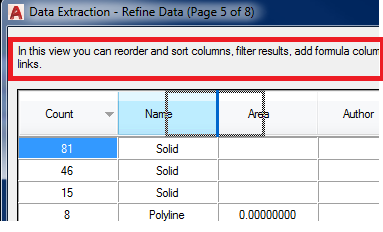 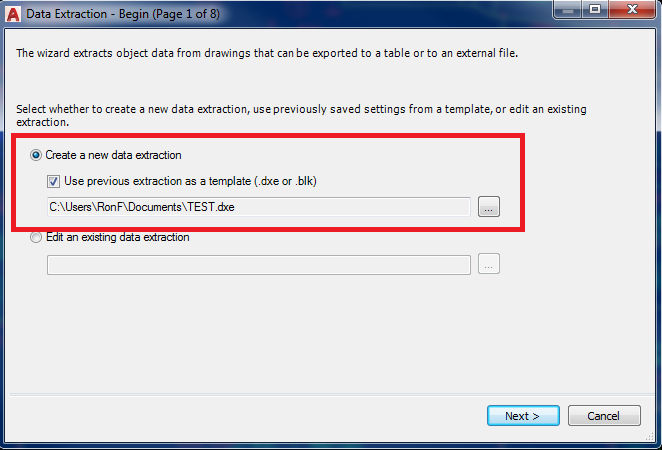 |
Posted By: Wout123
Date Posted: 06.Nov.2018 at 09:59
|
Thanks for the respond. Could it be that you are working in autocad? I know how this can be done in autocad. My problem is in GstarCAD. thanks |
Posted By: rebellio
Date Posted: 06.Nov.2018 at 10:20
|
Sorry i missed that, it is indeed in autocad, Unfortunately i can not check it in GstarCAD since we not use that software. isn't it similar as acad? Good luck |
Posted By: Wout123
Date Posted: 06.Nov.2018 at 10:23
|
No problem! GstarCAD is a Chinese version of AutoCAD. The function that I want to use does not work as it works in AutoCAD. Is this because I use an inferior AutoCAD or an older version. I do not know |