Table of tolerances in AutoCAD
Printed From: CAD Forum
Category: EN
Forum Name: AutoCAD
Forum Description: Discussion about AutoCAD and AutoCAD LT, viewers, DWG and DXF formats, Design Review, AutoCAD web, Drive, add-ons
URL: https://www.cadforum.cz/forum_en/forum_posts.asp?TID=13050
Printed Date: 05.Sep.2026 at 20:52
Topic: Table of tolerances in AutoCAD
Posted By: EngiMan
Subject: Table of tolerances in AutoCAD
Date Posted: 04.Jan.2019 at 13:33
|
Hello. I am wondering if it's possible to create somewhat automated table of tolerances in AutoCAD (currently using v2019), similar to fitslist command in autocad mechanical or Inventor I suppose. If not, does anyone have a neat way of creating it without making either a tone of single line texts or overlapping mtexts? I'd like it to look similar to what you can see on the image below. 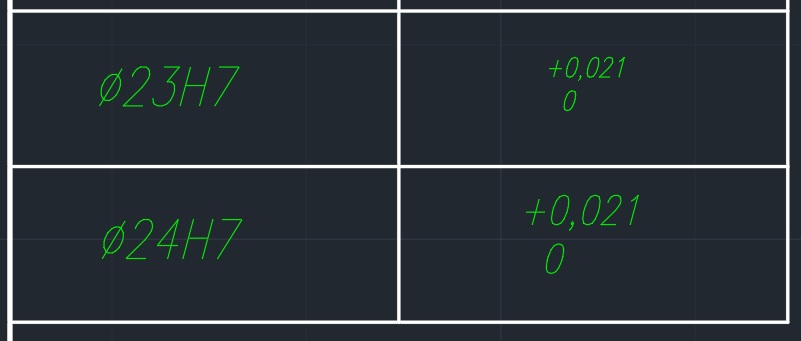 I've tried to create a simple table with text cell type but it's a bit poor when it comes to text editing options available (I can't justify the text properly, can't add tabs, etc.). Double overlapping mtext fields is another option, there's a freedom of text formatting but I'd rather have a single text entity, because switching draw order every now and then for editing purposes is annoying. I've given it a search but was unlucky with finding satisfying results.
|