Round top
Printed From: CAD Forum
Category: EN
Forum Name: AutoCAD
Forum Description: Discussion about AutoCAD and AutoCAD LT, viewers, DWG and DXF formats, Design Review, AutoCAD web, Drive, add-ons
URL: https://www.cadforum.cz/forum_en/forum_posts.asp?TID=13110
Printed Date: 05.Sep.2026 at 02:24
Topic: Round top
Posted By: nmaia
Subject: Round top
Date Posted: 21.Feb.2019 at 11:11
|
Hello all, following this for forum for a long time. Now i need help, from you.
what is the command to round the top of this piece? https://www.cadforum.cz/forum_en/uploads/585607/coracao.dwg" rel="nofollow - uploads/585607/coracao.dwg Thanks, 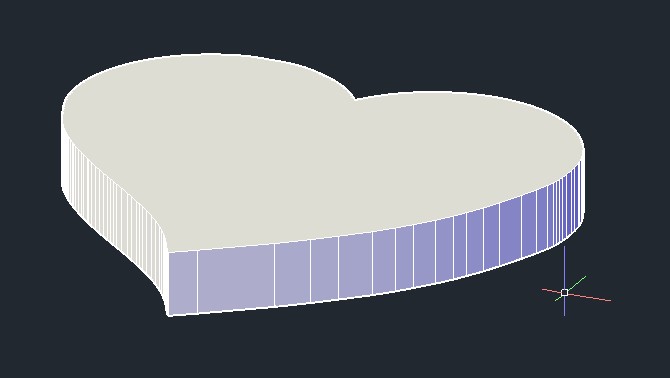 |
Replies:
Posted By: Vladimir Michl
Date Posted: 21.Feb.2019 at 11:23
|
FILLET ? ------------- Vladimir Michl (moderator) https://www.linkedin.com/in/vmichl/" rel="nofollow - LinkedIn , Autodesk Expert Elite |
Posted By: rebellio
Date Posted: 21.Feb.2019 at 11:45
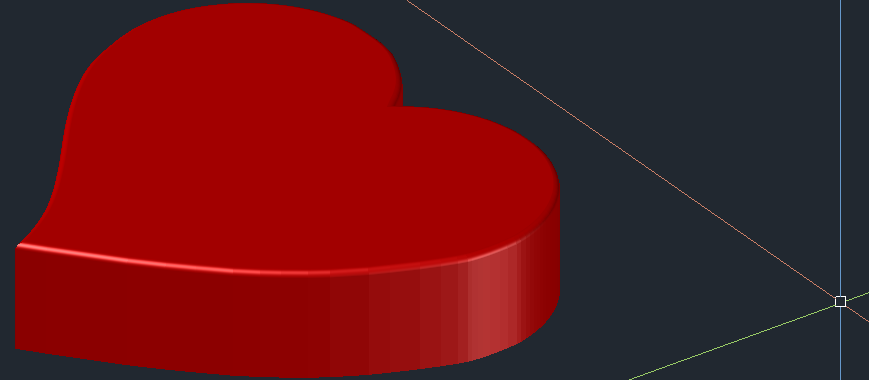
FILLETEDGE  if you make a it a good Solid object if you make a it a good Solid object
 |
Posted By: nmaia
Date Posted: 21.Feb.2019 at 16:40
|
Thanks, but it's not enougth. I want completely round. i want to do like the photos:   |
Posted By: John Connor
Date Posted: 21.Feb.2019 at 17:37
|
You might have to extrude the object an extra distance then slice it in two different planes using an arc or one half of an ellipse. So the slice (with object) would be made from front-to-back and from side-to-side. After each slice delete what is not needed. ------------- "Humans have a strength that cannot be measured. This is John Connor. If you are reading this, you are the resistance." <<AutoCAD 2015>> |