It this Lisp even possible?
Printed From: CAD Forum
Category: EN
Forum Name: AutoCAD
Forum Description: Discussion about AutoCAD and AutoCAD LT, viewers, DWG and DXF formats, Design Review, AutoCAD web, Drive, add-ons
URL: https://www.cadforum.cz/forum_en/forum_posts.asp?TID=13134
Printed Date: 10.Jun.2026 at 11:18
Topic: It this Lisp even possible?
Posted By: MoeJoe
Subject: It this Lisp even possible?
Date Posted: 14.Mar.2019 at 22:05
I am working on a project that a lisp routine would help a lot. The
problem is I don't know if it is even possible. I assume it is, but
don't know. Thought someone here with more knowledge would be able to
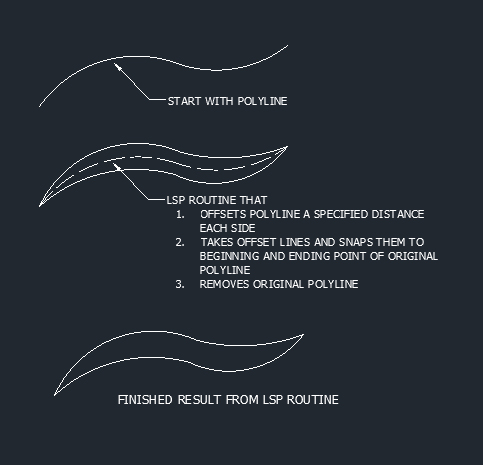
tell me if it is. I have several polylines that need to be offset to a variable I enter and then snapped back to the beginning
and ending of that polyline that it is offset to. I know crazy. I
attached an image to illustrate what i am talking about. Let me know
your thoughts.
?
Thanks!
 |
Replies:
Posted By: philippe JOSEPH
Date Posted: 15.Mar.2019 at 07:19
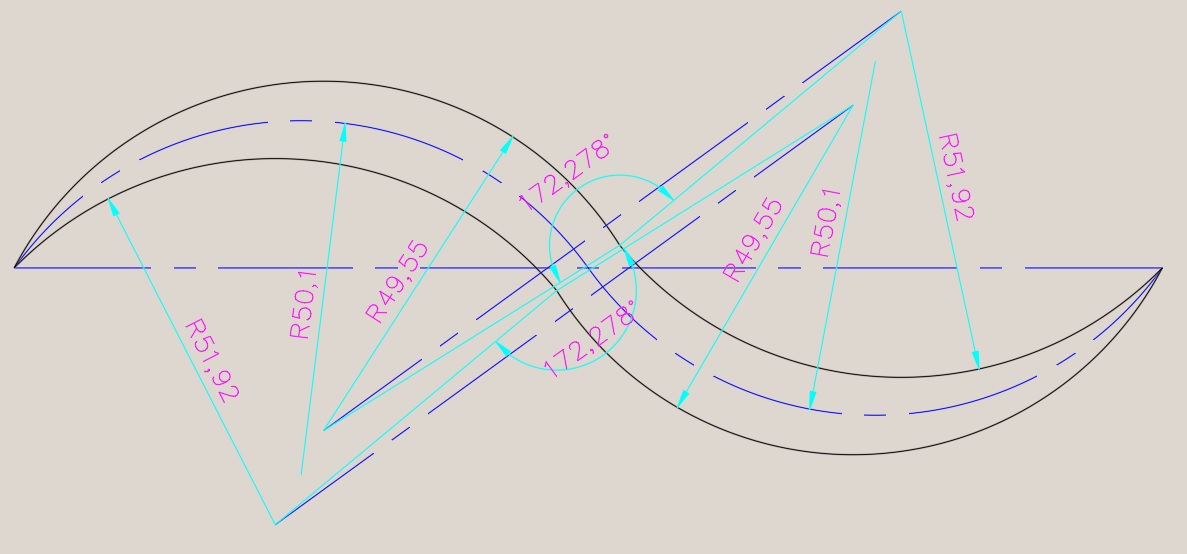 Hello MoeJoe, I don't know if the lisp is possible but when I draw with your method the last 2 polylines are with an angle in the middle.
|
Posted By: Kent Cooper
Date Posted: 15.Mar.2019 at 15:08
If it's always a two-arc-segment Polyline in which the two segments are tangent to each other [red]: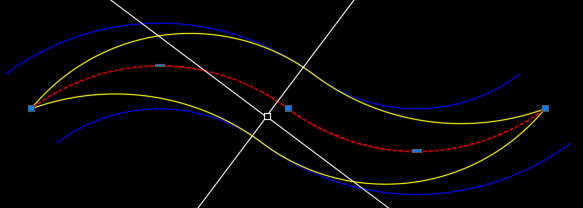 Offset the Polyline to both sides by the desired distance [blue]. Type SNAPANG, and for the angle, Osnap ENDpoint to the mid-way vertices of any two Polylines, to get the skewed crosshairs [white]. One of the crosshair directions is the tangent direction of all 3 Polylines at their mid-way vertices. ARC command, start at one of the mid-way vertices of a blue Polyline, use End option and pick a far end of the red Polyline, then use Direction option, and with ORTHO On, specify the tangent direction for the Arc [yellow] to head in from its start point. Do the same 4 times, or if it's a symmetrical original Polyline, twice for one side and do some grip-edit Copying and Rotating for the other side. If you want a single-Polyline result, use PEDIT's Join option or the JOIN command to connect the yellow Arcs. The equivalent could be made into an AutoLisp routine, but first verify that this is the situation, and the result you need.
|
Posted By: Kent Cooper
Date Posted: 15.Mar.2019 at 19:41
Give this a try! uploads/353260/DoubleOgee.lsp" rel="nofollow - uploads/353260/DoubleOgee.lsp
|
 Kent Cooper wrote:
Posted By: MoeJoe
Date Posted: 16.Mar.2019 at 13:23
Wow you guy are amazing. I will take a look at the lsp. I really appreciate your time and feedback on this. Thank You!  |
Posted By: MoeJoe
Date Posted: 16.Mar.2019 at 13:33
|
I tried the lsp but just got the following Two-arc-segment LWPolyline center-path to make Double-Ogee: Nothing selected, locked Layer, or not two-arc-segment LWPolyline. I converted the line to a LWPolyline but I still couldn't get it to work. I am probably doing something wrong. What am I doing wrong? Thanks!
|
Posted By: ketxu
Date Posted: 17.Mar.2019 at 15:54
|
So, you should post your drawing. At the atlert, you do not two-arc-segment LWPolyline, clearly |
Posted By: Kent Cooper
Date Posted: 18.Mar.2019 at 17:22
If by "line" you mean an AutoCAD Line entity, that won't work. It requires a Polyline made of two [and only two] arc segments [and only arc segments]. If you pick on anything else, whether any different entity type or a Polyline that doesn't match those requirements, OR if you simply missed in picking, or if you picked a qualifying Polyline but it's on a locked Layer, you'll get that message. As suggested, post a drawing file [limited to just the Polyline in question] if you think everything qualifies.
|
Posted By: rebellio
Date Posted: 26.Mar.2019 at 12:41
|
pline --> start point --> enter A --> second point --> 3th point --> enter Then the lisp will just work fine
|