HELP: alignment symbols all over drawing
Printed From: CAD Forum
Category: EN
Forum Name: AutoCAD
Forum Description: Discussion about AutoCAD and AutoCAD LT, viewers, DWG and DXF formats, Design Review, AutoCAD web, Drive, add-ons
URL: https://www.cadforum.cz/forum_en/forum_posts.asp?TID=13141
Printed Date: 06.Sep.2026 at 04:53
Topic: HELP: alignment symbols all over drawing
Posted By: sgsgsg
Subject: HELP: alignment symbols all over drawing
Date Posted: 21.Mar.2019 at 05:25
|
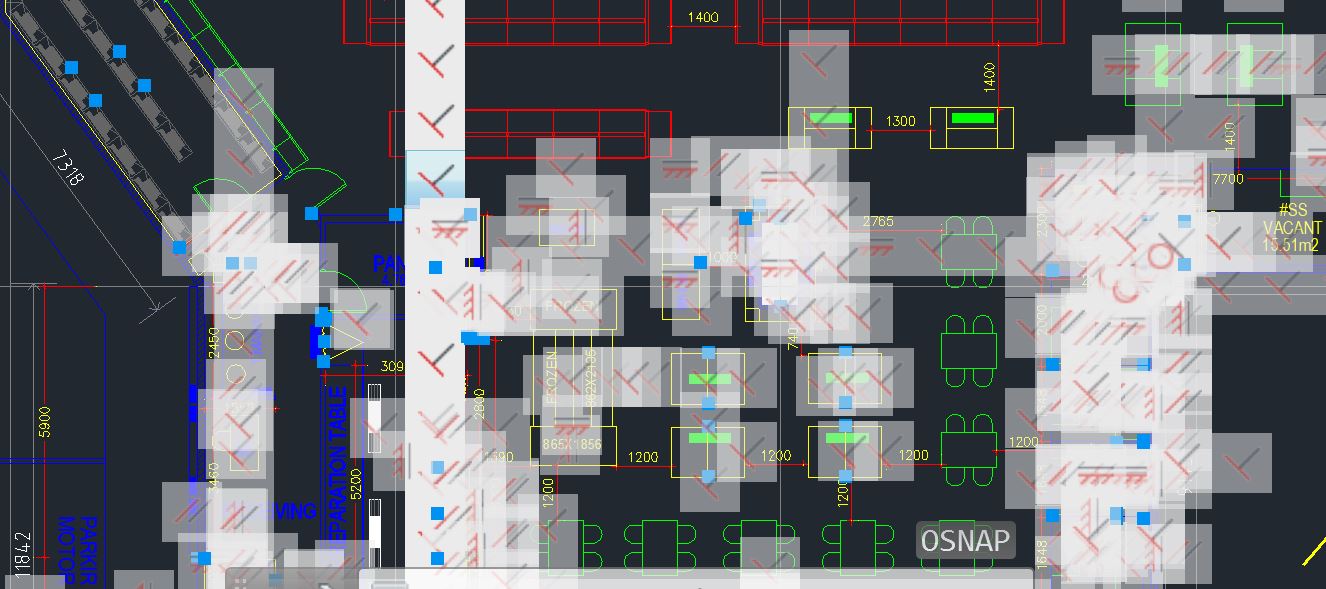
Just received a file from a client, and the file is super slow and shows alignment symbols everywhere. Never had this kind of issue before and dont know what to do to turn off/delete it. Autocad 2018 user Thanks for any help
 |
Replies:
Posted By: John Connor
Date Posted: 21.Mar.2019 at 11:50
|
Those are "constraints" not alignment symbols. https://knowledge.autodesk.com/support/autocad/learn-explore/caas/sfdcarticles/sfdcarticles/How-to-turn-off-and-delete-constraints-in-AutoCAD.html ------------- "Humans have a strength that cannot be measured. This is John Connor. If you are reading this, you are the resistance." <<AutoCAD 2015>> |
Posted By: philippe JOSEPH
Date Posted: 22.Mar.2019 at 07:15
|
Hello sgsgsg, to delete all this you should use the command : DELCONSTRAINT , choose ALL the objects. DO THIS ON A COPY OF THE FILE AND NOT THE ORIGINAL because that drawing is using parametric constraints. If you work on the original file with that parametric constraints, be carefull how to move/modify all the drawing entities. For example do not "simply" move a batch of entities because you will see some or dimensions going wild. Eventually read about this on the internet : CAD TUTORIAL / PARAMETRIC CONSTRAINTS or others. See : https://knowledge.autodesk.com/support/autocad/learn-explore/caas/CloudHelp/cloudhelp/2018/ENU/AutoCAD-Core/files/GUID-899E008D-B422-4DF2-AC8D-1A4F5701ED4E-htm.html
|
Posted By: John Connor
Date Posted: 22.Mar.2019 at 10:59
|
You can delete constraints as well as disable their future use in the original drawing without doing it any harm. ------------- "Humans have a strength that cannot be measured. This is John Connor. If you are reading this, you are the resistance." <<AutoCAD 2015>> |
Posted By: philippe JOSEPH
Date Posted: 23.Mar.2019 at 08:22
|
Yes but the parametric constraints won't be usable then if deleted. I don't think that it's possible to "disable" them, work on the file, "re-able" them as they were before if the drawing is modified and them send back the client that did the file with parametric constraints and want these constraint to be active and correct. I seldom use parametric constraints on AutoCAD because I don't have the real use ( experience ) and AutoCAD don't give the signal of an "over constrained" or "under constrained" drawing. In fact I only use them when it's not possible to get a correct geometry directly "by hand".
|
Posted By: John Connor
Date Posted: 23.Mar.2019 at 12:24
|
If the OP doesn't know what they are and doesn't have a need for them then what difference would it make if they were deleted? ------------- "Humans have a strength that cannot be measured. This is John Connor. If you are reading this, you are the resistance." <<AutoCAD 2015>> |
Posted By: philippe JOSEPH
Date Posted: 23.Mar.2019 at 13:34
|
Eventually to give back to the client an updated file WITH the original parametric constraints.
The best would be at least to "learn" how to live ( or learn how to use ) with those constraints.
|