copy paste problem
Printed From: CAD Forum
Category: EN
Forum Name: AutoCAD
Forum Description: Discussion about AutoCAD and AutoCAD LT, viewers, DWG and DXF formats, Design Review, AutoCAD web, Drive, add-ons
URL: https://www.cadforum.cz/forum_en/forum_posts.asp?TID=13146
Printed Date: 06.Sep.2026 at 17:39
Topic: copy paste problem
Posted By: Zuhaib
Subject: copy paste problem
Date Posted: 26.Mar.2019 at 13:20
|
helo hope you all well my problem is that: when I am copying a drawing with base point from clipboard and pasting it into another drawing as a block so the drawing is pasting not properly. when I am pasting as a block, its automatically mirror . As you can see in the attached picture 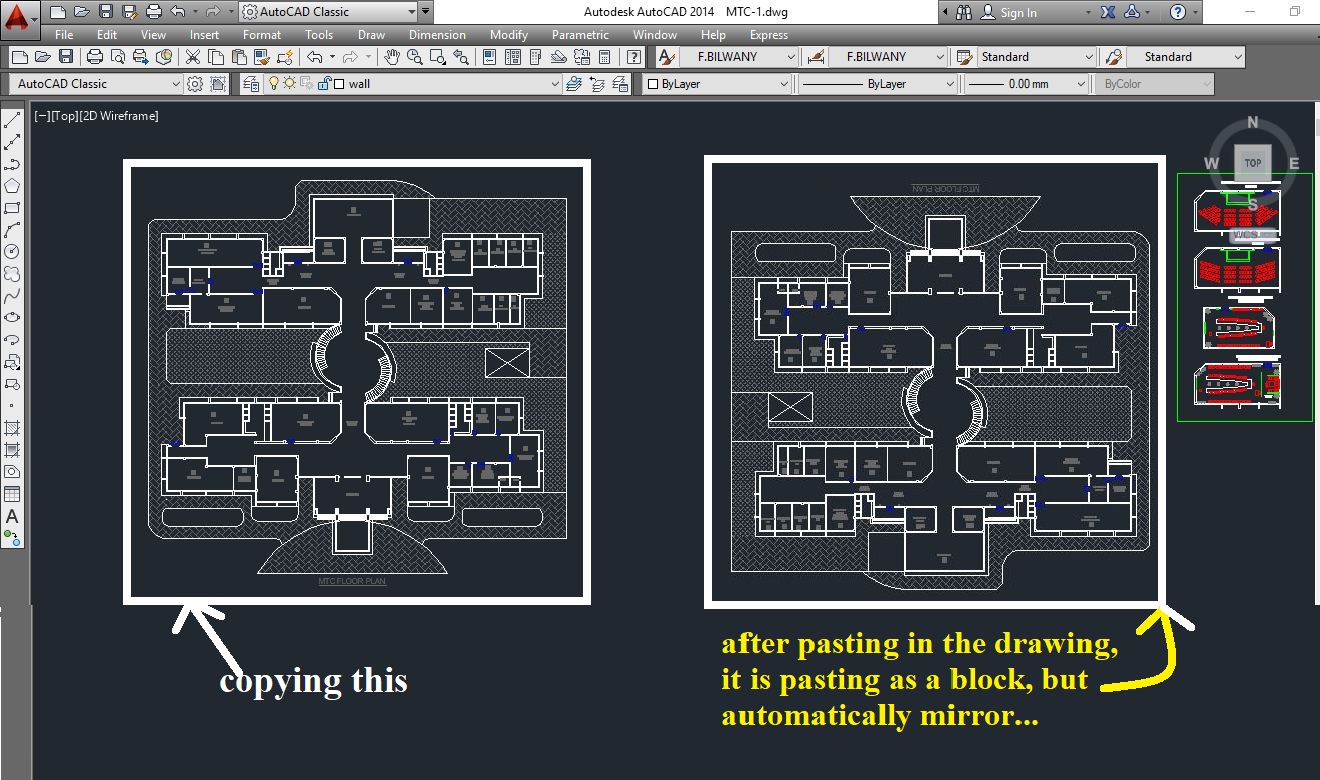 ------------- THANKING YOU REGARD: ZUHAIB KHAN |
Replies:
Posted By: ing_vali2009
Date Posted: 26.Mar.2019 at 18:57
|
1. Also, check that UCS is set to WORLD, then run command _PLAN (to WORLD) before doing copy & paste. 2. Mirrtext = 0.
|
Posted By: Zuhaib
Date Posted: 27.Mar.2019 at 05:33
|
Its worked. thanx dear @ing_vali2009.------------- THANKING YOU REGARD: ZUHAIB KHAN |