Dimensions Problem
Printed From: CAD Forum
Category: EN
Forum Name: AutoCAD
Forum Description: Discussion about AutoCAD and AutoCAD LT, viewers, DWG and DXF formats, Design Review, AutoCAD web, Drive, add-ons
URL: https://www.cadforum.cz/forum_en/forum_posts.asp?TID=13158
Printed Date: 05.Sep.2026 at 05:50
Topic: Dimensions Problem
Posted By: Zuhaib
Subject: Dimensions Problem
Date Posted: 03.Apr.2019 at 08:23
|
Dear all Hope you guys are well. I have some problem with dimensions. In my drawing, the dimensions properties are same but when I draw NEW dimension with DLI so the text height of the new dimension is bigger then old one, even when I MATCHROP the new dimension with old one or the old dimension with the new one, so it doesn't match as it should be... you can see the attach picture 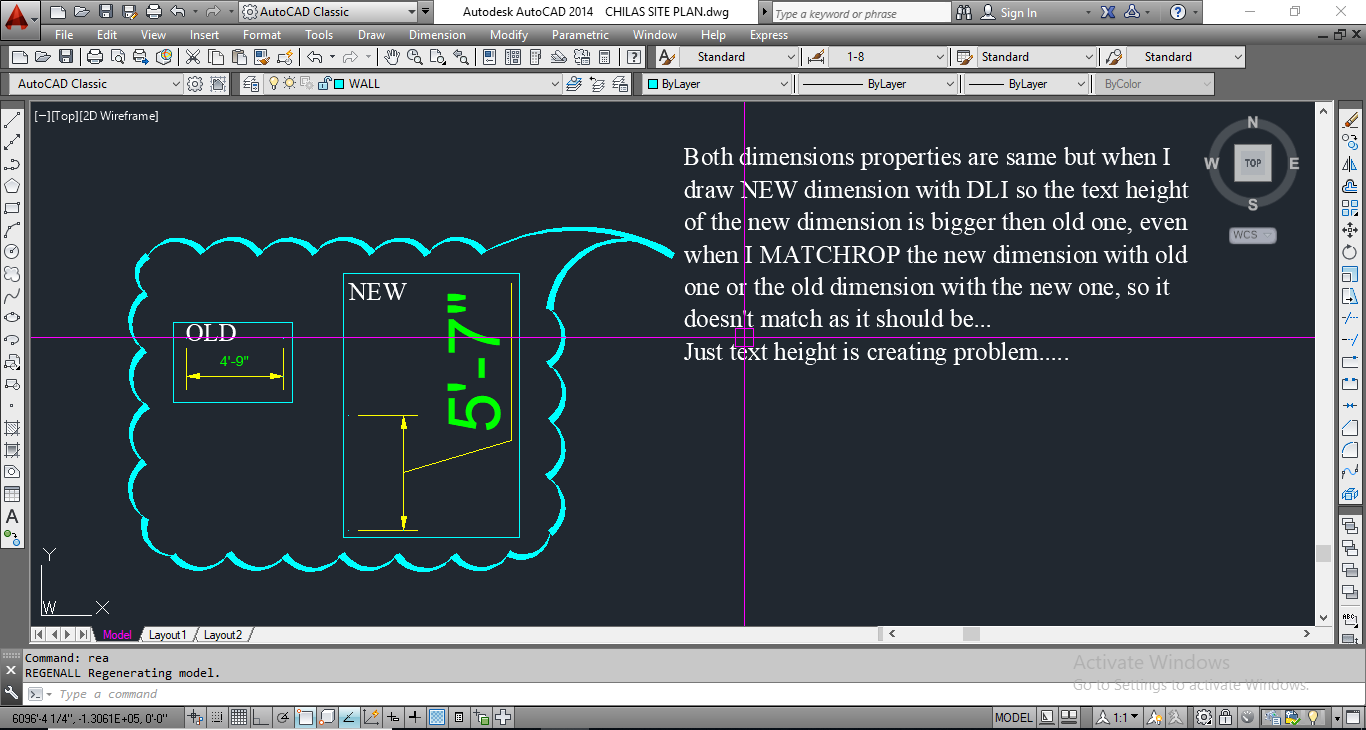 ------------- THANKING YOU REGARD: ZUHAIB KHAN |
Replies:
Posted By: rebellio
Date Posted: 03.Apr.2019 at 09:47
|
Probably the "OLD" Dimension is manipulated manually. Check the text size of the OLD Dimension via properties pallet. Then check the text height defined in the Dimension via ddim command --> Modify Dimension --> text tab Adjust the height when preferred. or upload the drawing to make it easier to solve the problem. Regards |