arc and circle not smooth
Printed From: CAD Forum
Category: EN
Forum Name: AutoCAD
Forum Description: Discussion about AutoCAD and AutoCAD LT, viewers, DWG and DXF formats, Design Review, AutoCAD web, Drive, add-ons
URL: https://www.cadforum.cz/forum_en/forum_posts.asp?TID=13181
Printed Date: 30.Oct.2026 at 01:03
Topic: arc and circle not smooth
Posted By: Kate28
Subject: arc and circle not smooth
Date Posted: 03.May.2019 at 07:11
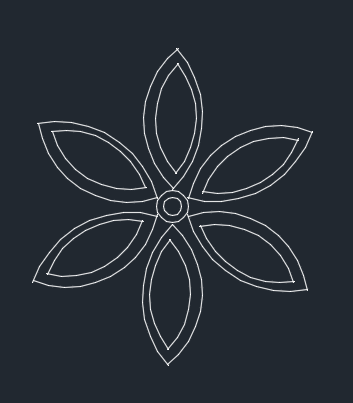
Its not working to me  I used all the possible solution and I've searched everything. I used all the possible solution and I've searched everything.I cant live to work like this anymore, seeing my arcs and circles not smooth, they look distorted, curvy and not connected. I really dunno the problem. Please HELP! https://www.cadtutor.net/forum/uploads/monthly_2019_05/image.png.e509abb0a26bf048e6532a1f7c984c92.png" rel="nofollow"> |
Replies:
Posted By: Vladimir Michl
Date Posted: 03.May.2019 at 07:41
|
It looks like a scanned/vectorized drawing - how did you make it? You will need to grip-edit the disjoint endpoints. ------------- Vladimir Michl //CADs.cz" rel="nofollow - //CADs.cz , https://www.linkedin.com/in/vmichl/" rel="nofollow - LinkedIn Autodesk Expert Elite |
Posted By: Kate28
Date Posted: 03.May.2019 at 07:46
| I just screenshot my drawing |
Posted By: jiteshnakum86
Date Posted: 03.May.2019 at 08:19
Please go to below step. Step 1 - Type "Op" (Option) in command bar and then Press Enter key. Step 2 - Select 2nd Tab named "Display" from the Opened window Step 3 - Enter Display resolution as a "20000" for arc and circle smoothness at right side. Step 4 - Select tab "apply" and then "Ok" at bottom of the entire window. Step 5 - close this window. Please check your arc and circle smoothness...!!! Hopefully this will work for you...!!! Thanks & Regards Jitesh Nakum Project Manager LTTS ------------- Warm Regards, Jitesh Nakum Manager Larsen & Toubro Ltd |
|||||||||

Posted By: Kate28
Date Posted: 03.May.2019 at 08:46
|
Hi Actually I did that already, Display resolution is 20000. but also doesn't work. |
Posted By: Kate28
Date Posted: 03.May.2019 at 08:49
|
Hi Actually I did that already, Display resolution is 20000. but also doesn't work. |
Posted By: rebellio
Date Posted: 03.May.2019 at 11:11
| post the drawing, it will make it a lot easier to solve (or not) |
Posted By: Kent Cooper
Date Posted: 03.May.2019 at 14:37
I think the question was about how you drew that, i.e. how you made the drawing, not how you made the image. Some of those kinked curves look like they could be Arcs, but some clearly have varying radius, so they can't be [at least not single] Arcs. I agree -- post the drawing file. Also, on the 20000 view resolution, did you REGEN after changing the setting?
|
 Kate28 wrote:
Posted By: Kate28
Date Posted: 04.May.2019 at 03:55
|
uploads/813674/Flower.dwg" rel="nofollow - uploads/813674/Flower.dwg
yes, after I change i used command REGEN
|
Posted By: rebellio
Date Posted: 06.May.2019 at 08:05
|
Seems ok on my pc, did you tried the regenall command? Also check the _GRAPHICSCONFIG settings..... and... set shademode on 2dwireframe 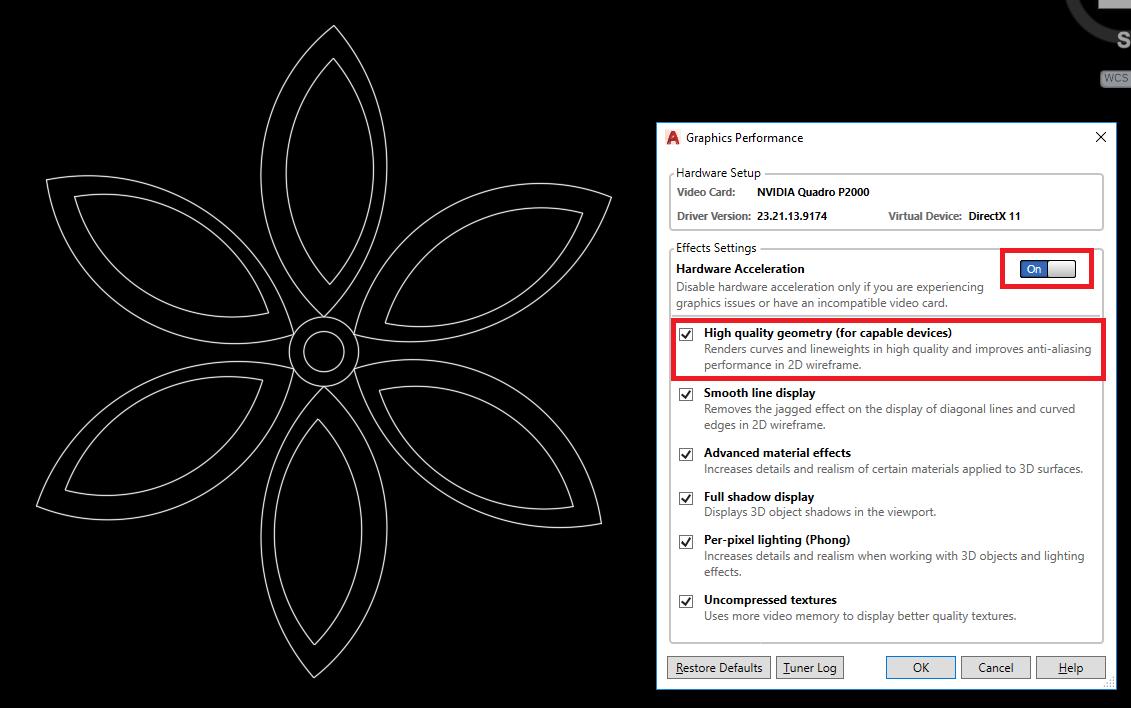 |
Posted By: Kate28
Date Posted: 07.May.2019 at 02:26
|
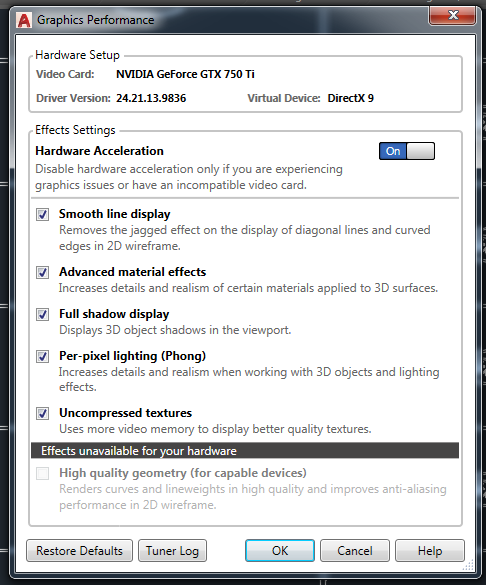
Really guys? So if my file looks okay in yours I think the problem is in my computer Graphics or card. I did that WHIPARC, GRAPHICCONFIG,REGEN and FACETRES already but nothing change. when I zoom out its really look distorted and not joined but if I zoom in its actually snapped together |
Posted By: Kate28
Date Posted: 07.May.2019 at 05:27
|
Posted By: rebellio
Date Posted: 07.May.2019 at 07:49
|
regenall command? and... set shademode on 2dwireframe? as mentioned in my previous post.........
|
Posted By: Kate28
Date Posted: 07.May.2019 at 13:19
| yes i did that already |
Posted By: Kent Cooper
Date Posted: 07.May.2019 at 14:19
| Could it be a computer screen-resolution thing, rather than an AutoCAD setting? |