Extract Loft/Surface isolines
Printed From: CAD Forum
Category: EN
Forum Name: AutoCAD
Forum Description: Discussion about AutoCAD and AutoCAD LT, viewers, DWG and DXF formats, Design Review, AutoCAD web, Drive, add-ons
URL: https://www.cadforum.cz/forum_en/forum_posts.asp?TID=13187
Printed Date: 06.Sep.2026 at 03:48
Topic: Extract Loft/Surface isolines
Posted By: kurubakla
Subject: Extract Loft/Surface isolines
Date Posted: 13.May.2019 at 13:52
|
Hello Dear All, I'm struggling since 3 years about that issue, maybe someone can help about it; As you can see down below i have kind of vortex shape (surface) and would like to extract u and v isolines as polyline or spline for that extractisoline command just giving random splines, xedges command giving only top and bottom circles, if i convert that shape into mesh it's giving distorted mesh body, i can't also snap intersection of isolines to drawing with 3dpoly, i have no idea left can someone tell me what can i do more? I just need exact position of isolines itself or intersection points. Note: I found that script many years ago but won't work either! Script: https://adndevblog.typepad.com/autocad/2014/03/extracting-isolines-from-surface.html" rel="nofollow - https://adndevblog.typepad.com/autocad/2014/03/extracting-isolines-from-surface.html Thank you and Best Regards 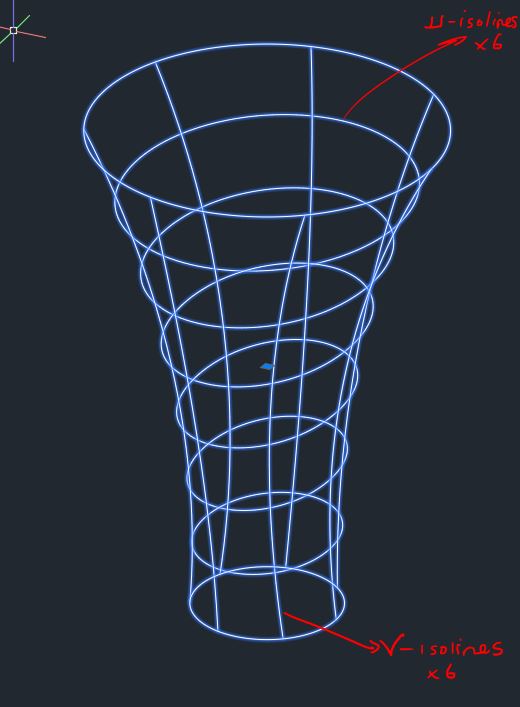 |
Replies:
Posted By: Vladimir Michl
Date Posted: 16.May.2019 at 20:46
|
The [CMD]SURFEXTRACTCURVE[/CMD] command can extract splines at any given point of the surface. [CMD]SPLINEDIT[/CMD] can then convert the spline to polyline. ------------- Vladimir Michl (moderator) https://www.linkedin.com/in/vmichl/" rel="nofollow - LinkedIn , Autodesk Expert Elite |
Posted By: kurubakla
Date Posted: 17.May.2019 at 07:59
|
Hi there @Vladimir Michl, Extractisoline=surfextractcurve I already tried that command but it's giving me random lines on surface, i need isolines precisely as shown as on model or at least their intersection points, in anyway i can't snap of this isolines this is the real problem! Nevertheless thank you very much for your respond Vladimir Cheers
|
Posted By: Vladimir Michl
Date Posted: 17.May.2019 at 08:18
|
The displayed isolines are not some type of geometry (you would snap to) - these are just visual elements. You can change the number of displayed isolines in the object's Properties palette (Ctrl+1). The easiest workaround would be to create work points on the source profiles. ------------- Vladimir Michl (moderator) https://www.linkedin.com/in/vmichl/" rel="nofollow - LinkedIn , Autodesk Expert Elite |
Posted By: philippe JOSEPH
Date Posted: 17.May.2019 at 08:22
|
Hello kurubakla and Vladimir, I think that I have faced that kind of problems with some very complex 3D mesh given for topo survey by an other company and when I asked them about the work on AutoCAD they answered that it's possible to create cuts through that mesh with an other software ( like we do with real 3D solids with the command SLICE or SECTION that is not working here on a non 3D solid ).
In other words, if you want to extract curves, do it on a real 3D solid.
|
Posted By: kurubakla
Date Posted: 22.May.2019 at 12:52
|
Hello Dear All, Answer has arrived for this topic in here: https://www.cadtutor.net/forum/topic/67626-extract-loftsurface-isolines/" rel="nofollow - https://www.cadtutor.net/forum/topic/67626-extract-loftsurface-isolines/
Thank you for all your responds |