shortcut draworder
Printed From: CAD Forum
Category: EN
Forum Name: AutoCAD
Forum Description: Discussion about AutoCAD and AutoCAD LT, viewers, DWG and DXF formats, Design Review, AutoCAD web, Drive, add-ons
URL: https://www.cadforum.cz/forum_en/forum_posts.asp?TID=13213
Printed Date: 06.Sep.2026 at 03:48
Topic: shortcut draworder
Posted By: roel-nahuis
Subject: shortcut draworder
Date Posted: 20.Jun.2019 at 08:12
|
hello, is there an shortcut for draworder send to back and bring to front?
|
Replies:
Posted By: rebellio
Date Posted: 20.Jun.2019 at 10:14
|
Hi, Shortcut is "DR" Adjustable via "Aliasedit" if preferred. 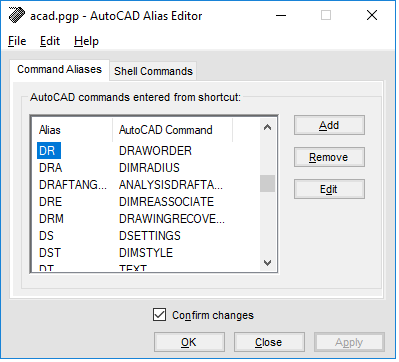 Regards
|
Posted By: roel-nahuis
Date Posted: 20.Jun.2019 at 10:24
| Thanks, it works!!! |
Posted By: Kent Cooper
Date Posted: 20.Jun.2019 at 14:44
I use two little shortcut commands for not just the DRAWORDER command [which still requires you to specify Back or Front], but for the command with the Back or Front option included in the command operation, without your needing to answer for it [EDIT: just replaced with upgraded version that allows pre-selection]: ;; DraworderBackFront.lsp [command names: DB & DF] ;; To put selected objects at the Back or Front of the Draworder ;; Kent Cooper, last edited 20 June 2019 [work with pre-selection] (defun DBF (which / cmde ss) (setq cmde (getvar 'cmdecho)) (if (ssget "_I") (setq ss (ssget "_I")); then (progn ; else (prompt (strcat "\nTo move to " which " in draw order,")) (setq ss (ssget ":L")) ); progn ); if (if ss (progn ; then (setvar 'cmdecho 0) (sssetfirst nil nil); clear if via pre-selection (command "_.draworder" ss "" (strcat "_" which) "_.regen") (setvar 'cmdecho cmde) ); progn (prompt "\nNothing selected."); else ); if (princ) ) (defun C:DB () (DBF "Back") ) (defun C:DF ()
(DBF "Front") ) |
 roel-nahuis wrote:
Posted By: Vladimir Michl
Date Posted: 21.Jun.2019 at 07:28
|
There is also a menu macro predefined in CUI - you can assign any keyboard shortcut to it to invoke it faster than through the ribbon. ------------- Vladimir Michl (moderator) https://www.linkedin.com/in/vmichl/" rel="nofollow - LinkedIn , Autodesk Expert Elite |
Posted By: rebellio
Date Posted: 21.Jun.2019 at 15:54
"Borrowed" this one from you Kent, thanks for sharing 
|