MATCHPROP
Printed From: CAD Forum
Category: EN
Forum Name: AutoCAD
Forum Description: Discussion about AutoCAD and AutoCAD LT, viewers, DWG and DXF formats, Design Review, AutoCAD web, Drive, add-ons
URL: https://www.cadforum.cz/forum_en/forum_posts.asp?TID=13324
Printed Date: 06.Sep.2026 at 05:09
Topic: MATCHPROP
Posted By: Zuhaib
Subject: MATCHPROP
Date Posted: 20.Nov.2019 at 06:08
|
Dear All hope you are doing well. Issue is that:When I am trying to math the properties of hatch its not matching properly. Please help. I will be thankful. 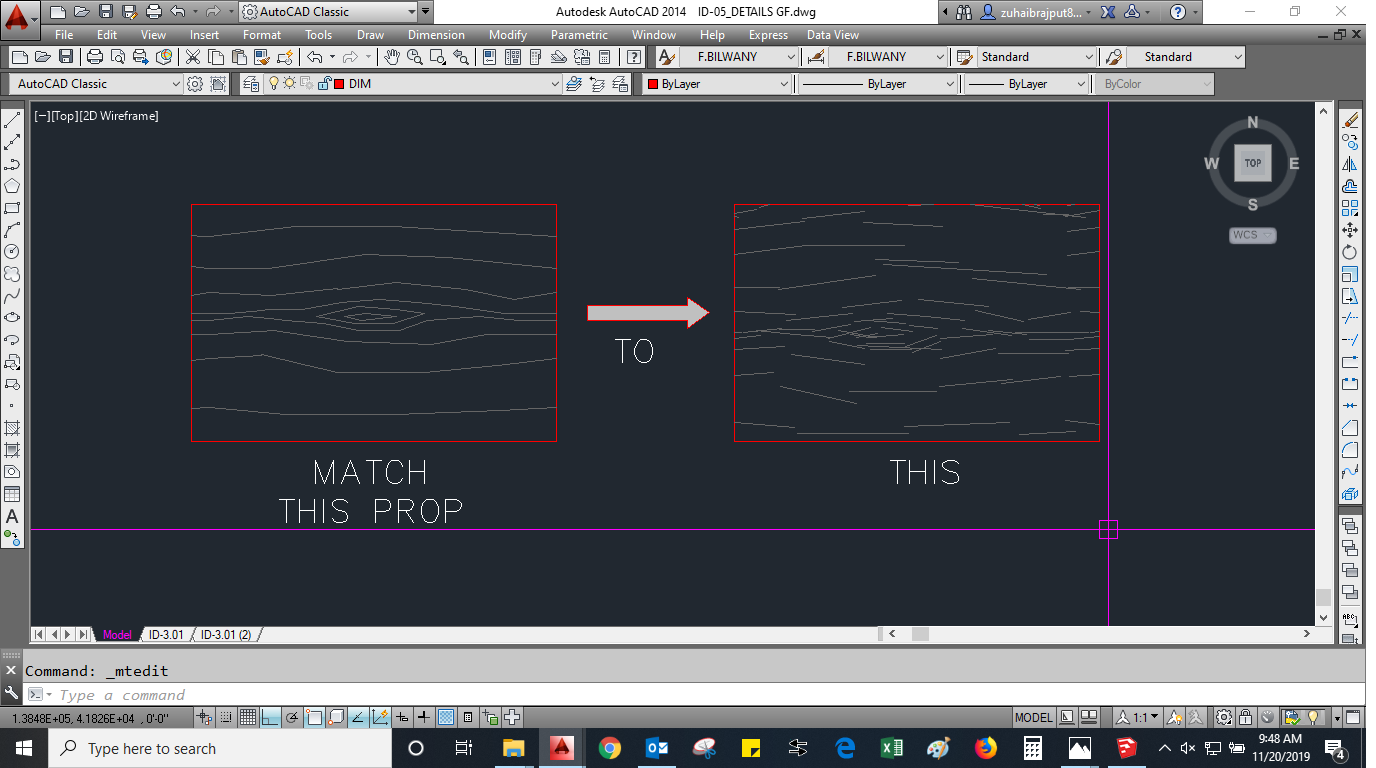 ------------- THANKING YOU REGARD: ZUHAIB KHAN |
Replies:
Posted By: philippe JOSEPH
Date Posted: 20.Nov.2019 at 08:39
|
Hello Zuhaib, if you want to use matchprop on hatches the "donor" is got to be very well setted at the first attempt. First set a hatch correctly without doing a hatch and then modify the properties, do a hatch with direct settings and erase it utill you've got one correct, the and only then you can use that hatch as a 'donor'.
|
Posted By: Zuhaib
Date Posted: 20.Nov.2019 at 12:18
|
Can you please tell me that how to set a hatch without doing a hatch? I am trying to understand your point.   ------------- THANKING YOU REGARD: ZUHAIB KHAN |
Posted By: John Connor
Date Posted: 20.Nov.2019 at 13:14
|
Use the MATCH PROPERTIES tool. Start by clicking on the Home tab > Properties panel > Match Properties. Find. Select the object from which you want to match properties (ex. - a previously used hatch pattern). Select the objects to which you want to copy the properties, then press Enter.
------------- "Humans have a strength that cannot be measured. This is John Connor. If you are reading this, you are the resistance." <<AutoCAD 2015>> |
Posted By: philippe JOSEPH
Date Posted: 20.Nov.2019 at 16:23
|
Zuhaib you will do a hatch OK to you by setting the properties when doing it but maybe the result won't be good at first. If you modify the hatches with the properties pannel ( Ctrl+1 ) then the MATCHPROP will paste the very first settings. That's why you should "work" on the hatches settings to be correct at the first try ( mainly scale and angle ). When you have a "correct" setting, the matchprop will work directly copying the hatches that you see on the "donor" hatches.
|
Posted By: Kent Cooper
Date Posted: 20.Nov.2019 at 17:00
| That misalignment of pieces in the right-side pattern looks like a simple problem of the Hatch origin being very far away from its content, which can result in that kind of thing with patterns that involve non-orthogonal pieces (because of rounding to a limited number of decimal places in the angles and origin points and pen-down/pen-up cycles). Try setting the origin of the target Hatch within it or at least a lot closer to it. |
Posted By: philippe JOSEPH
Date Posted: 20.Nov.2019 at 20:22
| OK Kent but as the hatches are done in the model space and not seen from viewports the origins must at each corner of the 2 rectangles that I suppose to be of the same size, correct or not ? |
Posted By: Kent Cooper
Date Posted: 20.Nov.2019 at 21:07
Not necessarily at a corner, but yes, if the patterns should "sit" in the same relationship to the rectangular outline of each, then each one's origin should be at the same place in relation to its rectangle [a corner, the middle, whatever puts the "graining" part of interest where they want it].
|
 philippe JOSEPH wrote:
Posted By: philippe JOSEPH
Date Posted: 21.Nov.2019 at 08:46
|
Kent and the others, now that the hatches have "grips" ( 4 in the case of those rectangles ) we can even copy them and re-grip or strech them, etc... In some cases when hatching isn't working easily and for some repetive hatching I would make a "bank" of hatches with 3, 4, 5, 6, etc... grips to copy, re-grip, stretch. And what I said about making a good hatch at the very first try otherwise the MATCHPROP won't work fine I experienced it years before today. When I do a first hatch on a file, if it's not OK for me ( mainly scale and angle ) I erase it and do the settings for it to be OK directly AND NOT MODIFIED WITH THE PROPERTIES PANNEL ( Ctrl+1 ) until i's good.
|
Posted By: Zuhaib
Date Posted: 21.Nov.2019 at 09:17
|
I did that . But after using (MATCHPROP) matching the properties, the hatch is not proper as it should be. ------------- THANKING YOU REGARD: ZUHAIB KHAN |
Posted By: Zuhaib
Date Posted: 21.Nov.2019 at 09:23
|
Dear @KENT its not the problem of origin . its the problem of result after matching the hatch properties by using MATCHpROP. ------------- THANKING YOU REGARD: ZUHAIB KHAN |
Posted By: philippe JOSEPH
Date Posted: 21.Nov.2019 at 13:16
| Hello Zuhaib, I hope all this is not only a problem of REGEN, try this command and after I won't know. |
Posted By: Kent Cooper
Date Posted: 21.Nov.2019 at 15:23
You must have Hatch properties not selected in your MATCHPROP Settings. Start MATCHPROP, pick the source Hatch pattern, choose the Settings option, and I suspect you will see this in regard to the highlighted piece:  The piece of Hatching visible to the left has its origin in the middle [you can see the greenish UCS icon], and the one visible to the right has its origin at 5000,5000, so it's distorted similar to your original image. When I MATCHPROP with this Special Property un-checked, as shown, I get what you describe [the target Hatch only gets the basic properties like Layer, color, etc. matched], but if I check that button at Hatch in Special Properties, then it works as you intend [properties specific to Hatch patterns, such as origin and scale, are also matched].
|
Posted By: Zuhaib
Date Posted: 22.Nov.2019 at 05:28
|
always use that command. ------------- THANKING YOU REGARD: ZUHAIB KHAN |
Posted By: Zuhaib
Date Posted: 22.Nov.2019 at 05:55
|
Dear Kent Thanx for picture help but dear its still not working for me. its a custom hatch as shown in the picture. Could it be the problem of custom hatch? 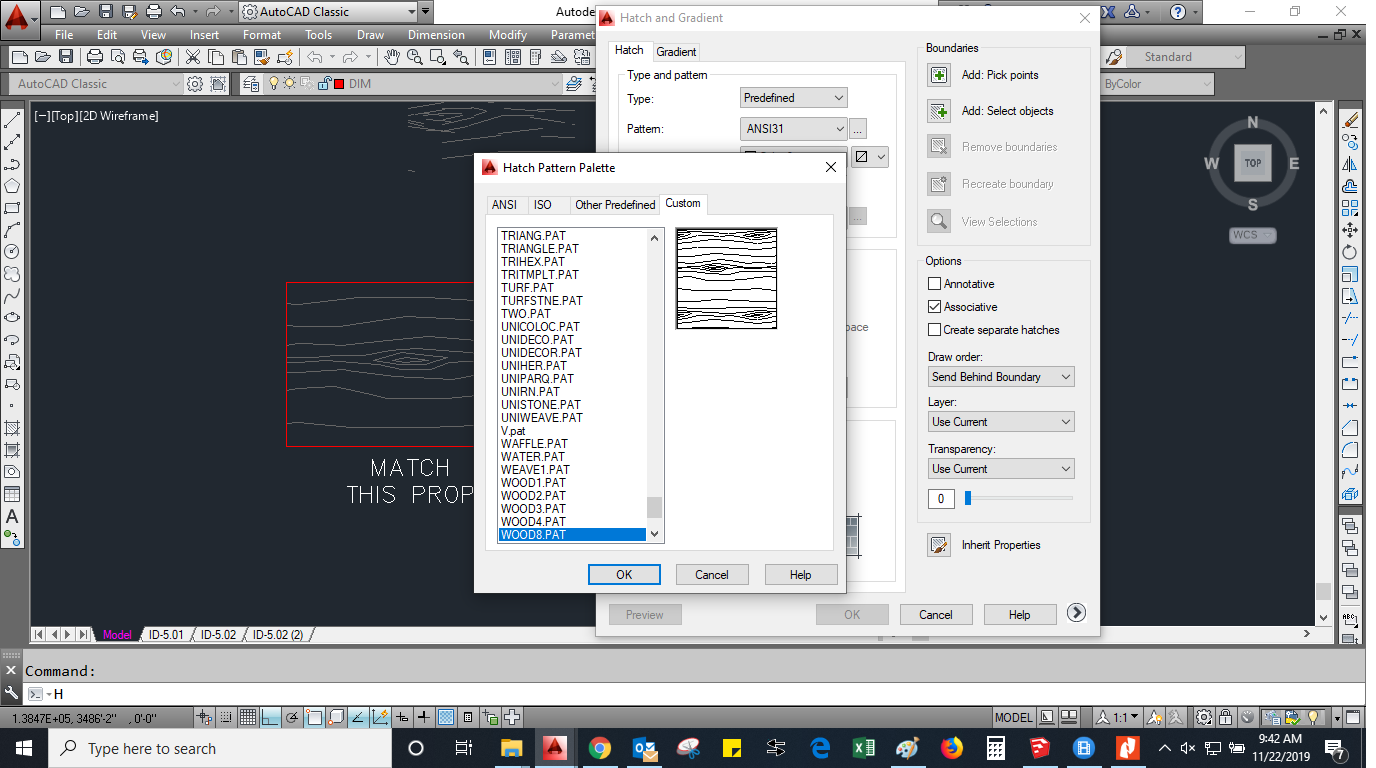 ------------- THANKING YOU REGARD: ZUHAIB KHAN |