SIZE ISSUE
Printed From: CAD Forum
Category: EN
Forum Name: AutoCAD
Forum Description: Discussion about AutoCAD and AutoCAD LT, viewers, DWG and DXF formats, Design Review, AutoCAD web, Drive, add-ons
URL: https://www.cadforum.cz/forum_en/forum_posts.asp?TID=13342
Printed Date: 04.Sep.2026 at 23:19
Topic: SIZE ISSUE
Posted By: Zuhaib
Subject: SIZE ISSUE
Date Posted: 18.Dec.2019 at 09:45
|
Dear All hope you all are well. I am facing a problem of drawing size. I am working on interior detail drawing. My working drawing size in 9MB, When I remove everything from the drawing and purge it all and then save it to my computer, the drawing size should be reduce but the drawing size is remain as before purge. Even when I am starting a new drawing and saving it without draw any thing, the drawing size is 4.5MB. What should I do for saving it in actual size? I will be very thankful to you. ------------- THANKING YOU REGARD: ZUHAIB KHAN |
Replies:
Posted By: John Connor
Date Posted: 18.Dec.2019 at 13:20
|
Is there any evidence of .DGN linetypes or text being loaded? ------------- "Humans have a strength that cannot be measured. This is John Connor. If you are reading this, you are the resistance." <<AutoCAD 2015>> |
Posted By: Zuhaib
Date Posted: 18.Dec.2019 at 13:43
There are some custom hatch patterns loaded, also some useless textstyles & line types are loaded as you can see in attach image. I don't know where its(linetypes & tex styles) comes from. also dont know how to delete or remove it.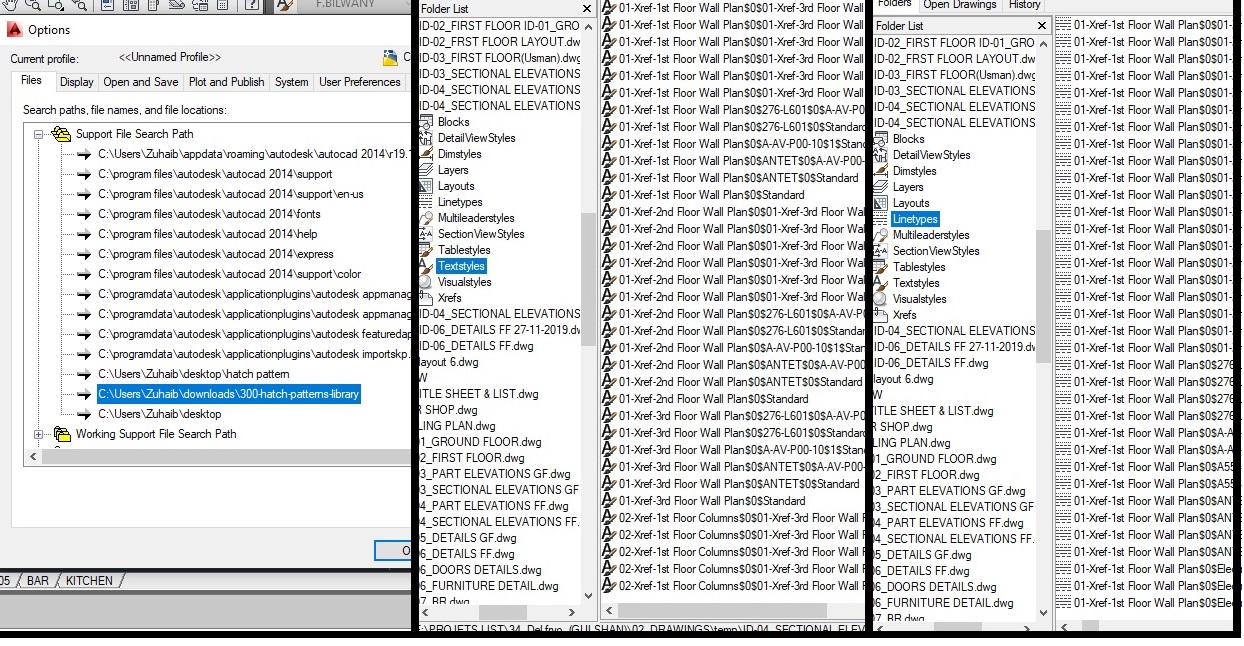 ------------- THANKING YOU REGARD: ZUHAIB KHAN |
Posted By: aqeel222
Date Posted: 19.Dec.2019 at 14:13
|
1- start from new dwg. 2-use dwg-purge external command (download & install first) 3-saveas as dwt format acad.dwt / any name. 4- close. 5- start new dwg with the last created dwt file. I hope it will solve your issue. |
Posted By: Zuhaib
Date Posted: 20.Dec.2019 at 10:47
ISSUE IS NOT RESOLVED YET  ------------- THANKING YOU REGARD: ZUHAIB KHAN |
Posted By: rebellio
Date Posted: 20.Dec.2019 at 11:33
|
Can you upload the file so we can have a look? |
Posted By: Zuhaib
Date Posted: 20.Dec.2019 at 12:14
|
YES ------------- THANKING YOU REGARD: ZUHAIB KHAN |
Posted By: Zuhaib
Date Posted: 20.Dec.2019 at 12:24
|
NOT UPLOADING DUE TO LRGE FILE SIZE. ------------- THANKING YOU REGARD: ZUHAIB KHAN |
Posted By: Zuhaib
Date Posted: 20.Dec.2019 at 12:32
|
If you guys don't mind so we can talk on whatsapp . May be the issue can resolve on whatsapp by doing clear chat. +923042210396 ------------- THANKING YOU REGARD: ZUHAIB KHAN |
Posted By: John Connor
Date Posted: 20.Dec.2019 at 13:13
|
If all you require is a clean acad.dwt (or acadiso.dwt) delete what is being used by AutoCAD now and rename the backup version which is in the same directory. ------------- "Humans have a strength that cannot be measured. This is John Connor. If you are reading this, you are the resistance." <<AutoCAD 2015>> |