Inquiry Solid No union
Printed From: CAD Forum
Category: EN
Forum Name: AutoCAD
Forum Description: Discussion about AutoCAD and AutoCAD LT, viewers, DWG and DXF formats, Design Review, AutoCAD web, Drive, add-ons
URL: https://www.cadforum.cz/forum_en/forum_posts.asp?TID=13368
Printed Date: 05.Sep.2026 at 00:03
Topic: Inquiry Solid No union
Posted By: carlosban71
Subject: Inquiry Solid No union
Date Posted: 30.Jan.2020 at 17:11
Consultation with solid (revolve)
I want to splice or join a piece, and then make a fillet on the marked piece as I can join it, thanks
They don't come together, they don't form a single piece,
|
 I've tried everything.
Replies:
Posted By: John Connor
Date Posted: 30.Jan.2020 at 18:13
|
Individual 3D solids in AutoCAD are "joined together" using the UNION command. Once you have done this then you can proceed with applying your fillets. Doesn't the white object shown above in your drawing also taper as well? ------------- "Humans have a strength that cannot be measured. This is John Connor. If you are reading this, you are the resistance." <<AutoCAD 2015>> |
Posted By: carlosban71
Date Posted: 30.Jan.2020 at 22:37
|
I tried not to join, why. |
Posted By: carlosban71
Date Posted: 31.Jan.2020 at 02:43
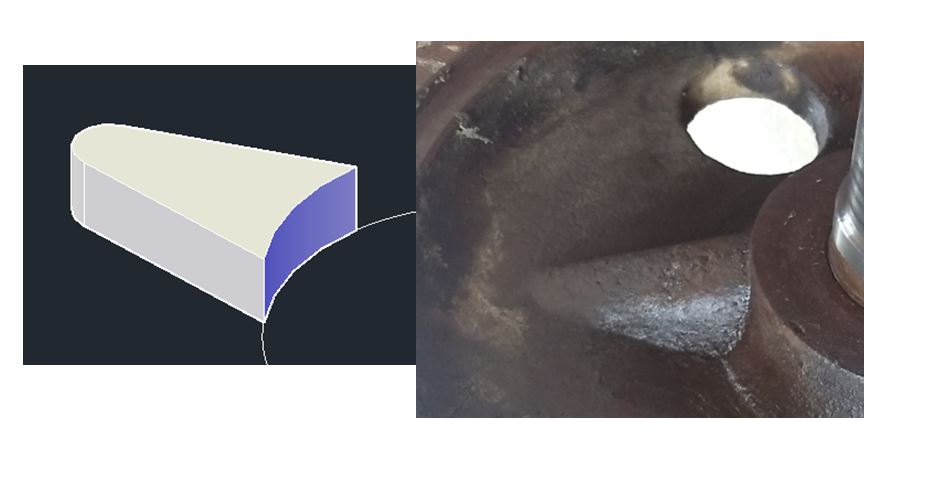
Good evening, thanks for the support, I left the union of the solids now this detail is presented to me as the height of one end is lowered and not to lose the flat shape
 |
Posted By: John Connor
Date Posted: 31.Jan.2020 at 13:12
|
If the two parts won't join then there is something wrong with your geometry. As regards the shape of the part pictured above you might try constructing it using the SWEEP command using three arcs of varying heights one of which (the end furthest from the hub) being flat. ------------- "Humans have a strength that cannot be measured. This is John Connor. If you are reading this, you are the resistance." <<AutoCAD 2015>> |
Posted By: carlosban71
Date Posted: 31.Jan.2020 at 21:16
|
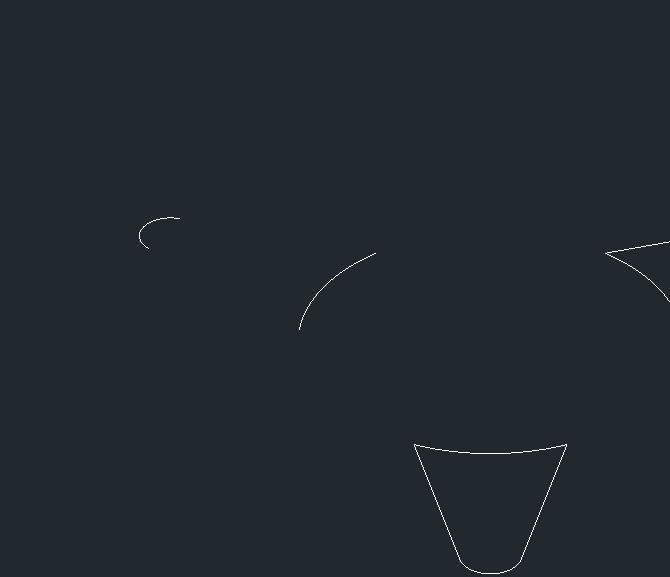
No idea, more or less in freehand drawing as it would be.
Thank you
|
Posted By: carlosban71
Date Posted: 31.Jan.2020 at 23:12
|
 carlosban71 wrote:
Posted By: John Connor
Date Posted: 01.Feb.2020 at 15:27
|
Freehand drawing? You're working with a CAD program. There shouldn't be any freehand drawing. I have attached an example of what I think you could do to create the shape you are looking for. Basically you need a series of arcs, one horizontal and a minimum of three vertical, that you can use the SWEEP command on. SWEEP between arcs 1 and 2. Next, SWEEP using arcs 2 and 3. Then SWEEP using arcs 3 and 4. Combine the results using the UNION command. Using a copy of the inner hub SUBTRACT the hub from the tapered part. Replicate as required. Finally JOIN to the hub. Unfortunately I cannot attach the drawing. I am getting the following message....Error inserting object in current location. I am using Windows 10 and Microsoft Edge. Sorry. Update: The file is available in the post below. ------------- "Humans have a strength that cannot be measured. This is John Connor. If you are reading this, you are the resistance." <<AutoCAD 2015>> |
Posted By: John Connor
Date Posted: 01.Feb.2020 at 20:56
|
OK...using a different browser I was able to upload the file. It is saved in a file type compatible with AutoCAD 2010 so you should have no problem opening it. ------------- "Humans have a strength that cannot be measured. This is John Connor. If you are reading this, you are the resistance." <<AutoCAD 2015>> |
Posted By: carlosban71
Date Posted: 07.Feb.2020 at 00:50
|
Thanks for the tip When executing the Sweep, it is generated according to the file I attach. That is the way. |
Posted By: John Connor
Date Posted: 08.Feb.2020 at 13:48
|
I should have told you to close each arc with a horizontal line to generate a solid not a surface. Although something des not look right just the same. I'm not sure exactly what you did. ------------- "Humans have a strength that cannot be measured. This is John Connor. If you are reading this, you are the resistance." <<AutoCAD 2015>> |