How to hatch like This. Wire pattern in Cable
Printed From: CAD Forum
Category: EN
Forum Name: AutoCAD
Forum Description: Discussion about AutoCAD and AutoCAD LT, viewers, DWG and DXF formats, Design Review, AutoCAD web, Drive, add-ons
URL: https://www.cadforum.cz/forum_en/forum_posts.asp?TID=13384
Printed Date: 05.Sep.2026 at 17:17
Topic: How to hatch like This. Wire pattern in Cable
Posted By: bsasith
Subject: How to hatch like This. Wire pattern in Cable
Date Posted: 02.Mar.2020 at 06:21
How to Hatch like this? Wire patterns in Cable drawing. This is a sector cable Drawing. thanks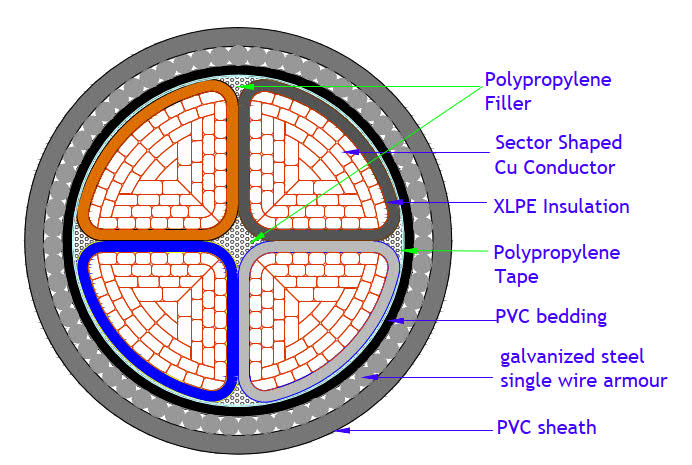 |
Replies:
Posted By: philippe JOSEPH
Date Posted: 02.Mar.2020 at 07:48
|
Hello bsasith, I suppose that this image is what you have to draw with your AutoCAD because it's already 'hatched'. I'm afraid this drawn with hatches would be confusing for the eyes with all that little surfaces. The very little surfaces don't have to be hatched. An option would be to copy/paste the image and see what's the result printed if not too dark in black and white. Maybe color would be correct but not everybody receiving your file would appreciate. Please show us your tests and try to apply the different correct hatches for steel, Cu ( copper ), PVC, etc...
|
Posted By: Kent Cooper
Date Posted: 04.Mar.2020 at 16:30
|
You can use my CirclesTriGridOpen pattern, part of the .zip file available at: https://forums.autodesk.com/t5/visual-lisp-autolisp-and-general/creat-this-hatch/m-p/2149478/highlight/true#M252989" rel="nofollow - https://forums.autodesk.com/t5/visual-lisp-autolisp-and-general/creat-this-hatch/m-p/2149478/highlight/true#M252989 The diameter of the "circles" and the spacing between them are both 1 drawing unit when used at a scale of 1.
|