Printing or saving to scale
Printed From: CAD Forum
Category: EN
Forum Name: AutoCAD
Forum Description: Discussion about AutoCAD and AutoCAD LT, viewers, DWG and DXF formats, Design Review, AutoCAD web, Drive, add-ons
URL: https://www.cadforum.cz/forum_en/forum_posts.asp?TID=13386
Printed Date: 06.Sep.2026 at 00:30
Topic: Printing or saving to scale
Posted By: Legu5
Subject: Printing or saving to scale
Date Posted: 02.Mar.2020 at 21:37
|
Hi, I have a CAD drawing in model space, full scale. I go to paper space and scale (1:50) put in scale: .02xp and it should save as 1:50. It is nearly 1:50 but about 7% out? The dimension of say 5.76m is measuring to scale as nearly 5.35 why is this? I've even tried cheating, and got the scale right, then when I saved it as a PDF the scale was wrong again? What's happening? Regards, Francis
|
Replies:
Posted By: philippe JOSEPH
Date Posted: 03.Mar.2020 at 08:12
|
Hello Legu5, are you printing to a 'little' printer A3 or A4; then it's normal for it to be out by some % because of the margins of the printer. If you print on a 'big' printer with the paper size biger by some cm then you can print surely at full scale. On a littke printer you can appreciate the % of magins when launching the print, see the image here enclosed in : Plot scale , FIT TO PAPER , 1 mm # 0.xxx unit. Calculate the ratio between 1 mm and xxx unit and draw a rectangle to print LOWER by 0.9xxxx that you have calculate then launch a print of that smaller rectangle and read again the : Plot scale , FIT TO PAPER , 1 mm # 1 unit. ( the 1 mm should be equal to 1 unit ) Please note that when you print to PDF you will get some % of margins more not equal to print to paper. 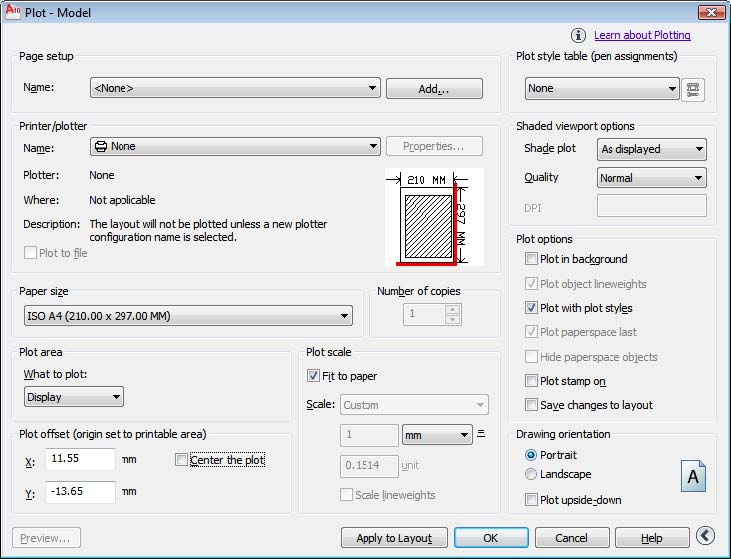 |
Posted By: John Connor
Date Posted: 03.Mar.2020 at 17:11
|
I disagree with the advice above that says to select "Fit to Paper". You choose that "Fit to Paper" when you don't care about scale at all.
------------- "Humans have a strength that cannot be measured. This is John Connor. If you are reading this, you are the resistance." <<AutoCAD 2015>> |
Posted By: philippe JOSEPH
Date Posted: 03.Mar.2020 at 18:55
|
Hello John, in my case drawing the paper sizes with their margins helps me in 'managing' my Model space to zero, usefull when you have 30 pages of procedure and it also helps me in having nothing out of the viewport. I can also have sequences perfectly centered from page to page and when you flip a PDF book your eyes are perfectly focused on the subject.
|