Coordinate Extraction
Printed From: CAD Forum
Category: EN
Forum Name: ARKANCE (CAD Studio) applications
Forum Description: Questions and discussion about applications by ARKANCE and Be.Smart - T4R, T4I, Civil Tools, DWGtext, GeoRefImg, XLSparam, FLAY, JobTime, GeoCode, TRANS, LT Extension,...
URL: https://www.cadforum.cz/forum_en/forum_posts.asp?TID=13391
Printed Date: 24.Aug.2026 at 15:33
Topic: Coordinate Extraction
Posted By: basusumana
Subject: Coordinate Extraction
Date Posted: 11.Mar.2020 at 12:59
|
Hi, I have AutoCad LT 2020 version. I have have just bought LT extension and installed it in my system. I want to extract coordinates of the objects from one of my layer. Is there any way by which I can extract coordinates using LT extension? Thank you, Sumana ------------- Sumana Basu Geophysicist Brimstone Site Investigation |
Replies:
Posted By: Vladimir Michl
Date Posted: 11.Mar.2020 at 13:04
|
Yes, you can use the function "Report coordinates" in the Tools/Utilities section.
------------- Vladimir Michl (moderator) ARKANCE - https://arkance.world" rel="nofollow - https://arkance.world - Autodesk Platinum Partner |
Posted By: basusumana
Date Posted: 11.Mar.2020 at 13:09
|
Hi Vladimir, Thank you for the prompt reply. Could you please let me know which button is report coordinates? I can find 'report lengths' but there is no 'report coordinate' in the LT extension menu bar. Thank you, Sumana ------------- Sumana Basu Geophysicist Brimstone Site Investigation |
Posted By: Vladimir Michl
Date Posted: 11.Mar.2020 at 13:13
I don't know if you are using the toolbar or ribbon menu but this is the proper ribbon button: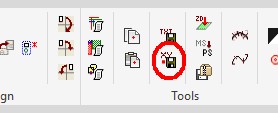 the objects must be either POINT, SHAPE, INSERT, or PLINE
------------- Vladimir Michl (moderator) ARKANCE - https://arkance.world" rel="nofollow - https://arkance.world - Autodesk Platinum Partner |
Posted By: basusumana
Date Posted: 11.Mar.2020 at 13:39
|
Hi Vladimir, Thank you  . Got it. . Got it.But I am still facing problem. The coordinates being extracted are all zero. Thank you, Sumana ------------- Sumana Basu Geophysicist Brimstone Site Investigation |
Posted By: Vladimir Michl
Date Posted: 11.Mar.2020 at 13:56
|
What type of objects are you selecting? Is the drawing metric or imperial? ------------- Vladimir Michl (moderator) ARKANCE - https://arkance.world" rel="nofollow - https://arkance.world - Autodesk Platinum Partner |
Posted By: basusumana
Date Posted: 11.Mar.2020 at 13:59
|
The coordinates are in mm. ------------- Sumana Basu Geophysicist Brimstone Site Investigation |
Posted By: Vladimir Michl
Date Posted: 11.Mar.2020 at 14:02
|
That is strange. I have retested it now in LT 2020, with block references (INSERTs) and it exports their ref.points coordinates properly. ------------- Vladimir Michl (moderator) ARKANCE - https://arkance.world" rel="nofollow - https://arkance.world - Autodesk Platinum Partner |
Posted By: basusumana
Date Posted: 11.Mar.2020 at 14:03
|
Objects are circles drawn in a layer. I need to extract the coordinate at the centre point of each circles. ------------- Sumana Basu Geophysicist Brimstone Site Investigation |
Posted By: basusumana
Date Posted: 11.Mar.2020 at 14:12
|
I have attached one of the dwg file from which I was trying to extract corordinate. uploads/839112/20200306_Earlsfield.dwg" rel="nofollow - uploads/839112/20200306_Earlsfield.dwg Please have a look. Thank you, Sumana ------------- Sumana Basu Geophysicist Brimstone Site Investigation |
Posted By: Vladimir Michl
Date Posted: 11.Mar.2020 at 14:41
|
I can see it. But it not that the "extracted coordinates are all zero" but rather "the number of extracted coordinates is zero" - as the objects are Circles. The only supported object types are POINT, SHAPE, INSERT, or PLINE. There is no easy fix I can think of. Maybe use the CEN osnap, start the POINT command and pick center points of all the circles. Then repeat the extraction. ------------- Vladimir Michl (moderator) ARKANCE - https://arkance.world" rel="nofollow - https://arkance.world - Autodesk Platinum Partner |
Posted By: basusumana
Date Posted: 11.Mar.2020 at 15:01
|
Hi Vladimir, Yes, this works. Thank you so much. Thank you, Sumana ------------- Sumana Basu Geophysicist Brimstone Site Investigation |