Transforming coordinates into 2D profile
Printed From: CAD Forum
Category: EN
Forum Name: AutoCAD
Forum Description: Discussion about AutoCAD and AutoCAD LT, viewers, DWG and DXF formats, Design Review, AutoCAD web, Drive, add-ons
URL: https://www.cadforum.cz/forum_en/forum_posts.asp?TID=13431
Printed Date: 06.Sep.2026 at 05:09
Topic: Transforming coordinates into 2D profile
Posted By: Mezooo
Subject: Transforming coordinates into 2D profile
Date Posted: 13.May.2020 at 15:43
|
Hello, I've got a problem regarding getting points (to which I have the x,y,z coordinates) into a 2D profile drawing. I am aware of the ViewCube option, however I already have a drawing of the profile with the correct proportions, I just need to insert the points (with the x,y,z coordinates) into the drawing. So basically my question is whether is there some way to convert my inserted ponts from a 3D model (x,y,z) into a 2D model / profile (x,y) along a line (the points are situated in a straight line), for example the the line would be on axis x and the z would ber on axis y. The specific coordinates of the points aren't important, just their relative distances from each other. Thanks in advance
|
Replies:
Posted By: philippe JOSEPH
Date Posted: 13.May.2020 at 18:55
|
Hello Mezooo, you can set in a 3D model an UCS conformably to your 3D profile to be like in 2D, copy ( Ctrl + C ) the points + the "2D like" UCS to have a reference and then set back the general UCS to paste the points + the "2D like" UCS to place then on a 2D view and the work only in 2D. I suppose that the problem is working in 3D only for you or for your coleagues. Hope this makes sence, I will do a manual sheme to explain this. In any case 1 : If you work in 3D, always take a 3D point of view to work or use the OSNAPZ setting to the correct value to avoid any risk ( I will have to verify if it's (0) or (1) ). In any case 2 : Beware of the points that you think being with Z=0 in your strictly aligned direction, this could lead to some problems when replaced in 2D ( items could not be with Z=0 exactly ).
|
Posted By: philippe JOSEPH
Date Posted: 14.May.2020 at 10:11
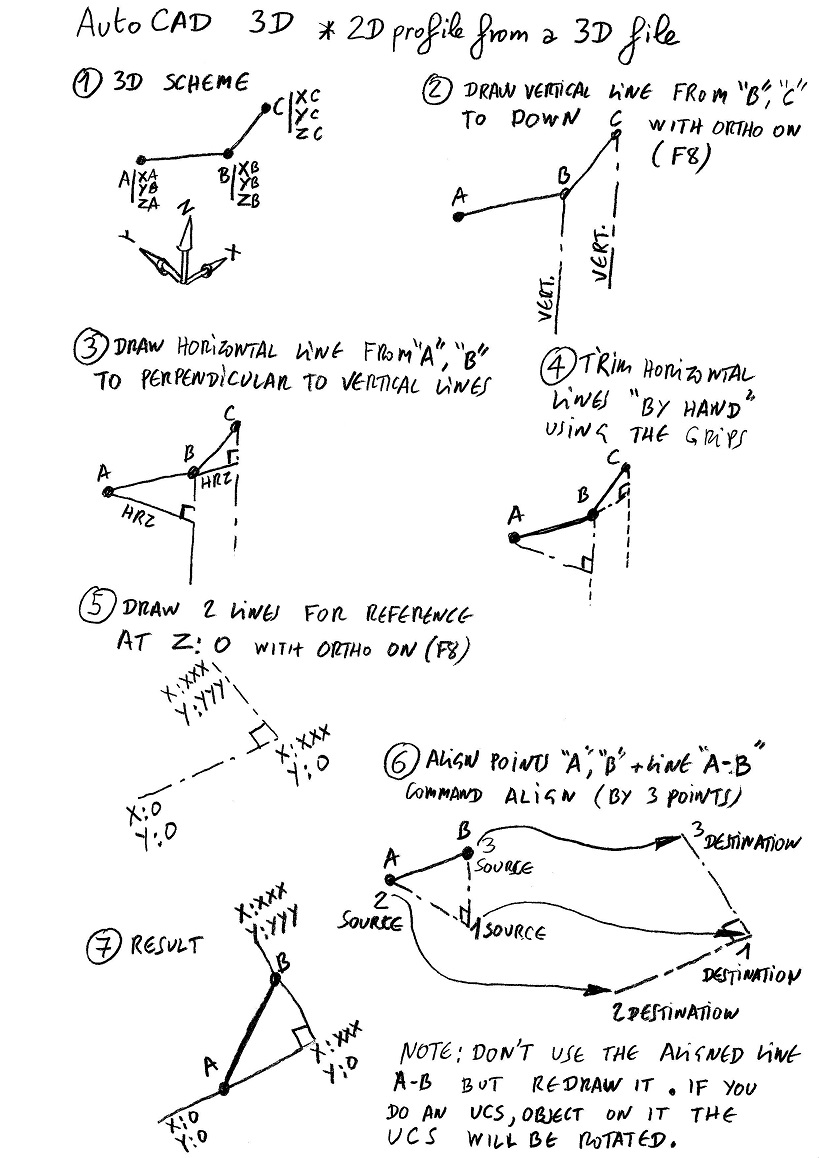
|
Posted By: Mezooo
Date Posted: 14.May.2020 at 13:33
|
Hello Philippe, thank you for your help, I've managed to solve the problem. Turns out my problem wasn't that complicated, I just changed the UCS of the points in front view, copied and pasted them in the original 2D drawing, and they are distributed correctly. Thanks again.
|
Posted By: philippe JOSEPH
Date Posted: 14.May.2020 at 17:51
|
Yes Mezooo, if you can set an UCS to copy correctly your points that means that you have one horizontal line + one vertical line or 3 points to set it. Then you can paste the points in a 2D drawing, or in the same 3D file. Beware of the points that all look to be in the same UCS with Z=0 and are with a little Z different to zero, that could lead to some problem in 2D. From your first post : (the points are situated in a straight line)
|