Text not properly display in AutoCAD 2018
Printed From: CAD Forum
Category: EN
Forum Name: CAD - general
Forum Description: General discussion about CAD, formats, standards, management, licensing, networking, harware, other CAD applications
URL: https://www.cadforum.cz/forum_en/forum_posts.asp?TID=13456
Printed Date: 24.Sep.2026 at 12:51
Topic: Text not properly display in AutoCAD 2018
Posted By: aqeel222
Subject: Text not properly display in AutoCAD 2018
Date Posted: 25.Jun.2020 at 12:22
|
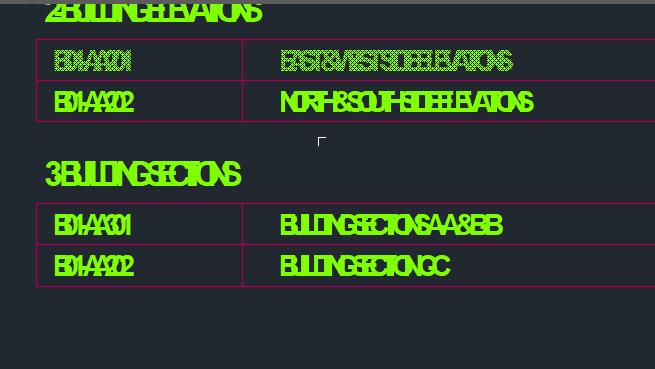
Text not properly display in AutoCAD 2018 as per below image.. please guide me how to resole this issue..thanks in printing its ok..
 |
Replies:
Posted By: John Connor
Date Posted: 25.Jun.2020 at 23:04
|
It almost looks like you have a second line of text (numbers and symbols) conflicting with the original text. Yet, you say it prints just fine? Could the cause be that you have a second layer with text on it that also uses the same color? ------------- "Humans have a strength that cannot be measured. This is John Connor. If you are reading this, you are the resistance." <<AutoCAD 2015>> |