Dynamic Block
Printed From: CAD Forum
Category: EN
Forum Name: AutoCAD
Forum Description: Discussion about AutoCAD and AutoCAD LT, viewers, DWG and DXF formats, Design Review, AutoCAD web, Drive, add-ons
URL: https://www.cadforum.cz/forum_en/forum_posts.asp?TID=13474
Printed Date: 05.Sep.2026 at 19:32
Topic: Dynamic Block
Posted By: VermaBhola123
Subject: Dynamic Block
Date Posted: 02.Aug.2020 at 03:54
|
I downloaded steel angle shape dynamic block from CADForam. This downloaded block is opening only as polyline not as dynamic block. Any help appreciated. I am using AutoCAD LT 2020.
|
Replies:
Posted By: John Connor
Date Posted: 02.Aug.2020 at 13:17
|
There are several steel angle shape dynamic blocks available in the CAD/BIM section of the CADForum. Which one specifically did you download? ------------- "Humans have a strength that cannot be measured. This is John Connor. If you are reading this, you are the resistance." <<AutoCAD 2015>> |
Posted By: VermaBhola123
Date Posted: 02.Aug.2020 at 14:57
https://www.cadforum.cz/catalog_en/block.asp?blk=20600" rel="nofollow - ehttps://www.cadforum.cz/catalog_en/block.asp?blk=20600" rel="nofollow"> L-Shape profile - dynamic block, large cat: https://www.cadforum.cz/catalog_en/?cat=98" rel="nofollow - Steel DWG2018 Downloaded: 24x Size 117,9kB • from 25.7.2020 Uploader: Vladimír Michl • Author: Brian Shutts
|
Posted By: philippe JOSEPH
Date Posted: 02.Aug.2020 at 20:09
|
Dynamic blocks are not available on the LT releases. If you have a friend with a plain release ask him to insert each visiblity of each blocks in a file so that you can have access. If you want some angles there should be everything in the CAD/BIM Blocks library. Try the last uploaded AutoCAD file : AMSTLSHAP2D.dwg.
|
Posted By: philippe JOSEPH
Date Posted: 02.Aug.2020 at 21:53
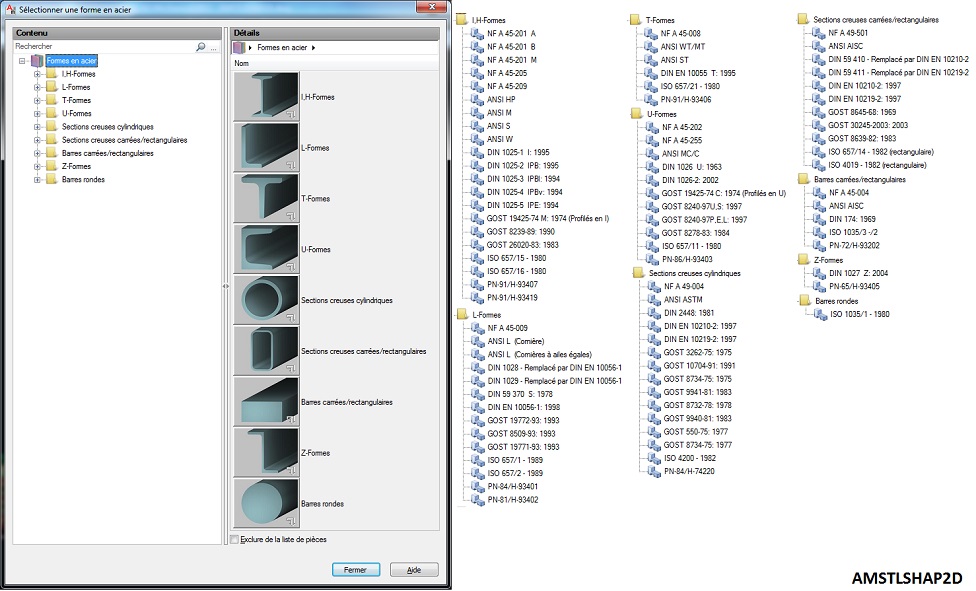
|
Posted By: John Connor
Date Posted: 03.Aug.2020 at 11:35
|
Sorry, but I beg to differ with you Philippe. Dynamic Blocks were fully incorporated into AutoCAD LT in the 2007 release. This information comes from Kate Morrical, Technical Marketing Directory for AutoDesk and recognized expert in all things related to AutoDesk LT (2/10/2012). ------------- "Humans have a strength that cannot be measured. This is John Connor. If you are reading this, you are the resistance." <<AutoCAD 2015>> |
Posted By: philippe JOSEPH
Date Posted: 03.Aug.2020 at 12:54
|
John, I hope this is OK for VermaBhola123 but It seems to me that I had to do "special" files for co worker without plain releases in 2008 but was it whith the AutoCAD 2008 or older 2006 ? I hope VermaBhola123 is inserting the file before and not trying to copy/paste it.
|
Posted By: John Connor
Date Posted: 03.Aug.2020 at 16:07
|
Fully functional in the 2007 release of AutoCAD LT. In the 2006 release of LT they could be manipulated but you could not create or edit one. ------------- "Humans have a strength that cannot be measured. This is John Connor. If you are reading this, you are the resistance." <<AutoCAD 2015>> |
Posted By: philippe JOSEPH
Date Posted: 03.Aug.2020 at 17:14
| OK John, then it could be that the OP wants to open the dynamic file ( no dynamic bloc editor available because of the LT ), copy and the paste the result into his own file instead of INSERT the dynamic file and have access to the various visibilities..... |
Posted By: VermaBhola123
Date Posted: 03.Aug.2020 at 20:41
| Thanks Phillipe & John for the help. Actually John is right. I am able to work with another dynamic block "steel joists" in LT. It works fine. And yes, I was copying and pasting. By inserting my dynamic block angle shape is also working fine. So, thanks again. |