Ikea Kullaberg Chair 3D Model
Printed From: CAD Forum
Category: EN
Forum Name: Inventor
Forum Description: Discussion about Autodesk Inventor
URL: https://www.cadforum.cz/forum_en/forum_posts.asp?TID=13513
Printed Date: 05.Sep.2026 at 14:52
Topic: Ikea Kullaberg Chair 3D Model
Posted By: whay
Subject: Ikea Kullaberg Chair 3D Model
Date Posted: 21.Oct.2020 at 11:32
|
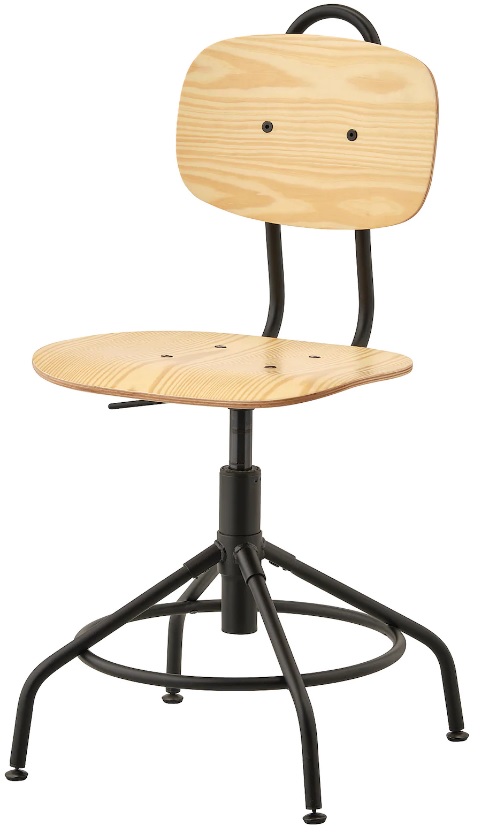
Hi all, I am new here, need some help from experience guy. Did anyone have the 3D model of ikea Kullaberg chair? can share with me? Thank you.
|
Replies:
Posted By: philippe JOSEPH
Date Posted: 21.Oct.2020 at 16:06
|
Hello Whay, I took a look at the Ikea swivel chair and it doesn't look so complicated to modelize... Is your problem the chair or the 3D? Do you have an example of the chair so that you could take some ( all ) the dimensions to draw it? If you have any problem with 3D, you can ask here. Have a nice day.
 |
Posted By: Vladimir Michl
Date Posted: 21.Oct.2020 at 17:29
|
Added one into the Blocks library: https://www.cadforum.cz/catalog_en/block.asp?blk=20900 ------------- Vladimir Michl (moderator) https://www.linkedin.com/in/vmichl/" rel="nofollow - LinkedIn , Autodesk Expert Elite |
Posted By: whay
Date Posted: 21.Oct.2020 at 18:08
| Hi, thanks for your drawing. but do you have it in solidworks files??Appreciste it. |
Posted By: whay
Date Posted: 21.Oct.2020 at 18:09
| i need a solidworks 3d model for my works. Thanks. |
Posted By: Vladimir Michl
Date Posted: 21.Oct.2020 at 18:47
|
DWG should be importable. ------------- Vladimir Michl (moderator) https://www.linkedin.com/in/vmichl/" rel="nofollow - LinkedIn , Autodesk Expert Elite |
Posted By: philippe JOSEPH
Date Posted: 21.Oct.2020 at 19:33
|
Yes you can open an AutoCAD 3D file on Solidworks with some precautions : Also the 3D AutoCAD file will come rotated in 2 directions and will be difficult to manage on Solidworks. Personally when I give a 3D AutoCAD file for Solidworks workers I rotate it before on AutoCAD for safety; My colleagues complain a lot when not done, it's very difficult if not done. The crane hook that you see on the Solidworks procedure here enclosed will come vertical on Solidsworks although horizontal in AutoCAD. The red rectangle that you see in the instruction number 3 is : millimeters. If you don't seen clearly enough the texts on the image do a right clic on it and upload it on your computer so that you can zoom on it. 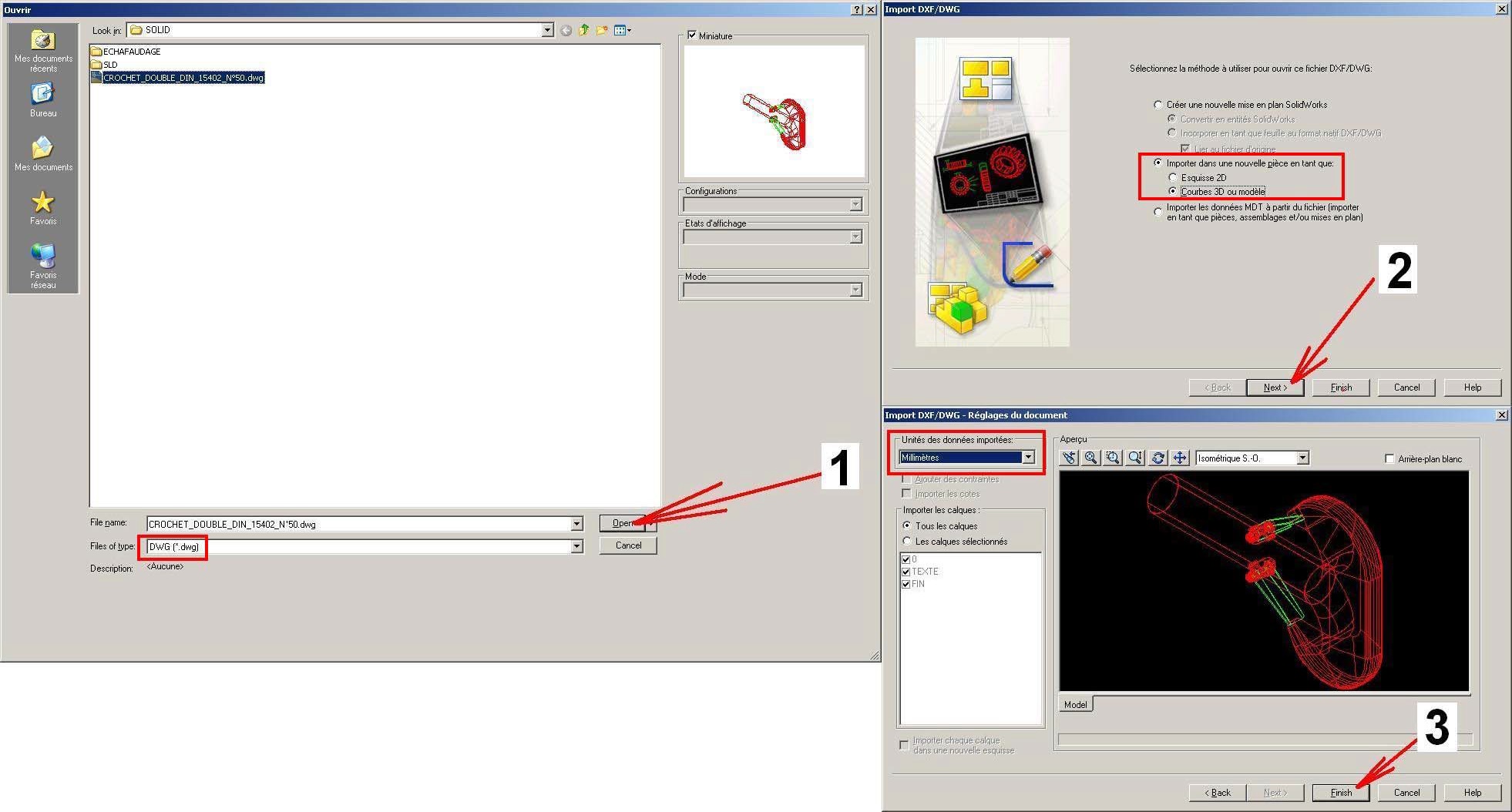
|