Both .dwg and .bak files will not open
Printed From: CAD Forum
Category: EN
Forum Name: AutoCAD
Forum Description: Discussion about AutoCAD and AutoCAD LT, viewers, DWG and DXF formats, Design Review, AutoCAD web, Drive, add-ons
URL: https://www.cadforum.cz/forum_en/forum_posts.asp?TID=13536
Printed Date: 06.Sep.2026 at 05:10
Topic: Both .dwg and .bak files will not open
Posted By: seanevans130181
Subject: Both .dwg and .bak files will not open
Date Posted: 22.Dec.2020 at 08:46
|
Hi all,
Looking for someone to shed some light on a problem I have. Completed a 3D assembly yesterday. Saved it and a .bak file was created. Came in this morning to a power cut. However when I came open the file which are there and I can see the image of the assembly it just wont open. I click and just a blank screen. Any ideas? Its for an assignment I need to get in or if someone could take a look for me. I will be happy to loose everything on this drawing as long as my model space drawing is all good. |
Replies:
Posted By: philippe JOSEPH
Date Posted: 22.Dec.2020 at 10:04
|
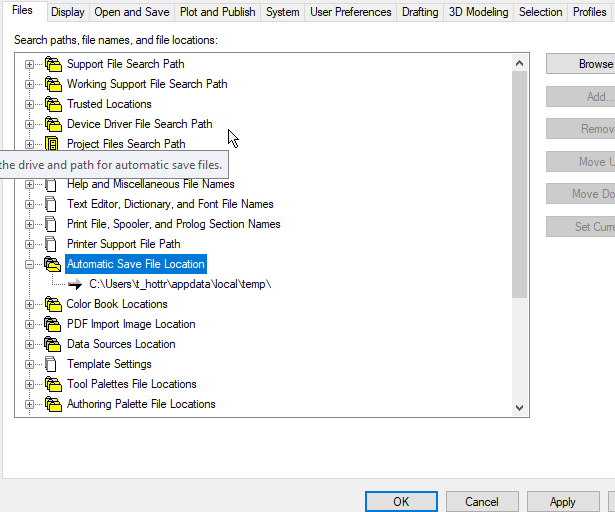
Hello sean, of course you have to rename the XXX.bak file to XXX.dwg to open it. You must have also the automatic save somewhere in your computer, ask how to search it if needed. https://knowledge.autodesk.com/support/autocad/learn-explore/caas/sfdcarticles/sfdcarticles/Change-default-location-for-automatic-save-files.html
|
Posted By: philippe JOSEPH
Date Posted: 22.Dec.2020 at 10:08
|