How multiple Text move to endpoint in AutoCAD?
Printed From: CAD Forum
Category: EN
Forum Name: AutoCAD
Forum Description: Discussion about AutoCAD and AutoCAD LT, viewers, DWG and DXF formats, Design Review, AutoCAD web, Drive, add-ons
URL: https://www.cadforum.cz/forum_en/forum_posts.asp?TID=13621
Printed Date: 06.Sep.2026 at 03:47
Topic: How multiple Text move to endpoint in AutoCAD?
Posted By: uk09
Subject: How multiple Text move to endpoint in AutoCAD?
Date Posted: 30.Jul.2021 at 08:20
|
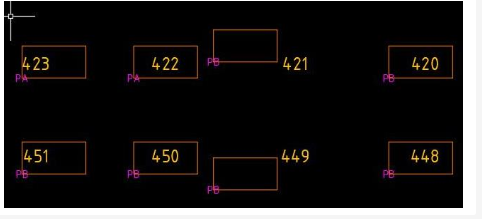
Hi All I'm new to AutoCAD using 2018v, I having 800 text with different location and rectangular box ,i want to move all text to that rectangular box of end like as below image. manually doing for 800 text its take e more time, any single short option or any other alternative methide, Please guide me,
 |
Replies:
Posted By: shakir.iqbal
Date Posted: 07.Sep.2021 at 18:41
|
Hi, If you just need a box around your text and the text type is MText in AutoCAD, you can simply select all the text in one go and press CTRL+1 (shortcut to open Properties window). Once properties window is open, scroll to the Option called "Text Frame" and select "Yes" against it. AutoCAD will automatically draw a frame around all your Mtext. I have enclosed a screenshot for you below. But if your Text is not MText or You don't just need a rectangle around your text, instead, you need a specific text to be in a specific rectangle in your drawing at a very specific location of each rectangle, Please contact me at below platform to develop a small application for you. https://www.fiverr.com/share/oBvYgg ------------- Shakir Iqbal Seasoned CAD Guru https://www.fiverr.com/shakiriqbal482 |