GeorefImg Panel
Printed From: CAD Forum
Category: EN
Forum Name: ARKANCE (CAD Studio) applications
Forum Description: Questions and discussion about applications by ARKANCE and Be.Smart - T4R, T4I, Civil Tools, DWGtext, GeoRefImg, XLSparam, FLAY, JobTime, GeoCode, TRANS, LT Extension,...
URL: https://www.cadforum.cz/forum_en/forum_posts.asp?TID=13641
Printed Date: 14.Sep.2026 at 21:33
Topic: GeorefImg Panel
Posted By: PedroFRG
Subject: GeorefImg Panel
Date Posted: 01.Oct.2021 at 08:46
|
Hi, I have been using GeorefImg for a long time and I find it a very useful tool. Since a couple of versions ago, the panel with the icons in the Autocad plugins group has disappeared and I have not been able to show it again; the only thing I managed to do was to add a menu with an icon in the Autocad menu bar, but nothing else. I have tried to uninstall the add-in and reload it, but nothing has changed, the panel still does not appear. This is how it appears at the moment: 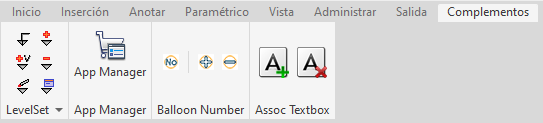 Does anyone know how to get the GeorefImg panel to appear? Thanks.
|
Replies:
Posted By: Vladimir Michl
Date Posted: 01.Oct.2021 at 14:36
|
Hello, are you using the version from Autodesk Apps or the manual install here from the Download page? The Apps installer should install the CUIx menu automatically. In any case, you should be able to CUILOAD the .cuix file manually (a one-time operation only). ------------- Vladimir Michl (moderator) https://www.linkedin.com/in/vmichl/" rel="nofollow - LinkedIn , Autodesk Expert Elite |
Posted By: PedroFRG
Date Posted: 04.Oct.2021 at 09:35
|
Hello, thank you for the quick response. I have used both methods to install the add-in and both failed to display the tab in the Autocad add-ins ribbon. What I have done is to go into the UI customization options and unloaded the GeoreImg panel and click "apply", then reloaded it in the same options dialog, click again "apply" and the panel is now showing in the add-ins. Thank you very much for the advice
|